Most people think aliasing is a recording problem. You didn't sample fast enough, some frequency folded back, and now your audio's ruined. That was true decades ago. It's mostly not the story anymore.
Your converters already handle the old problem. The real source of aliasing in a modern session is the non-linear processing happening inside your DAW — the saturators, clippers, and amp sims you're already running. So let's talk about what aliasing actually is, what it sounds like, and how to keep it in check without overthinking your sample rate.
TABLE OF CONTENTS
What aliasing actually is
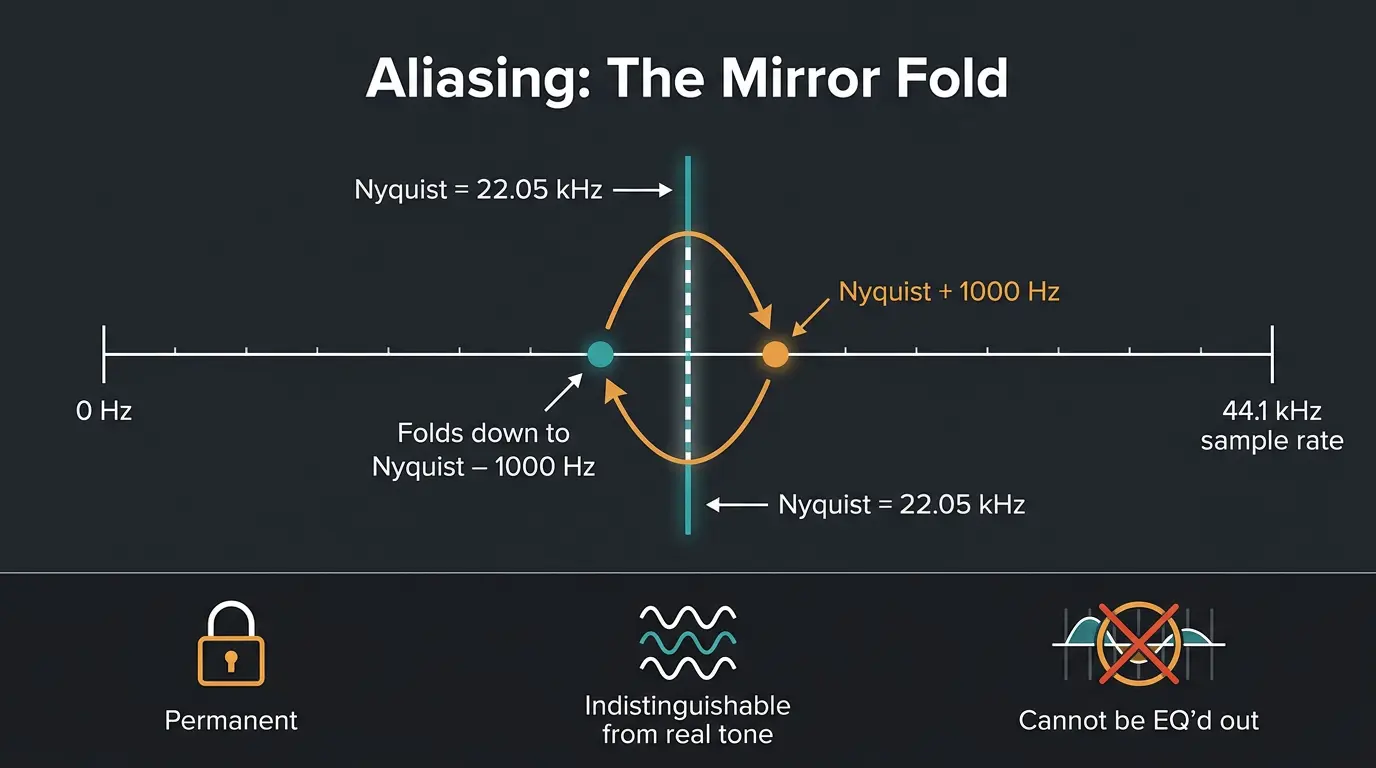
The Nyquist-Shannon sampling theorem says that to capture a frequency, you have to sample at more than twice that frequency. Half your sample rate is the Nyquist frequency. At 44.1kHz, that's 22.05kHz.
Anything above that ceiling doesn't just disappear — it folds back down. Picture a ball bouncing off the ceiling. A frequency sitting at Nyquist plus 1000 Hz shows up as Nyquist minus 1000 Hz. It's a precise mathematical mirror, not random noise.
Here's the part that matters most: once aliasing happens, it's permanent. The folded frequency now lives at a legitimate spot in your spectrum, and it's indistinguishable from a real tone at that frequency. You can't EQ it out, because you'd be cutting real signal along with it.
Why your converters aren't the problem anymore
When you record analog gear, it doesn't matter if that gear throws off harmonics above Nyquist. Every modern A/D converter runs a steep low-pass filter that strips anything above the Nyquist frequency before sampling. The aliasing gets stopped at the door.
While we're here, let's kill a myth. Recording at 96kHz does not add resolution in the audible range. A higher sample rate isn't a higher-quality version of the same audio — the detail below Nyquist doesn't improve. All you're doing is extending the range above the audible band and giving your anti-aliasing filters more room to work.
So the recording stage is handled. The conversation has moved somewhere else entirely.
The real culprit today: your plugins
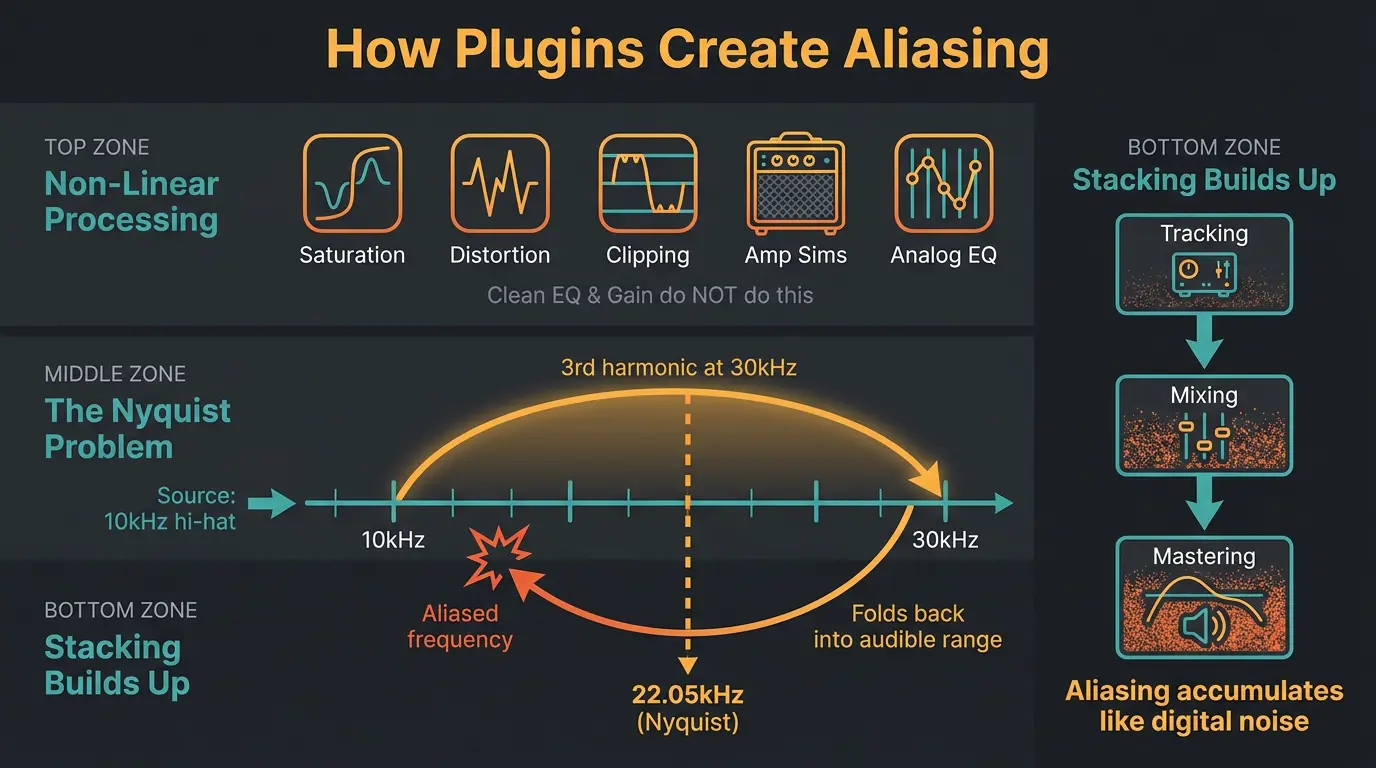
Non-linear processing generates new harmonics that weren't in the original signal. That covers a lot of ground — saturation, distortion, clipping, limiting, amp sims, some compressors, and certain analog-modeled EQs and filters. Clean linear plugins like a basic EQ or a gain stage don't do this. They just move what's already there.
Here's the problem. At 44.1kHz, Nyquist is 22.05kHz. Say you slam a hi-hat with tape saturation. There's real energy up around 10kHz, and the 3rd harmonic of 10kHz lands at 30kHz — well past Nyquist. It folds back down into the audible range as something that has nothing to do with the source.
One plugin might be subtle. The trouble is stacking. Aliasing from one plugin feeds into the next, and it builds up across tracking, mixing, and mastering like a digital version of line noise. Since a lot of that non-linear character comes from saturation plugins, it's worth knowing which of yours generate harmonics and how they handle the fallout.
What aliasing sounds like
Aliasing sounds smeared, fizzy, metallic, harsh. The giveaway is that it doesn't track musically with the source. Pleasing analog grit moves with the note and feels like part of the instrument. Aliasing sits on top and clashes.
With that being said, be honest with yourself about when it's actually audible. Low and mid content has to be pushed really hard for its harmonics to reach Nyquist, and they get quiet along the way. For aliasing to jump out, the processing usually has to be pretty extreme, or the source needs a lot of high-end energy — cymbals, hi-hats, bright synths.
The classic example is early digital synths. Their oscillators threw off harmonics above Nyquist that aliased back as inharmonic, metallic tones — that's part of the "digital" sound people chase. So don't assume all aliasing is a bug. Analog gear doesn't alias, but a good emulation of a vintage digital sampler might include it on purpose, because it's authentic to the original.
How to hear it for yourself
You don't have to guess. Generate a 20Hz to 20kHz sine sweep and drop a non-linear plugin on it — crank a saturator, or use a fast-attack compressor. Then watch it in a spectral tool like iZotope RX.
Let's give it a listen while you watch the display. If you see harmonics rise up, hit the top of the graph, and bounce back down as new lines, that's aliasing folding into the audible range. Make sure you use headphones if you're listening for it, because the artifacts can be quiet and easy to miss on speakers.
How to reduce aliasing in your mixes
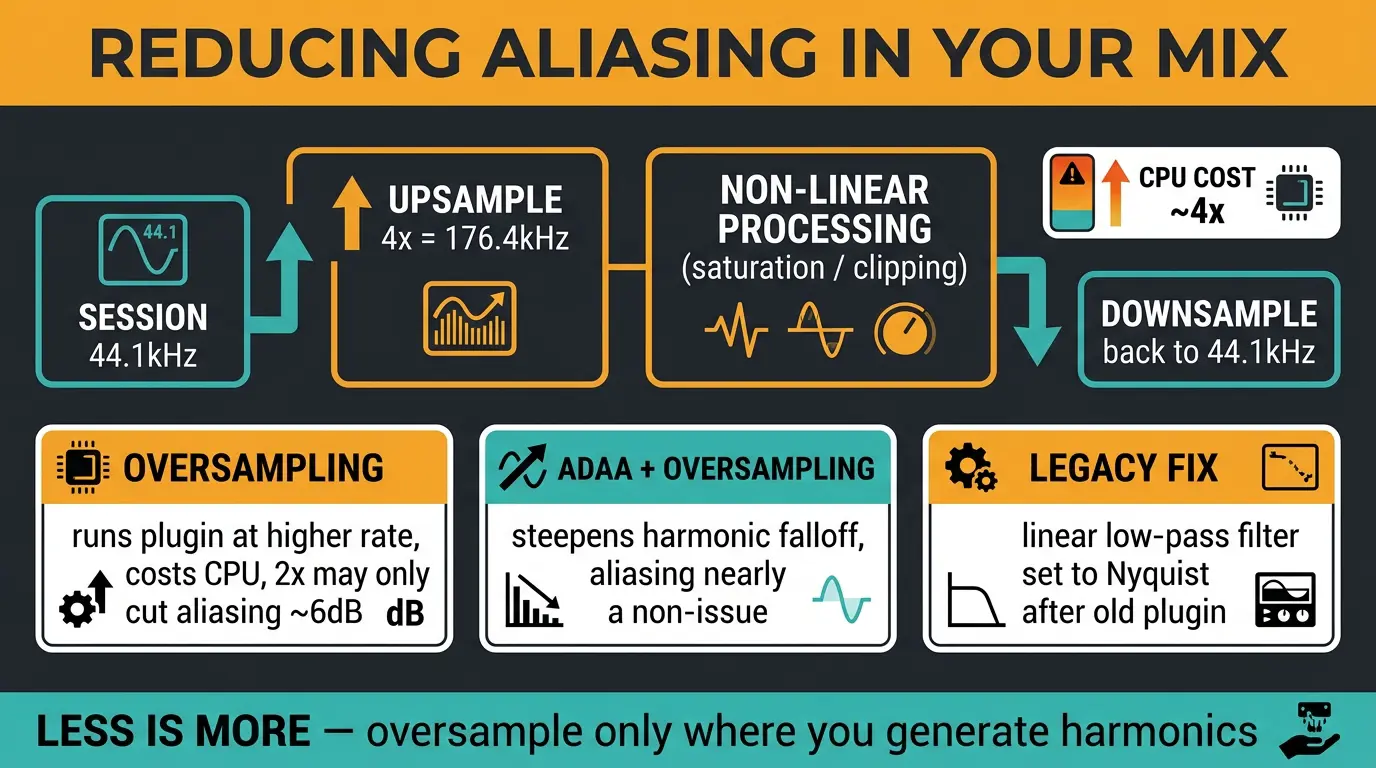
The main tool is oversampling. The plugin processes internally at a higher rate than your session, does its non-linear work up there where there's more room, then downsamples back. In a 44.1kHz session, 4x oversampling means the plugin temporarily runs at 176.4kHz. If you want the deeper version of how this works, I wrote a whole piece on what oversampling actually does.
It's not free. Processing time roughly multiplies with the oversampling factor, so 4x costs about four times the CPU. And how much it helps depends on how far past Nyquist your signal reaches — on a hard-driven saturator, 2x might only knock aliasing down by 6dB. That's why so many plugins ship with weak anti-aliasing: good oversampling is expensive, and developers want you to run lots of instances. Sound On Sound has a solid rundown on when oversampling is worth turning on.
The newer trick is ADAA — antiderivative anti-aliasing — from a 2016 DAFx paper out of Native Instruments. It pairs with oversampling instead of replacing it. ADAA steepens the harmonic falloff so oversampling can do its job, and the combination makes aliasing practically a non-issue even on a hard clipper. There's also the legacy fix: if an old plugin has no oversampling option, put a linear low-pass filter right after it, set to your Nyquist frequency.
Don't oversample every plugin blindly, though. Less is more. Turn it on where you're generating harmonics and leave it off where you're not.
Quick anti-aliasing checklist
- Turn on oversampling for non-linear plugins that offer it — saturators, clippers, limiters, amp sims.
- Watch high-frequency-heavy sources like cymbals and hi-hats, since those reach Nyquist the fastest.
- Don't lean on a high sample rate to fix in-the-box aliasing — it's a blunt safety margin, not a cure.
- Confirm with a spectral analyzer instead of guessing; a sine sweep tells you the truth in seconds.
What sample rate should you actually use?
For music headed to streaming or CD, record and mix at 44.1kHz, 24-bit. For audio to picture or broadcast, use 48kHz, 24-bit. Those cover the vast majority of what most people are doing.
96kHz earns its keep when you're doing heavy processing — pitch shifting and time stretching genuinely benefit from more samples to work with. Do the heavy lifting up there, then downsample to 44.1 or 48 for distribution. Just know a 96kHz file is roughly 118% larger, so you're paying in storage and CPU for that headroom.
The thing to hold onto: a higher rate is a safety margin above the audible band, not a resolution upgrade inside it. Pick the rate that fits the job and put your energy into the mix.
Frequently Asked Questions (FAQs)
Does recording at 96kHz stop aliasing?
No, recording at 96kHz doesn't stop aliasing from your plugins. Your A/D converter already prevents aliasing at the recording stage. A higher rate only pushes Nyquist further up, giving non-linear plugins more room before harmonics fold back — it's a safety margin, not a fix.
Can you remove aliasing after it happens?
No, you can't remove aliasing once it's baked in. The folded frequencies now sit at legitimate spots in your spectrum and are indistinguishable from real tones. You'd cut real signal trying to remove them. The only real answer is preventing it during processing with oversampling.
Do all plugins cause aliasing?
No, only non-linear plugins cause aliasing. Saturation, distortion, clipping, limiting, amp sims, and some compressors generate new harmonics that can fold back. Clean linear tools like a basic EQ or a gain stage don't create new frequencies, so they don't alias.
Is aliasing always bad?
Not always. Aliasing usually sounds fizzy and harsh in a way that clashes with the source, which is bad. But emulations of vintage digital gear like old samplers may include aliasing on purpose, because it's authentic to that gritty, metallic character people actually want.
Should I oversample everything?
No, don't oversample everything. Oversampling multiplies CPU load, and linear plugins don't benefit at all since they generate no new harmonics. Turn it on for non-linear processors driven hard, especially on bright sources. Less is more — use it where it earns its cost.
Final Thoughts
Aliasing isn't the recording-stage boogeyman it used to be. Your converters have that covered. These days it's mostly a plugin story, and the fix is knowing which of your tools generate harmonics and turning on oversampling where it counts.
Don't chase it in a panic, though. Set up a sine sweep, watch a spectral tool, and let your ears and eyes tell you whether it's actually a problem on a given source. Most of the time a little oversampling on your hard-hitting plugins is all you need.
Some of the links within this article are affiliate links. These links are from various companies such as Amazon. This means if you click on any of these links and purchase the item or service, I will receive an affiliate commission. This is at no cost to you and the money gets invested back into Audio Sorcerer LLC.