If you haven't been living under a rock for the past five years or so, you've probably heard about Gullfoss by Sound Theory. Maybe in forums, on YouTube, or from your favorite mix engineer. This plugin has built up a bit of a cult following.
I finally got around to reviewing it, and I've got to say — it lived up to the reputation. Here's a full breakdown of what Gullfoss actually does, how the controls work, and how it sounded on a real mix across drums, guitars, vocals, and the master bus.
TABLE OF CONTENTS
What Gullfoss actually is
Sound Theory calls Gullfoss an intelligent automatic equalizer. The closest familiar comparison is a dynamic EQ, but it works differently than any dynamic EQ you've used before.
Gullfoss is analyzing your audio about a thousand times a second using a model of human hearing, and adjusting an EQ curve about 300 times a second based on what it hears. What it's actually doing is looking at your signal and identifying two things in real time:
- Frequencies that are too dominant — stuff that's poking out, resonating, ringing, sounding harsh, or just generally grabbing too much attention.
- Frequencies that are getting buried — details that should be audible but are being covered up by the dominant stuff.
Then it does both jobs at once. The Tame control pulls down the dominant frequencies. The Recover control lifts the buried ones. And it makes these decisions hundreds of times per second, dynamically, only when the problem actually exists.
So this solves a bunch of things with one tool:
- Resonant peaks on a vocal — tamed.
- Harsh cymbals poking out — tamed.
- Buried hi-hats getting washed over by the snare — recovered.
- A muddy guitar covering up a vocal — both the guitar's mud gets tamed and the vocal's clarity gets recovered, simultaneously, only during the moments where it's actually a problem.
Traditional EQ can't do this because it's static. A cut at 3k on a guitar is there whether the vocal is singing or not. A de-esser only handles sibilance. A dynamic EQ requires you to set up the band yourself. Gullfoss figures out what's wrong and fixes it automatically across the whole spectrum, all at once.
If Gullfoss is sounding interesting to you so far, I've got a link [affiliate link] where you can go pick it up. And quick shoutout — if you like what Sound Theory does with Gullfoss, they also make Crafter, which is their multiband saturator and clipper. Same brain trust, same quality. Worth checking out if you're looking for transparent loudness and punch on your masters. Link here: [Crafter affiliate link].
The controls
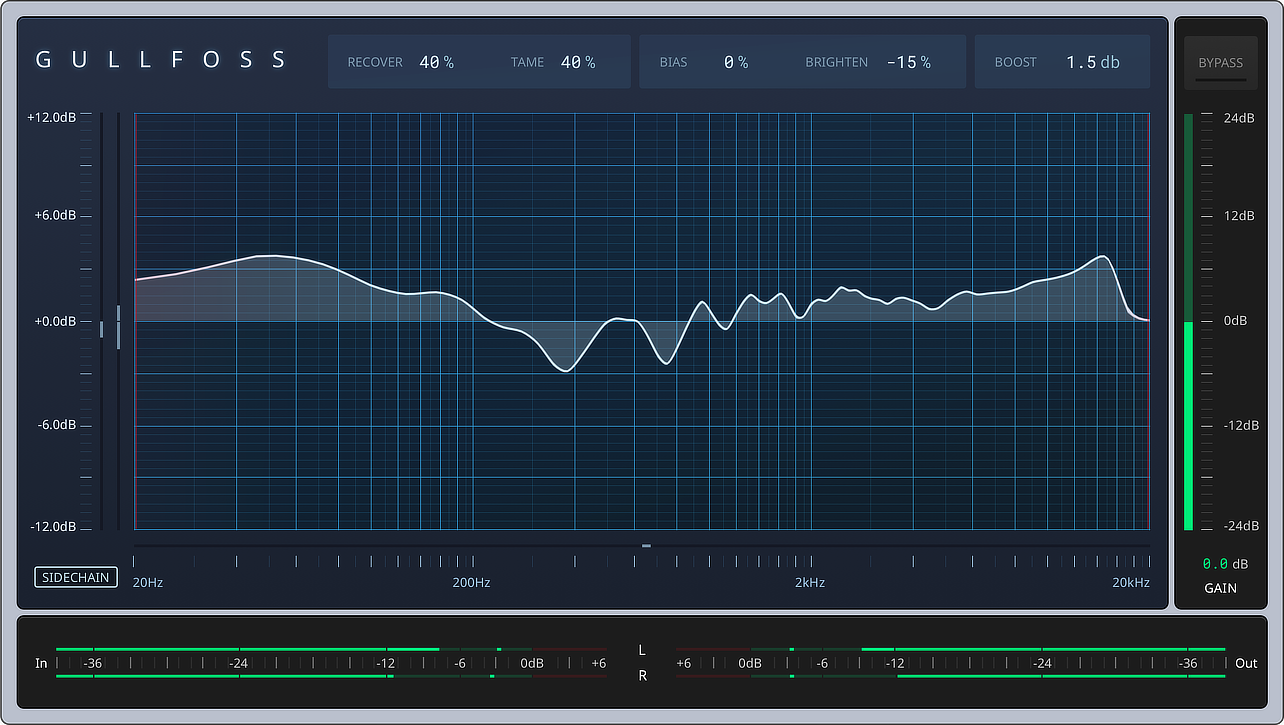
There are really only five parameters in this plugin, plus two hidden ones. Let's go through them.
Recover
Recover unmasks frequencies. You can use Gullfoss on overall mixes, submixes, or individual instruments — and obviously you'll hear the difference better on a mix or submix because there are multiple instruments interacting. But I do find this works very well on vocals. When you turn Recover up, it starts to highlight some of the frequencies in the vocal that need to come out, and it does it in a tasteful way.
Tame
Tame suppresses dominant frequencies. This is the one that grabs the resonant peaks and the parts of the signal that are popping out or building up in the mix. You can use Recover and Tame together to balance highlighting the important frequencies while taming the ones that need to be suppressed. That's what makes Gullfoss really cool.
Bias
Bias determines whether Recover or Tame is going to be more dominant — basically which one gets the most space in the frequency spectrum. Positive Bias leans toward Recover. Negative Bias leans toward Tame.
Brighten
Brighten is straightforward. Positive percentages give you a brighter sound, negative gives you a duller sound. This one's actually really useful, because when you unmask frequencies with Recover, the overall sound tends to brighten up. Brighten lets you dull it back toward unity if you want to.
Boost
Boost just lifts the low end. That simple.
The two hidden controls
Down on the grid, on the left and right sides, there are two lines you can drag inward. The left one sets a low-frequency cutoff — anything below that gets ignored. The right one does the same for the high end.
A scenario where this might be useful: maybe you already treated the low end of an instrument yourself and you don't want Gullfoss touching it. You can just narrow the plugin's focus to the upper mids or wherever you want it working. Or if you're using it on an instrument that doesn't have much low or high content, you can just zero in on the range that matters.
How it sounds — the demos
I tested Gullfoss on four sources: a drum mix, overdrive guitars, lead vocals, and the full master. For the drum demo in the video, I exaggerated the settings so could hear the plugin at it extremes. In real use, less is more with this plugin.
Drums
I thought the drums sounded really good before this plugin. The kick was solid. But the snare was a little dirty — mostly because I was using a decent amount of the room mic and some pretty heavy parallel compression. Gullfoss cleaned up the snare, smoothed out the cymbals, and put a nice polish on the kick. Subtle, but a real improvement on something that was already working.
Overdrive guitars
I had Gullfoss ignoring frequencies above 7.5k and below 80 Hz on the guitars. Some of the upper mids around 5–6k popped out a little — that's the sizzle in the tone — and that worked great. It was also taming around 200–250 Hz, which is the body of the guitar but also where some of the muddiness lives. In a thick mix you've got to clear that area out to make room for everything else, and Gullfoss handled it without me having to set up a single EQ band.
Lead vocals
This is where Gullfoss really shined. The vocal in question was a yelled, slightly saturated take, and Gullfoss rounded it out while bringing out the presence. At the same time, it was taming the 2k–5k range — the area that gets harsh and hurts your ears when it's not under control.
I'll say this: there are a lot of plugins out there that just tame frequencies. Gullfoss is the only one I've used that tames and pops out the needed ones at the same time. For lead vocals especially, that's a big deal.
The master
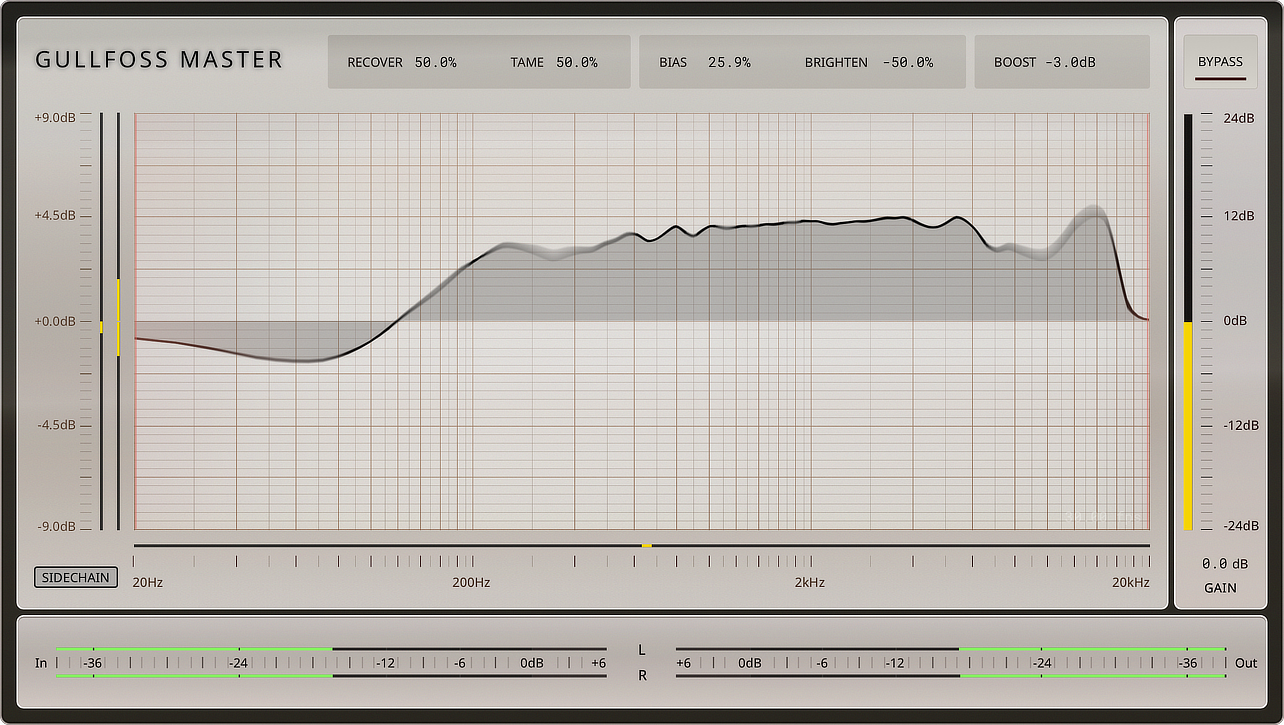
For the master bus, I used Gullfoss Master, which is the high-resolution version of the plugin — lower noise floor and a more precise auditory perception model. On the full mix, the changes were subtle. I was looking for two to three dB of cut and boost, which I got with Recover and Tame at 9% and Brighten at 1%. The mix already sounded great. I just wanted some final polish, and Gullfoss delivered.
I've seen people push Gullfoss into the 15–20% range on masters, which is fine because the plugin is moving dynamically the whole time. But you don't want to crank it to 40 or 50% on a master like you might on the regular Gullfoss for individual tracks. Less is more on the master bus.
How to set it
There isn't really a right or wrong way to set this plugin. You can see how I set it in the demos, but I can't tell you how to set it on your stuff — you've got to listen to your own instrument and your own mix and make that call yourself. Use your own ears.
If you want a safe starting point: less is more. Start small and only push it harder if you actually need it.
Final verdict
I really like this plugin. It's transparent when used right, it improves the sound without much work, and it's hard to mess up. It works really well on overall mixes and mix buses, did a great job on the drum mix, and I like it on lead vocals more than any of the other frequency-taming plugins out there — because it's not just taming, it's also recovering at the same time.
If you've been hearing about Gullfoss and wondering whether it's worth picking up, here's where to grab it: https://www.soundtheory.com/gullfoss. And again, if you want to round out your Sound Theory toolkit, Crafter is here: https://www.soundtheory.com/kraftur.