A channel strip plugin puts your EQ, compression, gating, and saturation in one box, modeled after a real console channel. That means you can shape a track fast, with one consistent flavor running across your whole mix.
That matters for two reasons: speed and tone. Instead of stacking five plugins and guessing how they interact, you reach for one tool that already sounds like a finished record. And because everything shares the same character, your tracks glue together instead of fighting each other.
We picked five of the best channel strip plugins, each modeled on a real console — SSL, Neve, API. I'll tell you what each one does, what I think, and where it shines. No fluff, no fake hype. And yes, one of them is modeled on twelve real Neve 1073s, which is either overkill or a dream come true, depending on how you look at it.
TABLE OF CONTENTS
What a channel strip plugin actually does for you
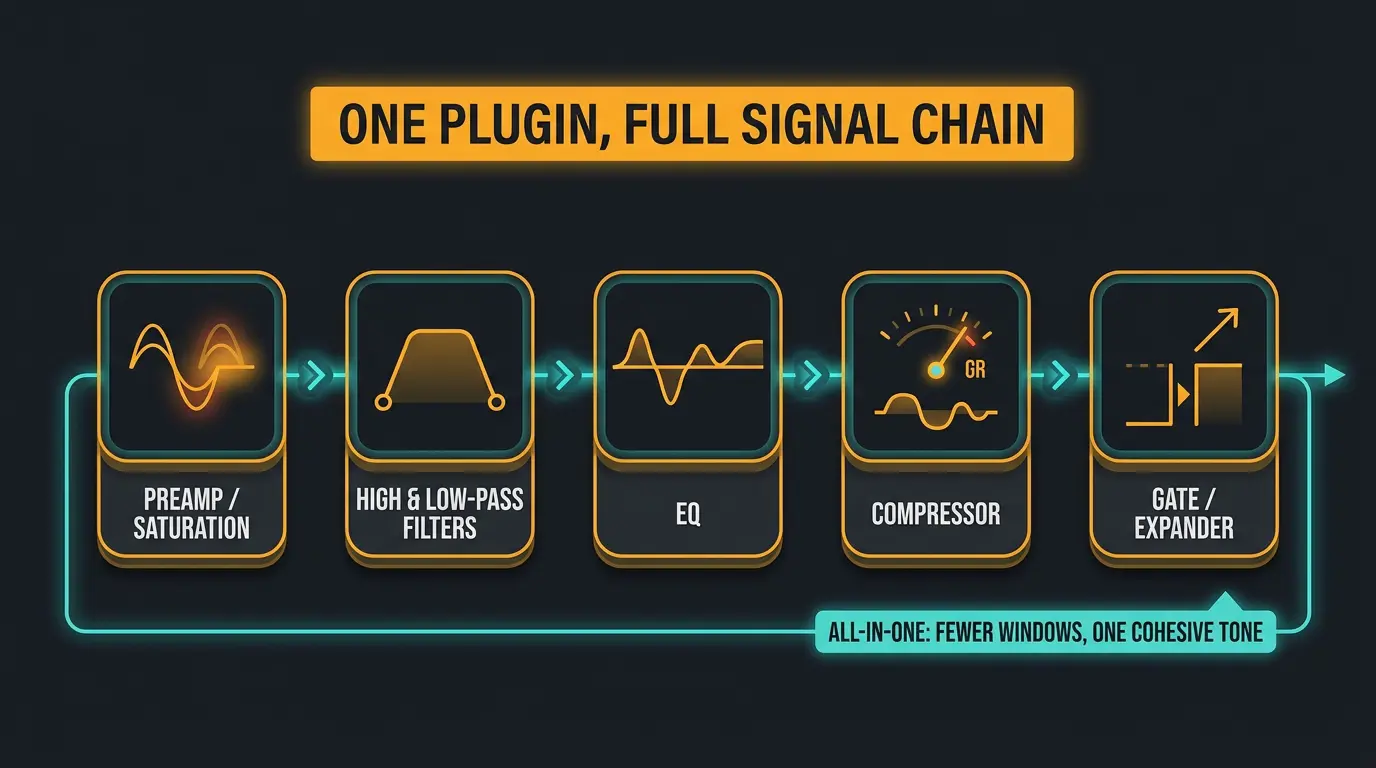
Most channel strips share the same building blocks. You get a preamp or saturation stage for tone and harmonic weight, high- and low-pass filters to clean up the edges, an EQ to sculpt, and a dynamics section — usually a compressor plus a gate or expander.
The case for one plugin doing all of it is simple. Less is more. One tool means fewer windows, fewer plugins fighting each other, and one cohesive character across the track. You make decisions faster because everything lives in one place.
And let's settle the old debate: plugins are as good as hardware now. The "you need real gear" argument is done. These models hold up against the consoles they're based on, so pick your channel strip on tone and workflow — not on some idea that a rack of metal is automatically better. If you want to dig into the broader saturation side of this, our roundup of the best saturation plugins pairs nicely with any of these.
Quick picks at a glance
- SSL 4K B Channel Strip — the most complete-feeling strip here and our pick for overall console tone.
- UAD API Vision Channel Strip Collection — unmistakable API punch with two EQ flavors for serious flexibility.
- KIT Plugins BB N73 — the smooth, mix-cutting Neve saturation people chase, modeled from twelve real 1073s.
- SSL Native Channel Strip 2 — clean, surgical SSL tone wrapped in a tight, modern workflow.
- Waves SSL EV2 — the CPU-friendly workhorse you can throw across a full session of tracks.
SSL 4K B Channel Strip Plugin
#1
Best Overall
SSL 4K B Channel Strip Plugin
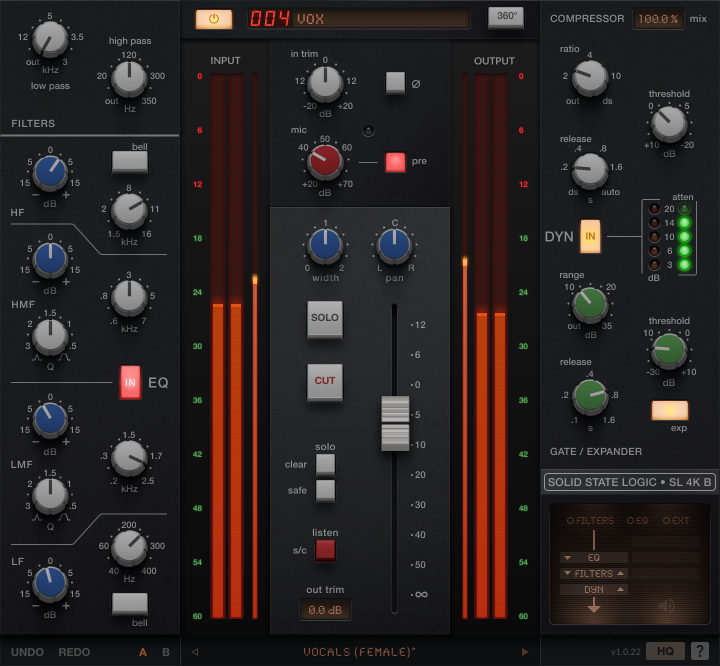
The SSL 4K B is modeled on the rare SL 4000 B console — only six were ever built. It packs the full classic channel strip layout: high- and low-pass filters, a four-band EQ, a compressor/limiter, and a gate/expander. What sets it apart is the harmonically rich mic pre and VCA fader emulation, which give it real character before you even touch the EQ.
It's Apple Silicon native and part of SSL's 360° ecosystem, so it keeps getting maintenance updates instead of being left to rot. A scenario where this earns its spot: you want one cohesive console flavor across an entire mix — drums, bass, vocals, the works. Print this on everything and the whole thing starts to feel like it was tracked through the same desk.
This is the most complete-feeling strip on the list, which is exactly why it tops it. For some history on the console it's based on, MusicRadar has a good piece on how the 4K B traces back to the desk used on Phil Collins' "In The Air Tonight".
Pros
- Full feature set: filters, four-band EQ, compressor/limiter, and gate/expander in one window
- Harmonically rich mic pre and VCA fader emulation add character before you touch anything
- Apple Silicon native with ongoing 360° ecosystem updates
- The most cohesive, complete-feeling tone of the bunch
Cons
- Heavy on features if you only want quick EQ and compression
- Access leans toward SSL's subscription model
Universal Audio UAD API Vision Channel Strip Plugin Collection
#2
Runner-up
Universal Audio UAD API Vision Channel Strip Plugin Collection
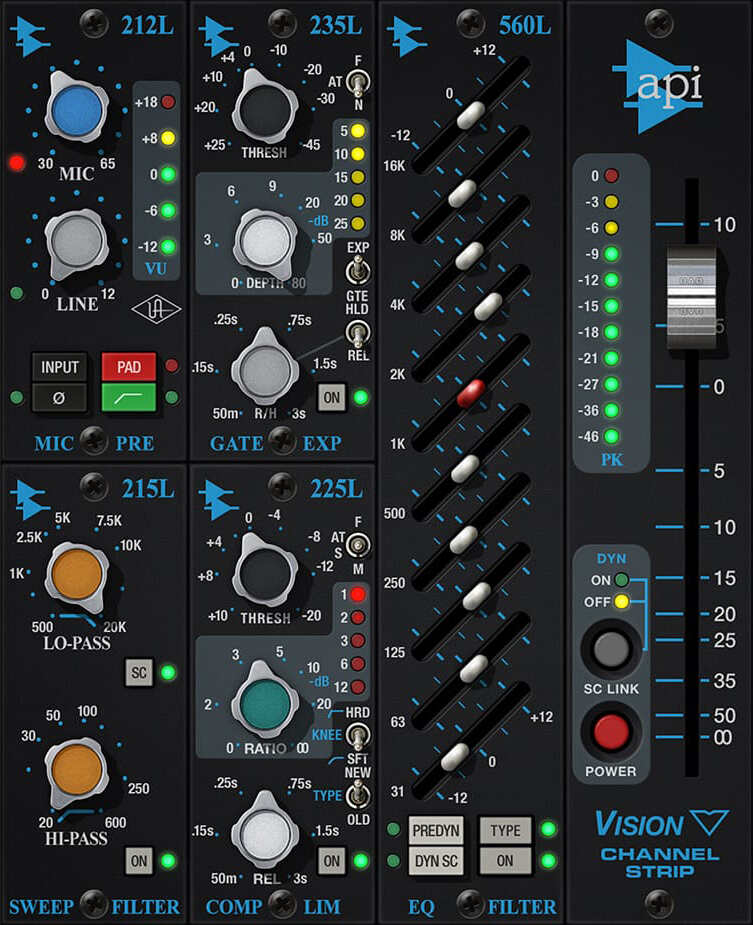
The big update here is the EQ Type button. Hit it and you switch between the classic 550L 4-band parametric EQ and the new 560L 10-band graphic EQ. That's a genuinely useful pair — the 550L for musical, broad-stroke shaping, and the 560L for sculpting guitars, adding bite to drums, and pushing vocals forward with that unmistakable API analog character.
And to clear up a common worry: it runs natively on your computer with no UA hardware required. It also runs on UAD DSP if you've got it, but you don't need it to get going.
A scenario where the dual EQ earns its keep: you've got a guitar that needs surgical graphic-EQ work and a vocal that just wants a couple of musical bands. One plugin, both jobs. That API punch is impossible to miss, and the added 560L makes this far more versatile than the old single-EQ version.
Pros
- Two EQ types in one plugin via the EQ Type button — 550L parametric and 560L graphic
- That signature API punch is unmistakable on drums and guitars
- Runs natively with no UA hardware required (also runs on DSP)
- More versatile than the older single-EQ release
Cons
- API color is strong — not the neutral choice if you want a clean strip
- Native version doesn't include the Legacy plugin that ships with the DSP collection
KIT Plugins BB N73 Channel Strip Plugin
#3
Top Pick
KIT Plugins BB N73 Channel Strip Plugin
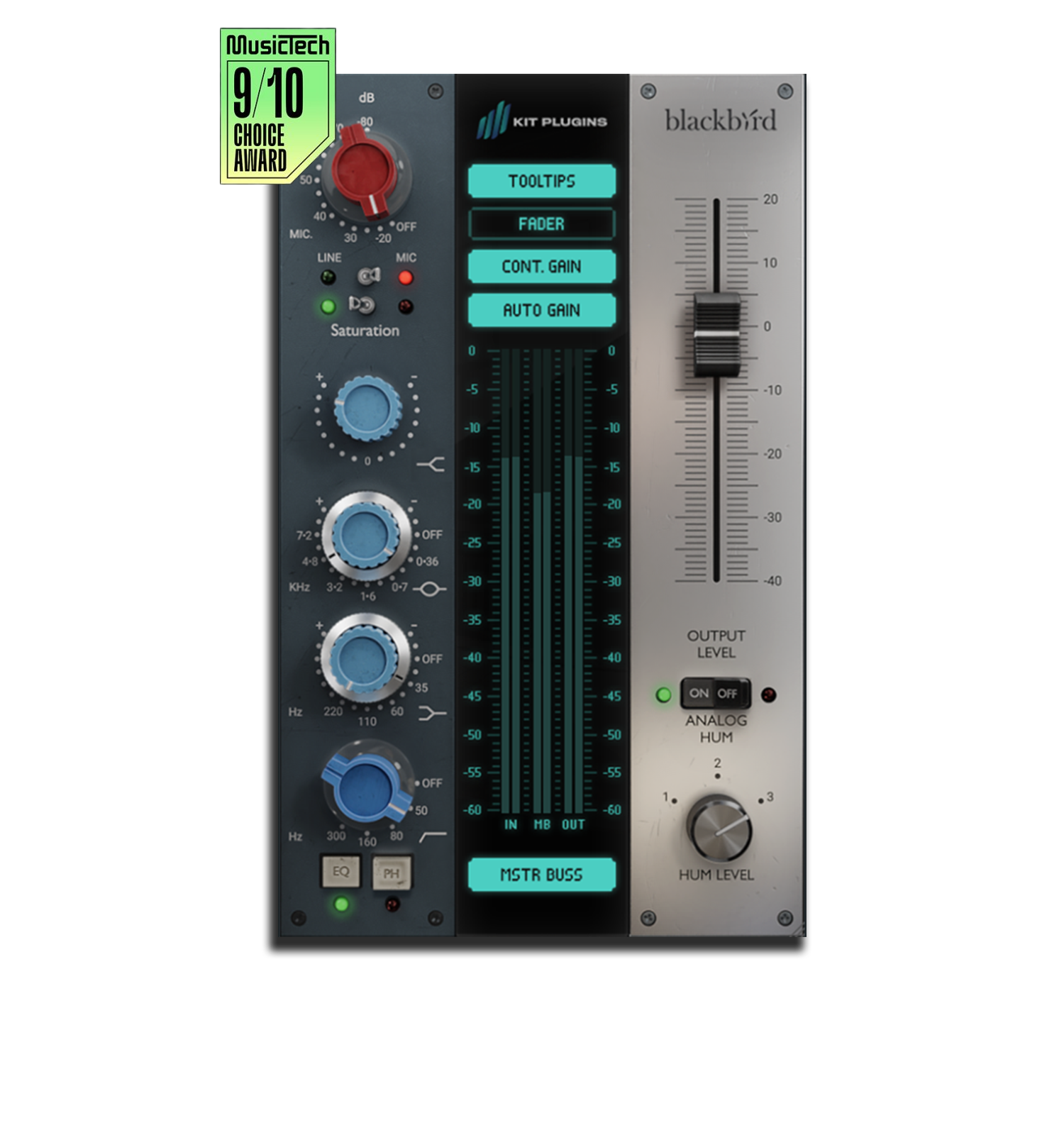
The BB N73 is modeled from twelve real Neve 1073s in Blackbird Studio's private collection, fused into one idealized model. You get a Class-A mic pre emulation, the classic 3-band EQ, and — the part I really like — a master buss amp stage derived from the Neve 8058 console for added harmonic weight, subtle compression, and real analog glue.
It's full-range modeled from 10Hz to 96kHz, with full M-series support across all formats. A scenario where this shines: you want that smooth, mix-cutting saturation people chase Neve for. Push the pre, dial the EQ, and tracks sit forward without getting harsh.
Honest take — where the SSL picks are about clean, surgical control, the N73 is about color and weight. If you want a track to feel thick and present rather than precise, this is the one to reach for. It pairs especially well with anything you'd run through our favorite tape emulation plugins for extra warmth.
Pros
- Modeled from twelve real Neve 1073s into one idealized model
- Master buss amp stage adds genuine harmonic weight and glue
- Full-range modeling (10Hz–96kHz) and full M-series support
- Smooth, mix-cutting Neve saturation that sits tracks forward
Cons
- Color-forward by design — not a transparent, surgical strip
- 3-band EQ is less flexible than the SSL and API options here
Solid State Logic Native Channel Strip 2 Plugin
#4
Top Pick
Solid State Logic Native Channel Strip 2 Plugin
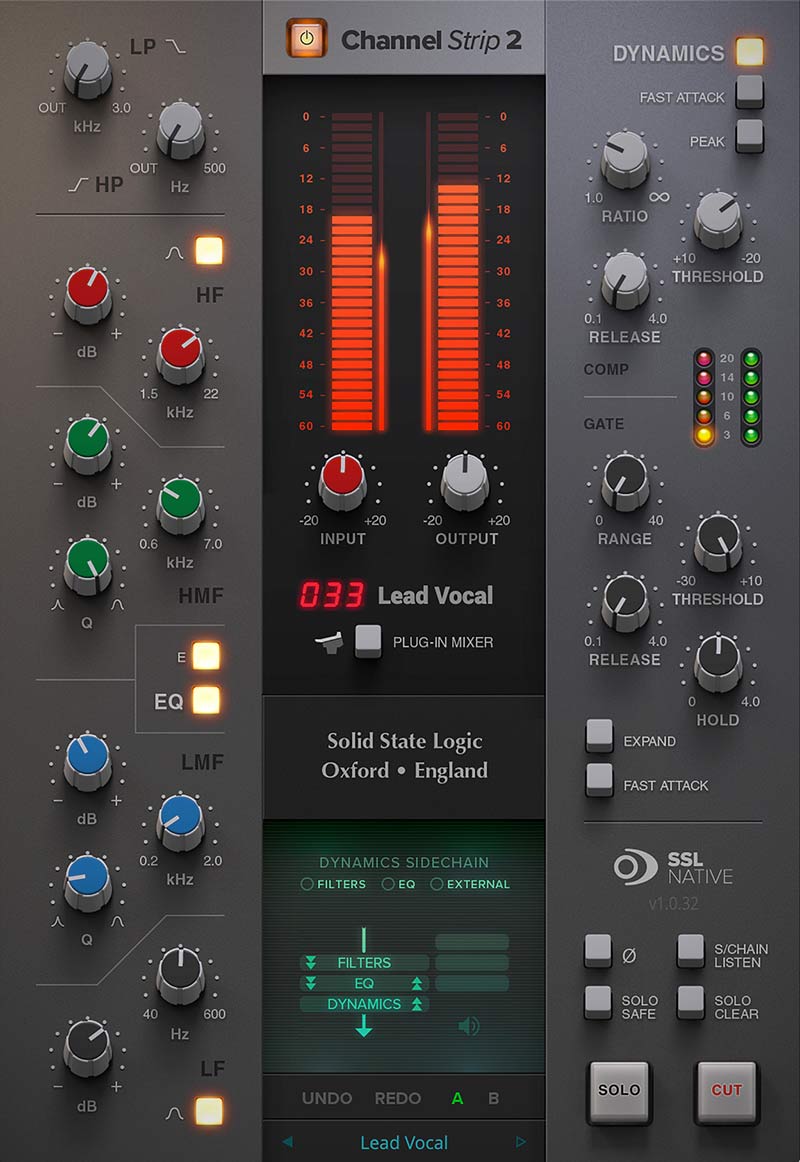
The SSL Native Channel Strip 2 is inspired by the SSL 9000 K, and it brings SSL's proprietary EQ anti-cramping technology plus an external side chain input. The v2 update adds a new output section with fader level, width, and pan controls, along with advanced DAW solo and cut integration for Ableton Live, Studio One, and REAPER.
It's Apple Silicon native and integrates with SSL 360°, UC1, and UF8 if you're in that ecosystem. One thing worth knowing: v2 is the current version, and it replaces the old v1, which is now legacy for backwards compatibility with older sessions.
A scenario where this fits: you want clean, surgical SSL tone with a tight modern workflow. The 9000 K flavor is smoother and more hi-fi than the grittier E-series sound, so this is the SSL strip to grab when you want control without grit.
Pros
- 9000 K-inspired tone with EQ anti-cramping technology
- v2 adds a full output section with fader, width, and pan
- Tight DAW solo/cut integration for Live, Studio One, and REAPER
- Apple Silicon native with SSL 360°/UC1/UF8 integration
Cons
- Cleaner 9000 K voicing has less vintage grit than the E-series
- v1 sessions need the legacy version for full compatibility
Waves SSL EV2 Channel Strip Plugin
#5
Lowest Price
Waves SSL EV2 Channel Strip Plugin
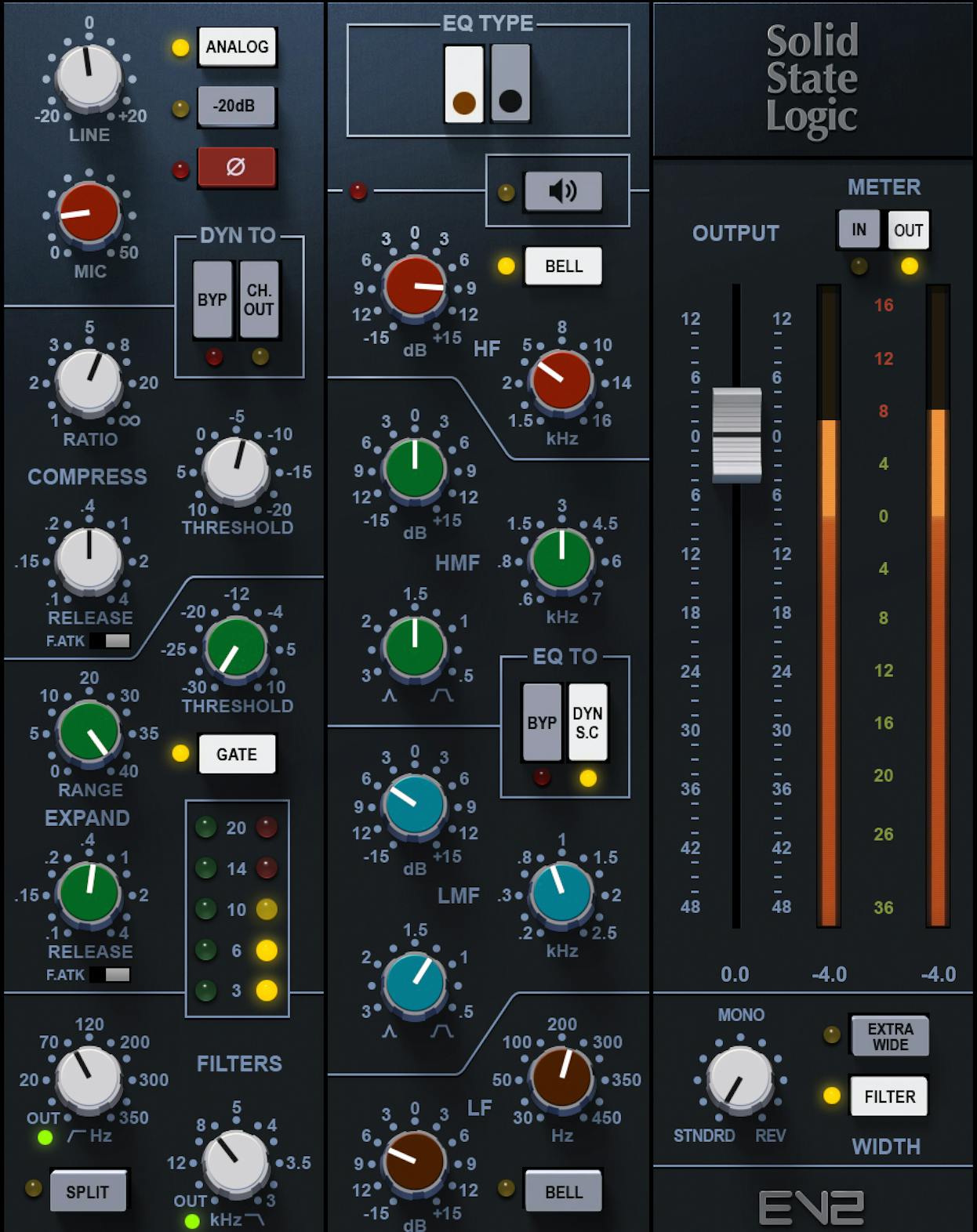
The Waves SSL EV2 is a component-by-component recreation of the SSL 4000E channel strip, authorized by SSL, using Precision Analog Component modeling. The fun part: you can choose between the gritty O2 brown knob EQ and the clean 242 black knob EQ, and it adds the console's richly saturated mic pre and line inputs.
Here's its biggest strength — CPU efficiency at scale. This is the workhorse you can throw across sixty tracks without bringing your computer to its knees. If you mix big sessions and want one reliable, great-sounding E-series strip on everything, the EV2 is hard to beat for daily use.
The honest caveat: some users still report relatively high CPU at very large track counts, so it's efficient, not weightless. But for the vast majority of sessions, it's the strip you'll reach for over and over.
Pros
- Component-by-component recreation of the SSL 4000E, authorized by SSL
- Choice of gritty O2 brown knob or clean 242 black knob EQ
- Saturated mic pre and line inputs add real E-series color
- Efficient enough to run across a full session of tracks
Cons
- Some users report relatively high CPU at very large track counts
- E-series only — no 9000 K or non-SSL flavors here
Waves Magma Tube Channel Strip
#6
Top Pick
Waves Magma Tube Channel Strip
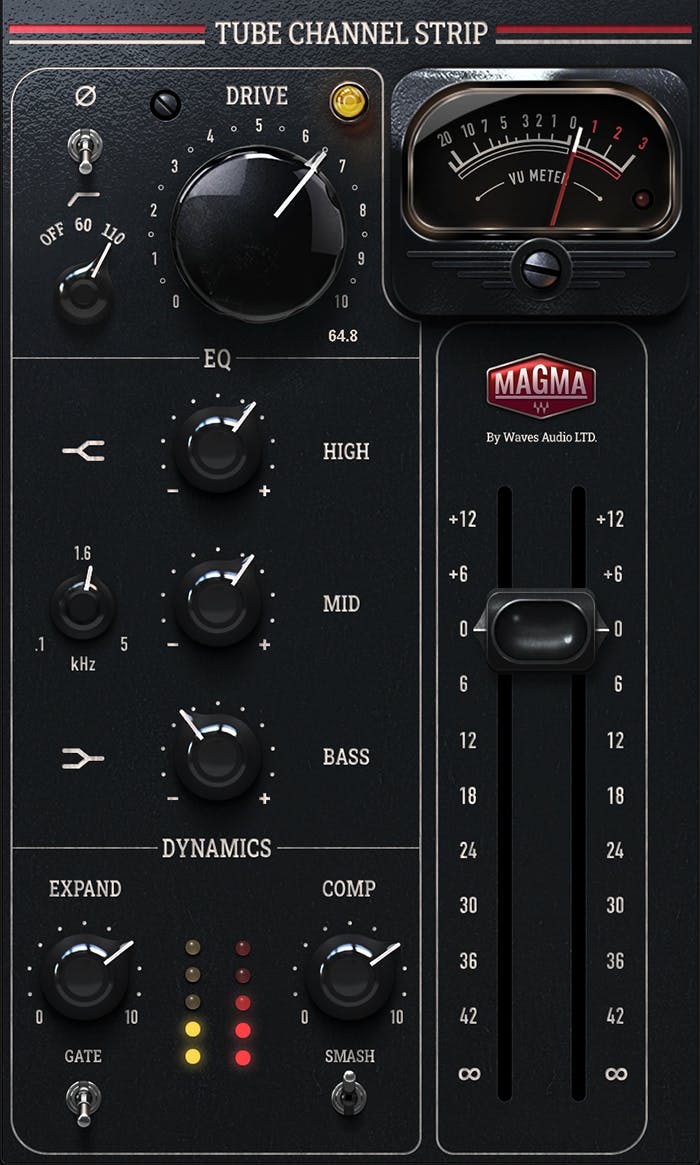
Magma Channel is Waves' tube channel strip, and it does a lot with very few knobs — saturation, a 3-band EQ, and dynamics in one signal path, all built on the same True Valve Modeling behind their BB Tubes plugin. The drive knob is the heart of it: up to about five you get smooth analog thickening, and past halfway it gets gnarly enough to wake up limp drums. The one-knob compressor goes from gentle glue to full pump, and there's a SMASH button when you want it to really grab. It's fast, it sounds good almost anywhere you point it, and the simplicity is genuinely the selling point — turn a couple knobs and your track sounds warmer.
Pros
- Tube saturation that ranges from subtle warmth to soft-clip grit, and stays smooth up top
- One-knob drive and compressor make it fast to dial in, even for newer mixers
- Musical EQ with gentle shelves and a well-chosen sweepable mid
- Over 450 artist presets and a calibratable VU meter, no iLok required
Cons
- No wet/dry Mix knob, so parallel compression or saturation isn't built in
- The highpass filter only offers Off, 60 Hz, or 110 Hz — limited options
| Plugin | Modeled On | Best For |
|---|---|---|
| SSL 4K B Channel Strip | SL 4000 B console | Overall console tone across a whole mix |
| UAD API Vision Channel Strip Collection | API 550L + 560L | Punch and dual-EQ flexibility |
| KIT Plugins BB N73 | Twelve Neve 1073s | Smooth Neve saturation and weight |
| SSL Native Channel Strip 2 | SSL 9000 K | Clean, modern SSL workflow |
| Waves SSL EV2 | SSL 4000E | CPU-friendly daily mixing |
| Waves Magma Tube Channel Strip | Vintage Valve Tube Hardware | Dialing in sound quickly |
Frequently Asked Questions (FAQs)
What is a channel strip plugin and do I need one?
A channel strip plugin combines EQ, compression, gating, and saturation in one tool, modeled after a real console channel. You don't strictly need one, but it speeds up mixing and gives every track a consistent tone. It's one of the fastest ways to get pro-level sound on individual tracks.
Do these channel strip plugins need special hardware to run?
No, none of these require special hardware. The UAD API Vision Collection runs natively on your computer with no UA hardware needed, and it also works on UAD DSP if you have it. The SSL and Waves picks all run native too. Special hardware is optional, not required.
What's the difference between the SSL E and 9000 K flavors here?
The SSL E-series sound (Waves EV2) is grittier and more aggressive, while the 9000 K (SSL Native Channel Strip 2) is cleaner and more hi-fi. Reach for the E-series when you want vintage character and color, and the 9000 K when you want surgical, transparent control.
Which channel strip is best for low CPU when mixing lots of tracks?
The Waves SSL EV2 is the most CPU-friendly pick for big sessions, which is why it's the go-to workhorse for throwing across many tracks at once. Just know that some users still report relatively high CPU at very large track counts, so it's efficient rather than truly weightless.
Are plugin channel strips as good as real console hardware?
Yes, modern plugin channel strips genuinely match the hardware they're modeled on. The "you need real gear" argument is over — these emulations hold up against the actual consoles. Pick your strip based on tone and workflow, not on the idea that hardware is automatically better.
Final Thoughts
If you want one pick to cover most situations, the SSL 4K B is the most complete-feeling strip here and the easiest to recommend. Want raw punch? Go UAD API Vision. Chasing Neve weight and color? The KIT BB N73. Need to mix huge sessions without melting your CPU? The Waves SSL EV2.
There isn't one right answer — it comes down to the tone you're after and how you like to work. Grab one, print it on a few tracks, and let your ears decide. Make sure you trust them over any spec sheet.
Some of the links within this article are affiliate links. These links are from various companies such as Amazon. This means if you click on any of these links and purchase the item or service, I will receive an affiliate commission. This is at no cost to you and the money gets invested back into Audio Sorcerer LLC.