An AI vocals remover uses machine learning to pull the vocals (or the instruments) out of a finished mix. That's it. What matters is what it isn't — it's not EQ, it's not phase cancellation, it's not some clever filter carving out a frequency range.
Modern separation predicts and rebuilds each source from a single mixed waveform. And here's the honest part up front: it's genuinely good now. Really good. But the quality you get is capped by your source recording, not by the tool. Let's get into how it actually works and how far you can push it.
TABLE OF CONTENTS
The old way vs. what AI actually does
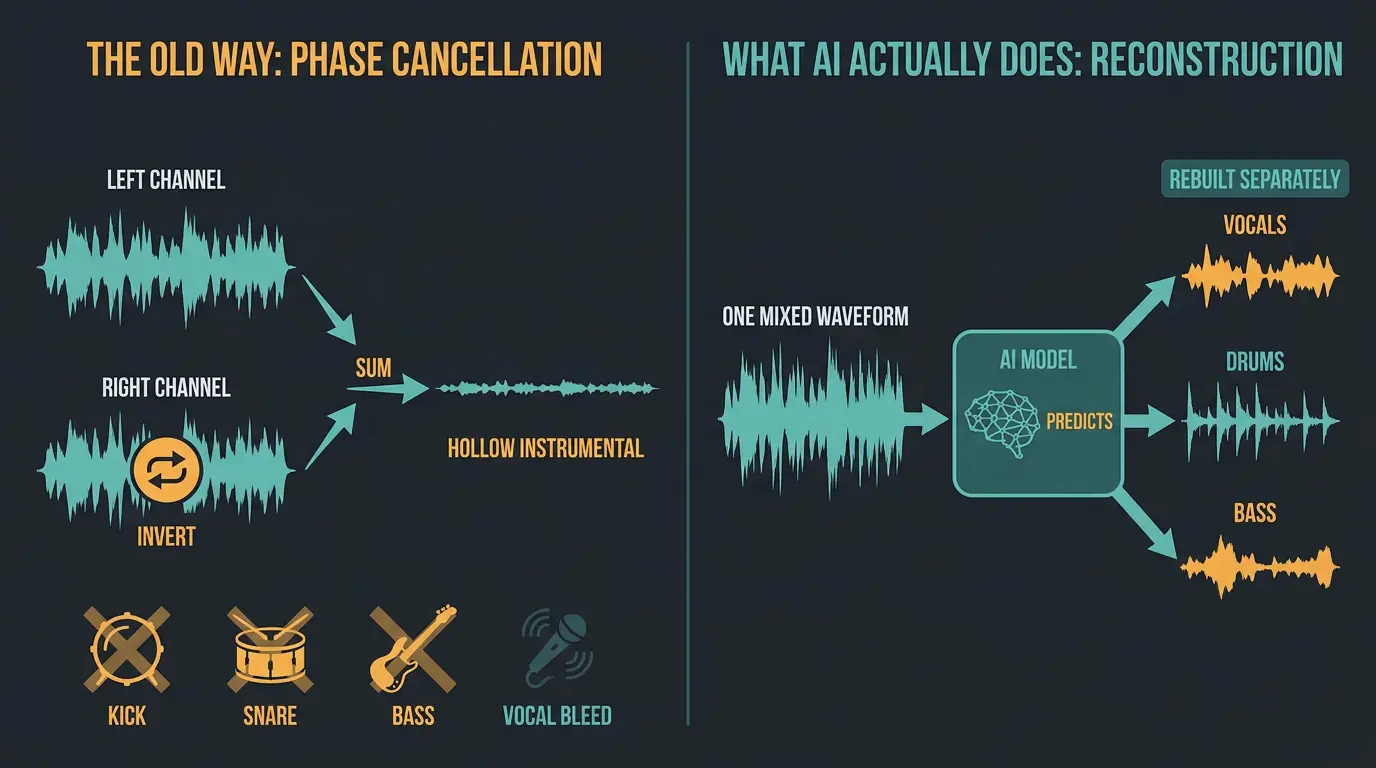
Before any of this AI stuff, the go-to trick was phase cancellation. You'd invert one stereo channel, sum it with the other, and anything sitting dead center would cancel out. Since lead vocals usually live in the center of a mix, poof — the vocal mostly disappeared.
The problem? It only worked on center-panned vocals, and it gutted everything else in the middle too. Your kick, snare, and bass all live in the center. So you'd end up with a hollow, lopsided instrumental and a vocal that was still bleeding all over the place.
AI doesn't cancel anything. That's the mental shift. The file you feed it is one mixed waveform — there are no labeled folders inside it. The vocal, the drums, the bass, they're all overlapping in time, frequency, and stereo space. The model looks at that soup and predicts what each source is, then rebuilds it. It's reconstruction, not subtraction.
How the models actually work
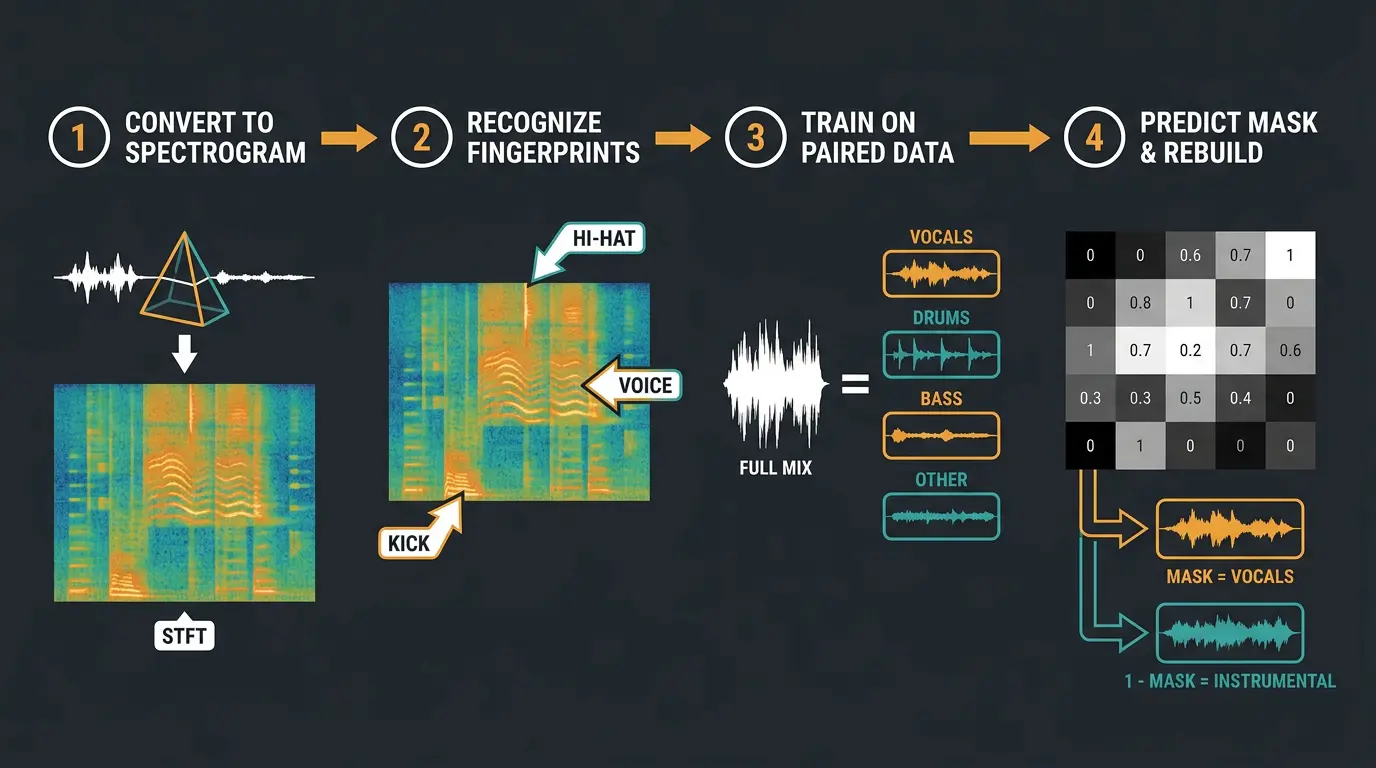
The pipeline is more approachable than you'd think. Here's the order it happens in:
- Convert audio to a spectrogram. Using a Short-Time Fourier Transform (STFT), the audio gets split into its frequencies and how they move over time. Think of it as a prism for sound — it turns a flat waveform into a picture the model can actually read.
- Recognize learned fingerprints. Every source leaves a mark. A kick is a short burst down low. A hi-hat is a sharp spike up top. A voice traces something more complex — harmonics, vibrato, the texture of consonants and breath. Consistent enough that a model can learn it.
- Train on paired data. The model is fed huge datasets of full mixes paired with their isolated tracks, so it learns which spectral shapes belong to which source.
- Predict a mask and rebuild. This is the clever bit. The model outputs a soft mask — a value between 0 and 1 for every point on the spectrogram. Multiply the mix by that mask and you lift the vocal out. Multiply by 1 minus the mask and you're left with the instrumental.
The standard split you'll see is vocals, drums, bass, and "other." Fancier tools break that further into piano, guitar, and individual drum pieces. If you want a plain-English deep dive on the underlying math, this breakdown of audio source separation is a solid read.
Why hybrid models sound cleaner
Here's the upgrade that made recent tools jump ahead. Older models worked on the spectrogram alone, which tends to smear sharp transients and lose phase detail. Great for smooth stuff, rough on drums and hard consonants.
Hybrid models run two streams at once — one on the raw waveform, one on the spectrogram — and weigh the outputs against each other per source. That preserves the snap of a snare and the bite of a "t" or "k" sound. It's why newer models sound noticeably better on percussion and vocals, and it's now the standard approach.
The models worth knowing by name
Here's something most people don't realize: this field is mostly open-source research. The big models are all publicly available, which means two apps that look completely different might be spitting out identical results under the hood. Knowing the models matters more than knowing the brand names.
The ones worth having in your head:
- HTDemucs (Meta): the best general-purpose 4-stem model. If you want solid quality across vocals, drums, bass, and other, this is usually the right call. The fine-tuned htdemucs_ft variant is the clean default.
- MDX-Net: came out of the 2021 Sony demixing challenge. Spectrogram-based and still a strong performer, especially blended with others.
- BS-RoFormer (ByteDance): the current state of the art. It's transformer-based — same family as large language models — and it tops the leaderboards. The catch is it's compute-heavy and less widely deployed.
- Spleeter (Deezer): the legacy baseline. Still fast and stable, but it hasn't had a real update since 2019 and the quality gap is now audible.
Most engineers run these locally through Ultimate Vocal Remover (UVR), a free desktop app. My favorite tip: use UVR's ensemble mode. Instead of trusting one model and living with its quirks, you run several in parallel and blend the results. It smooths out artifacts that any single model would leave behind.
| Model | Best for | Notes |
|---|---|---|
| HTDemucs | General-purpose 4-stem | Best all-round quality; htdemucs_ft is the clean default |
| MDX-Net | Vocal isolation, blending | Spectrogram-based; strong in ensembles |
| BS-RoFormer | Top-tier quality | Current state of the art but compute-heavy |
| Spleeter | Fast, lightweight jobs | Legacy baseline; audibly behind newer models |
How good is it, really?
Quality gets measured in SDR — signal-to-distortion ratio, in decibels, higher is better. It's tested against a reference set of tracks called MUSDB18. In plain English: anything above about 9 dB on vocals is past the point where most people can pick it out in a blind test. Above 10 dB is approaching transparent.
Top models now hit around 11 dB on vocals. So we're firmly in "most listeners can't tell" territory. That's a big deal.
But here's the takeaway that matters most. The gap between the best paid engine and a well-tuned free UVR setup is under 1 dB on most material. Let that sink in — the bottleneck almost never the model. It's your source recording.
If the vocal sits clearly above a clean, center-panned mix with modest reverb, you'll get clean stems. If it's buried under dense instrumentation or drenched in effects, no model on earth saves it. That's not a flaw in the tool. That's physics. The information you want was never cleanly separable in the first place.
Artifacts to listen for
Make sure you listen on headphones for this, because a lot of it is subtle and speakers will hide it. Let's give it a listen with your ears wide open. Here's what to hunt for:
- Watery warble: that "underwater" swirling around the vocal, especially on sustained notes.
- Smeared transients: drums that lose their punch and sound a little soft or blurry.
- Phasey highs: a shimmering, swirling quality up top that wasn't in the original.
- Bleed: bits of the instrumental leaking into your acapella, or vice versa.
- Chopped reverb tails: reverb that gets cut off early or hangs around oddly after the vocal stops.
There isn't always a right or wrong result here. It depends entirely on the material. Trust your ears — if it sounds good for what you need it for, it is good.
Good use cases for an AI vocals remover
- Making instrumentals or acapellas to practice over, sing along to, or study a mix — quick and usually clean enough for the job.
- Remixing and sampling, where you need a usable acapella or a loop from a source you don't have the multitracks for.
- Karaoke tracks, where a little bleed or warble is completely forgivable and nobody's soloing the vocal anyway.
- Rescuing old recordings where the multitracks are long gone — not perfect, but sometimes it's the only way to get separated sources back.
Frequently Asked Questions (FAQs)
Can AI remove vocals perfectly?
Not quite, but it gets close on the right material. If the vocal sits clearly above a clean, center-panned mix, you can get near-transparent results. If it's buried under dense instrumentation or heavy effects, expect artifacts — no model can separate what was never cleanly separable to begin with.
What's the best free AI vocals remover?
Ultimate Vocal Remover (UVR) is the best free option for most people. It's an open-source desktop app that runs the top models locally, including HTDemucs. Turn on ensemble mode to blend several models together and you'll match paid tools within about 1 dB on most tracks.
Can I isolate vocals from any song?
You can attempt it on any song, but the result depends entirely on the mix. Vocal-forward tracks with clean recordings separate beautifully. Dense, effects-heavy, or heavily layered productions fight back and leave you with warble and bleed. The source recording is the ceiling, not the software.
Do these tools work on live recordings?
They work, but expect messier results than studio tracks. Live recordings have crowd noise, room reflections, and heavy bleed between sources, all of which confuse the model. You'll get usable stems for practice or study, but rarely release-clean separation from a live capture.
Is it legal to use separated stems?
That depends on how you use them, not on the tool itself. Running a separation for personal practice or study is one thing; releasing a remix or sampling copyrighted material without clearing it is another. The legality lives in the source and your usage, so clear your rights before you publish anything.
Final Thoughts
AI vocal removal went from a party trick to a genuinely useful tool, and the honest truth is that free and paid options are now separated by a hair. Grab UVR, run an ensemble, and let your source recording do the heavy lifting — because that's really what decides the outcome.
Don't expect miracles from a dense, muddy mix. But feed a clean, vocal-forward track into a modern model and you'll be surprised how far the tech has come. Trust your ears, use headphones, and decide for yourself what's good enough for the job.
Some of the links within this article are affiliate links. These links are from various companies such as Amazon. This means if you click on any of these links and purchase the item or service, I will receive an affiliate commission. This is at no cost to you and the money gets invested back into Audio Sorcerer LLC.