The wired vs wireless question isn't what it was a couple of years ago. Bluetooth got genuinely good, the headphone jack vanished from most phones, and the old "just use a cable" advice needs some nuance now.
So here's a plain breakdown of what actually matters today. No marketing noise, no version-number worship. Just what's true, so you can pick the right headphones and get on with listening.
TABLE OF CONTENTS
The short answer
Wireless is good enough now for the vast majority of people, and the gap keeps shrinking. If you're buying headphones for everyday life, you don't need to feel like you're settling by going wireless.
Wired still wins in a few specific spots — latency-sensitive work, guaranteed zero-dropout reliability, and some high-end listening where you just want the simplest signal path. The rest of this post explains the why behind all of that, so you know when each one actually matters.
How wireless headphones actually work
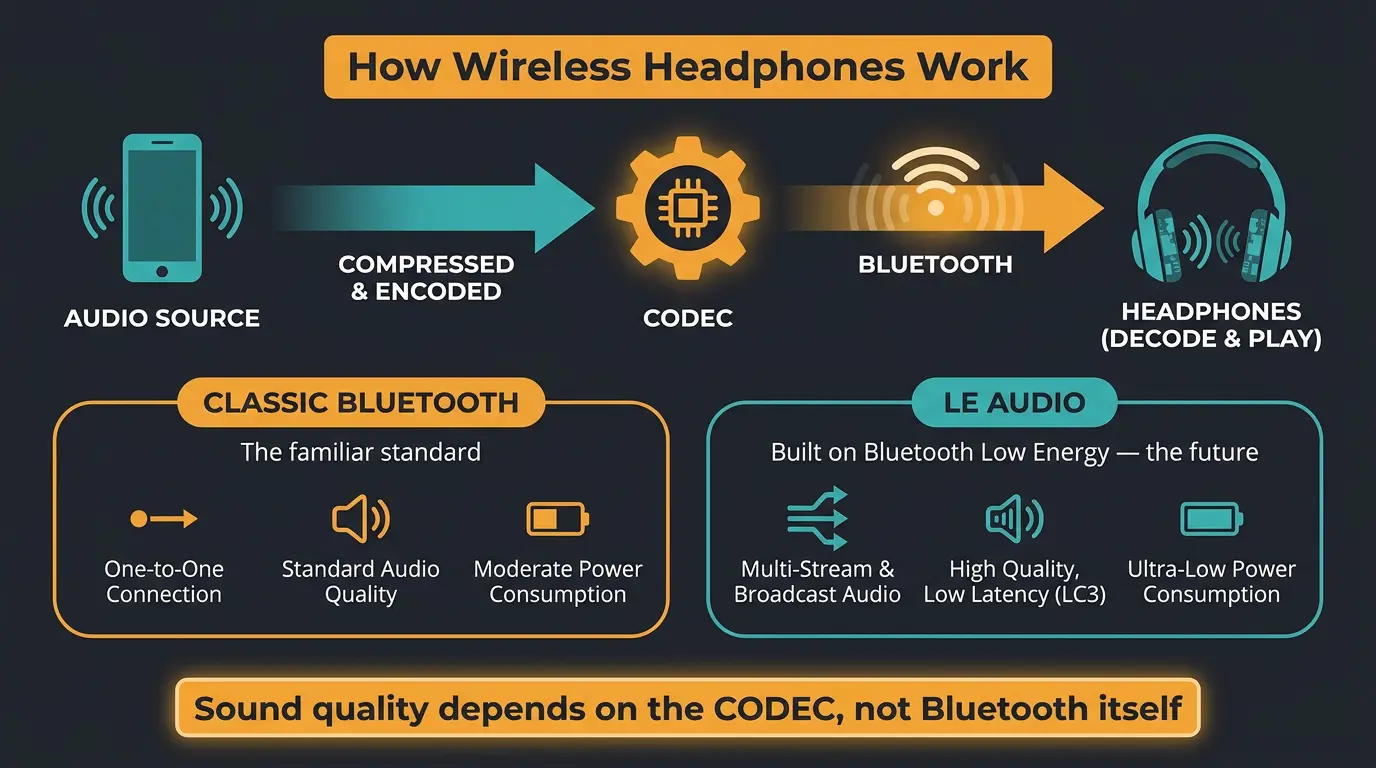
Wireless means Bluetooth. That part hasn't changed. What has changed is that Bluetooth isn't one single thing anymore.
There are now two architectures living side by side. There's Classic Bluetooth, the thing you've used for years, and there's the newer LE Audio, built on Bluetooth Low Energy. They handle audio differently, and LE Audio is the bigger deal going forward.
But before we get into that, here's the thing most people get wrong about wireless sound quality. It isn't really about Bluetooth at all. It's about the codec.
The version number isn't what matters — the codec is
You'll see headphones advertised with Bluetooth 5.4 or 6.0 like it's a sound-quality spec. It isn't. The version number handles stability, range, and power efficiency — not audio quality or latency.
A codec is the compression format that carries the audio from your phone to your headphones. That's the thing that decides how good it sounds and how much delay you get. The Bluetooth version is just the road; the codec is the car driving on it.
Practical guidance: anything on Bluetooth 5.3 or newer is fine for stability and range. Avoid models stuck on 5.0 or older, where dropouts and latency get noticeably worse. Beyond that, stop staring at the version number and look at which codecs the headphones actually support.
The codecs worth knowing
Here's the short list, with what each one is actually for.
- SBC — the universal fallback. It's mandatory on every Bluetooth audio device, so it's always there. Fine, not special.
- AAC — Apple's default. If you're on an iPhone, this is usually what you're getting, and it's solid.
- LDAC — the best objective quality on Android. At its 990kbps setting it measures beautifully. The tradeoff is higher latency.
- aptX family — a range that goes up to aptX Lossless, which claims bit-perfect CD-quality audio over Bluetooth on matched Snapdragon Sound gear.
- LC3 — the LE Audio baseline that replaces SBC. Lower latency than the rest and more efficient on battery.
One honest caveat: those bitrate and latency numbers are theoretical. Radio conditions in the real world — walls, your pocket, a crowded room — decide what you actually get. So treat the specs as a ceiling, not a promise.
| Codec | Approx. Bitrate | Latency | Best For |
|---|---|---|---|
| SBC | ~328 kbps | High | Universal fallback, always works |
| AAC | ~256 kbps | Moderate | Apple devices, iPhone default |
| LDAC | Up to 990 kbps | 100-200ms | Best quality on Android |
| aptX | ~352 kbps | 70-120ms | Android, balanced quality and delay |
| aptX Lossless | ~1.2 Mbps | 80-100ms | CD-quality on Snapdragon Sound gear |
| LC3 | ~345 kbps | 20-40ms | LE Audio, lowest latency |
LE Audio and Auracast: the future that already arrived
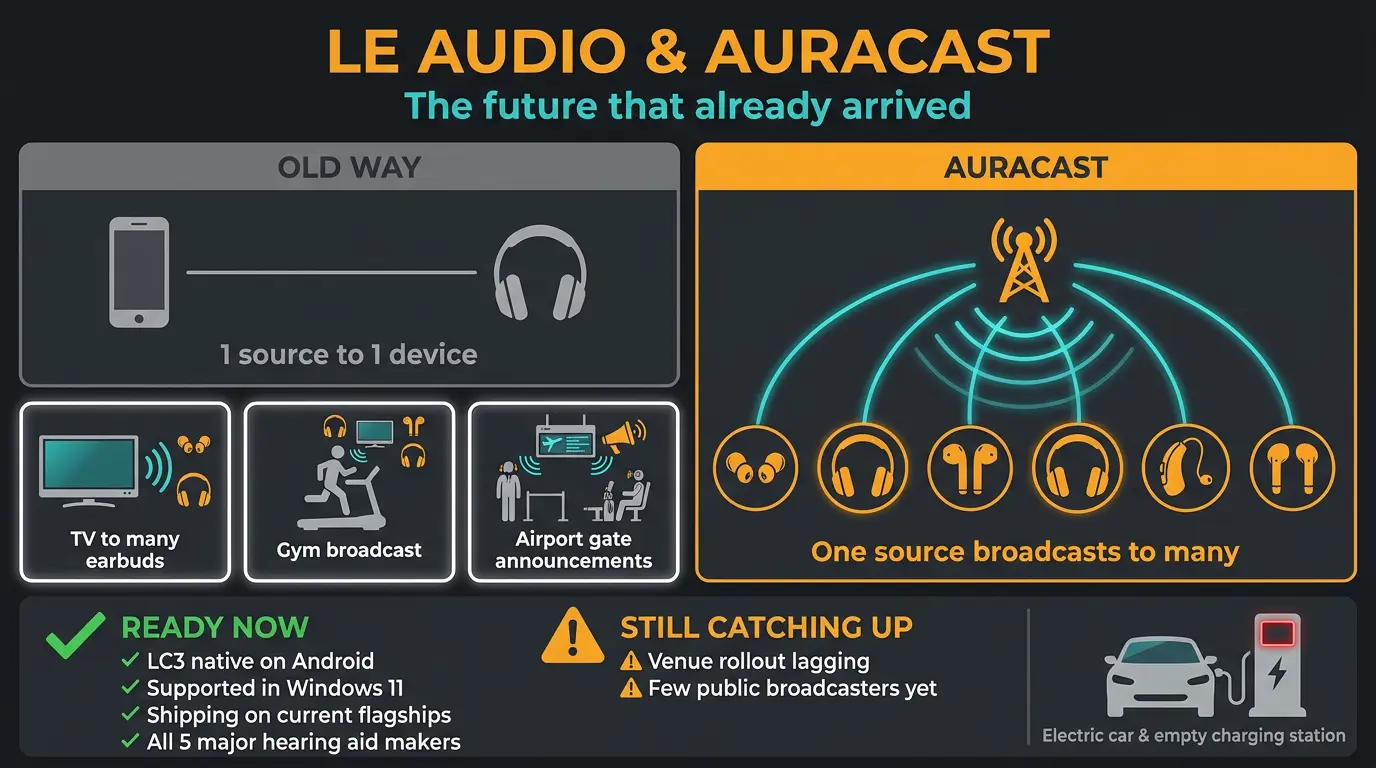
For a while, LE Audio was the thing everyone said was coming. It's here now. LC3 is native on recent Android releases, supported in Windows 11, and shipping on current Galaxy and Pixel flagships. The future quietly became the present.
The headline feature is Auracast. Instead of one phone pairing to one set of headphones, Auracast lets a single source broadcast audio to many receivers at once. Think one TV feeding a dozen pairs of earbuds, or a gym broadcasting to everyone's headphones, or an airport sending gate announcements straight to your ears. The biggest driver is accessibility — hearing aids. All five of the major hearing aid makers now support it, and that covers most of the market. You can read more about how it works over on the Auracast overview.
With that being said, let's be honest about where it stands. Device support is well ahead of venue rollout. Right now, having an Auracast-ready device without venues to use it in is a bit like owning an electric car in a state with no charging stations. The hardware's ready; the world around it is still catching up. Give it time.
The wired story has changed too

"Just use a cable" used to be simple advice. It's split in two now, depending on what you're plugging into.
On phones, the 3.5mm headphone jack is effectively gone. It's been the standard to leave it off flagship and upper-midrange phones for years now. The wired path on mobile is USB-C, which carries digital audio. And here's the gotcha: a cheap passive adapter won't cut it. The adapter needs a DAC or digital-audio support built in to actually convert the signal. A dumb dongle just gives you silence.
On laptops and dedicated players, though, the jack lives on, and that's still the easiest route to clean wired sound. If you want to get into why the amplification side matters for some headphones, our guide to headphone impedance and our picks for the best headphone amp go deeper.
So why go wired at all? No latency, no battery to charge, no dropouts, and often a simpler path to high-fidelity listening. For a lot of serious listening, that simplicity is the whole point.
When to pick wired vs wireless
- Go wired for monitoring, recording, or anything latency-sensitive where delay would throw you off.
- Go wired when you need guaranteed reliability with zero dropouts.
- Go wired for simple, no-fuss high-fidelity listening with the shortest signal path.
- Go wireless for everyday use, travel, and commuting where convenience wins.
- Go wireless for workouts, where a cable just gets in the way.
What this means for how you listen
It depends on who you are. If you're a casual listener, modern wireless is genuinely good, and you can stop worrying about whether you're missing something. You're not.
If you're making music or doing actual audio work, wired still earns its place for critical listening and real mixing decisions. You want the lowest latency and the most honest signal you can get. When you're making calls that affect the final product, the cable keeps things simple. Our rundowns on studio headphones for mixing and open-back vs closed-back are worth a look if that's your world.
For everyone in between, the best move is to trust your ears and use the right headphones for the job, not the biggest spec sheet. Don't let a version number pick your headphones for you — that's a job for your ears, and they work for free.
Frequently Asked Questions (FAQs)
Is wired still better than wireless for sound quality?
Does Bluetooth version affect audio quality?
Can I use wired headphones on a phone with no headphone jack?
What's the best Bluetooth codec for Android vs iPhone?
What is Auracast and do I need it?
Final Thoughts
The honest takeaway is that the wired vs wireless debate isn't the fight it used to be. Wireless caught up for nearly everyone, and the few places wired still wins are specific and worth knowing. Pick based on what you actually do, not what a spec sheet tells you.
Less is more here. Don't overthink it. Grab the headphones that sound right to you for the job in front of you, and let your ears make the call.
Some of the links within this article are affiliate links. These links are from various companies such as Amazon. This means if you click on any of these links and purchase the item or service, I will receive an affiliate commission. This is at no cost to you and the money gets invested back into Audio Sorcerer LLC.