That's not a sampled string library. That's not a session player I hired. That's AI — and the only thing I gave it was MIDI. I'd known ACE Studio for years as a vocal tool, and a lot of you probably know it that way too. But version 2.0 added AI instruments, and that's the part I wanted to dig into. So I wrote a piece specifically featuring strings, ran the MIDI through ACE Studio's AI violins, and recorded the whole process for a new video. By the end of it you'll hear the full arrangement these strings live in. This post walks through what these instruments are, how the workflow actually goes in Pro Tools, and my honest take after using them on a real piece of music.
TABLE OF CONTENTS
That's not a sampled string library. That's not a session player I hired. That's AI — and the only thing I gave it was MIDI.
I'd known ACE Studio for years as a vocal tool, and a lot of you probably know it that way too. But version 2.0 added AI instruments, and that's the part I wanted to dig into. So I wrote a piece specifically featuring strings, ran the MIDI through ACE Studio's AI violins, and recorded the whole process for a new video. By the end of it you'll hear the full arrangement these strings live in.
This post walks through what these instruments are, how the workflow actually goes in Pro Tools, and my honest take after using them on a real piece of music.
What ACE Studio AI Instruments actually are
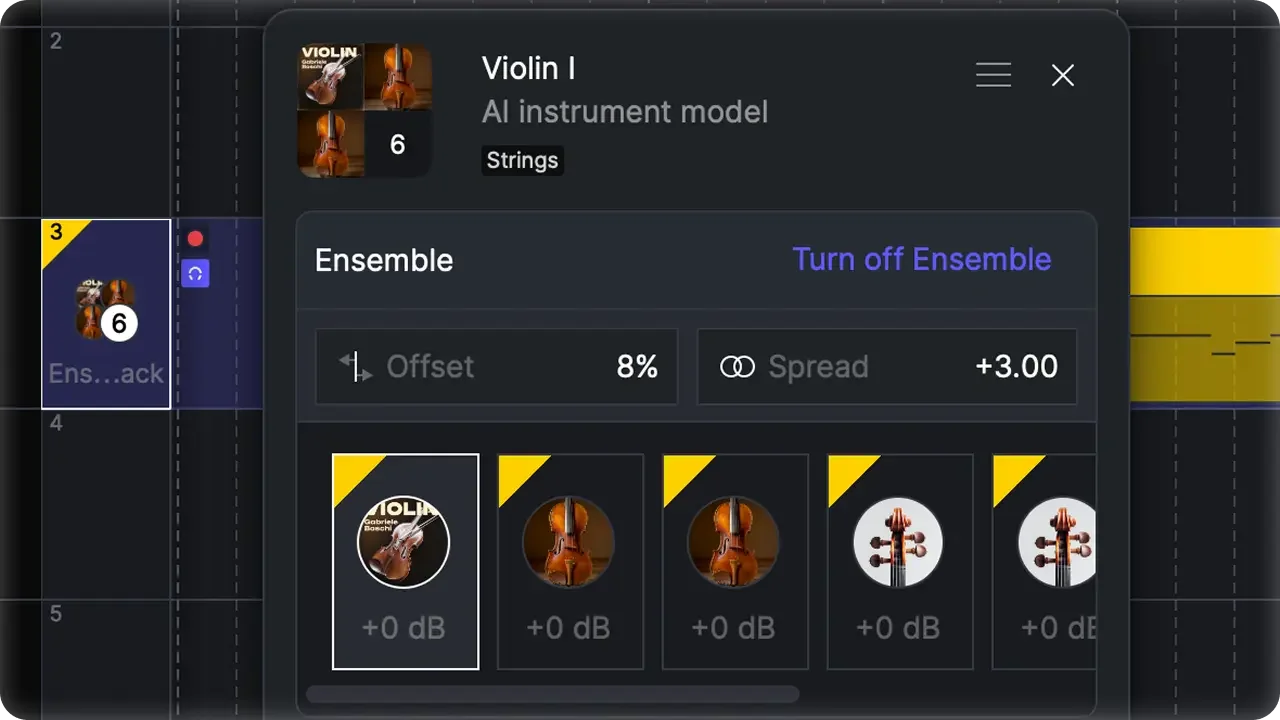
Here's the honest pitch: you write a MIDI track and the AI performs it.
That sounds simple, and that's kind of the point. With a traditional sample library, you're programming. Key switches to change articulations. Expression maps. CC lanes for dynamics and vibrato. You spend more time fighting the library than making music. ACE Studio's AI instruments skip all of that. You hand it a MIDI lane and you get back a performance track — the kind of thing that sounds like a real player moving between notes, not a sampler triggering one-shots.
The instrument set right now covers solo strings and a few other voices, with violin, cello, and saxophone among them. I focused on the violins for this video because that's what my piece called for.
This is the thing that sets it apart from a regular virtual instrument. When you play it back, an algorithm is generating the performance — the transitions between notes, the way a phrase moves — so it reads like a person played it rather than a patch responding to MIDI.
The workflow in Pro Tools (the part nobody shows you clearly)
One heads-up before we get into it. I'm in Pro Tools, and the ACE Studio ARA-style deep integration doesn't work with Pro Tools yet. So I'm showing the method that actually works right now, which is the ACE Bridge 2 plugin. It's clean, it's reliable, and it's the real path. ACE Bridge 2 runs as VST3, AU, and AAX, so this same idea works in Logic, Ableton, and Cubase too.
I'll walk through it the way I did in the video — with a dead-simple arrangement first, just a solo violin, a couple of bars. Once you see how the plumbing works, you can scale it up to a full arrangement.
Step 1: Duplicate your MIDI track
Click on your violin track. On a Mac, hit Option+Shift+D (Alt+Shift+D on PC) to bring up the Duplicate Tracks window, and duplicate it. Then right-click the original and choose Hide and Make Inactive. That gets the original out of your way without deleting it, so it's non-destructive. You've still got it if you need it. On the duplicate, remove whatever virtual instrument you had on it. Now you've just got the raw MIDI and no plugin.
Step 2: Add ACE Bridge 2
Open ACE Studio so it's running alongside Pro Tools. You don't have to do anything in it yet. Back in Pro Tools, add the ACE Bridge 2 plugin to your MIDI track — it gets installed when you install ACE Studio, so just search "ACE." Hit the Connect to ACE Studio button. A scenario where the next part matters: you can drive everything from ACE Studio, or you can drive it all from your DAW. I drive it from Pro Tools. So inside the plugin, click to select a voice or instrument, go to the Instrument tab, and pick your violin. I'd also turn on Sync Tempo During Playback while you're in there.
Step 3: Record the MIDI into ACE Studio
Flip back to ACE Studio and you'll see it created the track for you. In the bottom-right corner, "Bridge Linked" lights up purple — that's how you know the two are talking to each other. Now just press play in Pro Tools. It records the MIDI data into ACE Studio on that track. Give it about ten seconds for the AI to do its thing, because again, this isn't a virtual instrument loading a sample — it's an algorithm generating a real-sounding violin performance from your notes.
Step 4: Edit in ACE Studio, not Pro Tools
Here's the one mental shift. Once your MIDI is in ACE Studio, you do your editing there. It's got a nice MIDI editor built in, and any change you make shows up when you play back in Pro Tools. You're still driving playback from Pro Tools, but the note editing lives in ACE Studio going forward. Don't go back and edit the MIDI in your DAW.
That's the whole workflow. Let's give it a listen.
How it sounds
I'll be straight with you, the way I always am with this stuff.
The violin I landed on sounds great. Noticeably better than the stock virtual instrument I'd been using on that part. And here's the honest part most reviews skip: the instrument I was using before already sounded pretty darn good. I wasn't rescuing a bad-sounding track. This is several notches up from something that was already solid — not a miracle save.
I also swapped in one of the vintage violins to compare, and it had a completely different flavor. Both sounded great. For this particular track I liked the first one better, but that's a taste call, not a quality call. That's the kind of decision you make with your own ears on your own music — I can't make it for you.
If you want to hear all of this in context, the video has the full string arrangement on its own, then the same strings inside a larger piece I wrote called "The Echoes of Pratt Street."
ACE Studio AI Instruments at a glance
Here's how the pieces line up so you know what you'd actually be working with.
| Feature | Detail |
|---|---|
| What it does | Turns MIDI into AI-performed instrument tracks |
| Instruments | Solo strings and more (violin, cello, saxophone among them) |
| DAW integration | ACE Bridge 2 plugin — VST3, AU, AAX |
| Pro Tools note | Deep ARA-style integration not supported yet; use ACE Bridge 2 |
| Tested DAWs | Pro Tools, Logic Pro, Ableton, Cubase |
| Also includes | 140+ royalty-free AI singers, stem splitter, voice cloning |
| Commercial use | Built-in voices/instruments are royalty-free and licensed |
| Editing | Built-in MIDI editor inside ACE Studio |

MIDI to Performance in seconds!
ACE Studio 2.0 — AI Instruments
Should you use it?
If you write parts in MIDI and you're tired of programming articulations to make a library sound human, this is worth a look. It's strong for solo lines where a sampled library tends to give itself away — the moving, expressive stuff. It won't replace a great live player on a hero take, and it's not trying to. But for getting a real-sounding performance out of a MIDI part fast, it does the job, and it does it well.
And remember, less is more. You don't need to pile these on every track to justify the tool. Use it where it actually makes the music better.
Watch the full video
I show the entire workflow start to finish, compare two of the AI violins, and play you the full arrangement. Watch it here, and there's a link in the description to sign up if you want to try ACE Studio yourself.
Frequently Asked Questions (FAQs)
What are ACE Studio AI instruments?
ACE Studio AI instruments turn a MIDI track into a real-sounding performance. Instead of programming a sample library with key switches and expression maps, you hand it a MIDI lane and an algorithm generates the performance — the phrasing and note transitions that make it sound like a real player. Version 2.0 added them alongside ACE Studio's AI vocals.
Does ACE Studio work with Pro Tools?
Yes, through the ACE Bridge 2 plugin. The deeper ARA-style integration doesn't support Pro Tools yet, but ACE Bridge 2 is reliable and it's the method I use in the video. It also runs in Logic, Ableton, and Cubase as VST3, AU, or AAX.
How much does ACE Studio cost?
ACE Studio uses two tiers, Artist and Artist Pro, with annual pricing or a rent-to-own plan that becomes a permanent license after two years. Both tiers include the AI instruments, AI vocals, stem splitter, voice cloning, and ACE Bridge 2. Pricing changes, so check their site for current numbers.
Do I edit the MIDI in my DAW or in ACE Studio?
Once your MIDI is recorded into ACE Studio, you edit it there using the built-in MIDI editor, and your changes are heard on playback in your DAW. You still drive playback from your DAW, but the note editing lives in ACE Studio going forward.
Can I use ACE Studio tracks in commercial projects?
The built-in AI voices and instruments are royalty-free and licensed for commercial use. If you clone a custom voice, you're responsible for having the rights to that voice.
Final thoughts
ACE Studio's AI instruments do something I didn't expect from a tool I'd filed away as a vocal synth: they take a plain MIDI part and hand back a performance that sounds like someone played it. The workflow in Pro Tools is a little roundabout right now because of the integration gap, but ACE Bridge 2 makes it work without much fuss.
My take, plainly: the violins sound great, the gap between this and a good sampled library is real, and it's a genuinely useful tool if you write in MIDI. Go watch the video, hear it in a real arrangement, and decide with your own ears.
"Some of the links within this article are affiliate links. These links are from various companies such as Amazon. This means if you click on any of these links and purchase the item or service, I will receive an affiliate commission. This is at no cost to you and the money gets invested back into Audio Sorcerer LLC."