Bit depth controls two things: dynamic range and recording headroom. That's it. It does not make your finished song sound better, no matter how many times you've heard otherwise.
This is the single most misunderstood spec in digital audio, and the myth costs people time and storage for zero audible gain. So let's clear it up.
By the end of this, you'll know what bit depth actually does, the 6dB-per-bit rule, where 32-bit float fits in and where it doesn't, why dither matters, and how to pick the right depth for recording, mixing, and delivery.
TABLE OF CONTENTS
What bit depth actually is
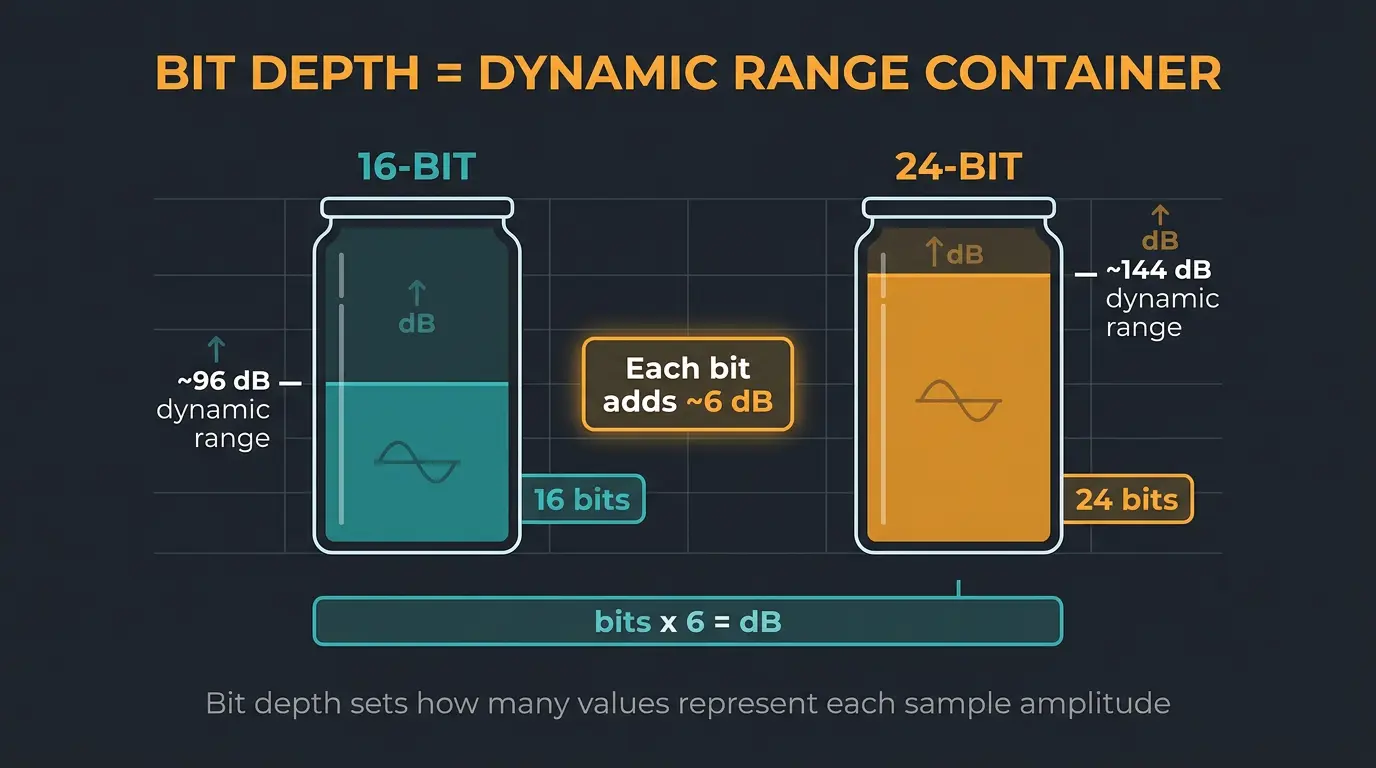
Bit depth is how many bits are used to represent the amplitude of each audio sample. More bits means more possible values for each sample, and more values means a wider gap between the quietest and loudest sound the file can hold. That gap is called dynamic range.
Here's the rule worth memorizing: every bit adds roughly 6dB of dynamic range. Do the math and it shakes out cleanly. 16-bit gives you about 96dB. 24-bit gives you about 144dB.
That's the whole physics of it. No magic, no mysticism. Bit depth is a container size for dynamics, and the numbers are predictable.
The myth: more bits does not mean better sound
The most common and costly belief about bit depth is that a bigger number makes a finished track sound better to the listener. It doesn't, and here's why.
Once a file holds more dynamic range than your ears can perceive, adding bits doesn't add anything you can hear. 16-bit already clears that bar once it's dithered. Its noise floor sits below the threshold of hearing and below the noise of whatever room you're sitting in right now.
So when you jump to 24-bit, you're lowering a noise floor that was already inaudible. You can't hear silence get quieter. That's the part people miss.
Why 24-bit is the recording standard
If 16-bit already covers human hearing, why does everyone track in 24-bit? Headroom and safety. Not fidelity.
Recording at 24-bit lets you leave plenty of margin below 0 dBFS. A scenario where this saves you: a vocalist who's been singing softly suddenly belts a line way louder than soundcheck suggested. That extra room keeps the peak from slamming into the converter and clipping, which is the kind of digital distortion you can't undo. Good gain staging still matters, but 24-bit gives you a wider net.
There's a second reason. Modern DAWs process internally at 32- or even 64-bit floating point regardless of your file's bit depth. Once you start summing and processing dozens of tracks, all that internal math needs the extra range to stay clean. So 16-bit can capture a single signal fine, but 24-bit is the norm for recording and exporting today, and 16-bit is rarely used in production anymore.
32-bit float recording, explained
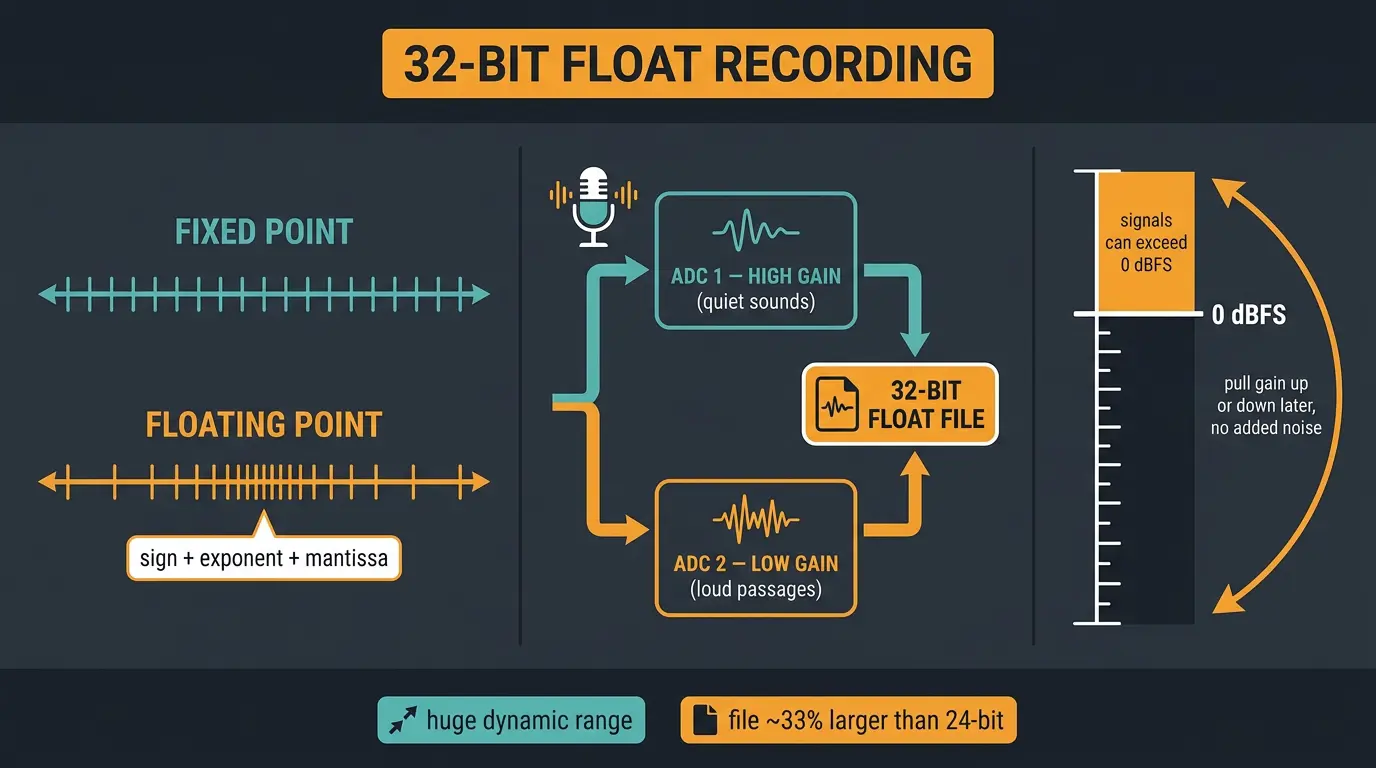
This is the biggest change since this post first went up. 32-bit float used to be just a DAW setting. Now it's a mainstream hardware recording format in field recorders like the Zoom F3, Tascam Portacapture, Sound Devices MixPre II, and Rode Wireless Pro.
Standard files are fixed point, where the values are spaced evenly. Floating point works more like scientific notation, with a sign, an exponent, and a mantissa. That structure gives 32-bit float a theoretical dynamic range up into the ridiculous, well past anything real audio produces.
The clever part is how recorders pull it off. They run two analog-to-digital converters in parallel, one set high for quiet sounds and one set low for loud passages, then merge both streams into a single 32-bit float file. The payoff is real: the file can hold signals that exceed 0 dBFS, and you can pull the gain up or down after the fact in your DAW with no added noise or distortion. The trade-off is file size, roughly 33% larger than 24-bit.
What 32-bit float does not fix
Here's where I want to be straight with you, because the marketing oversells this one. 32-bit float is not unclippable.
The format only protects the digital side. If your mic or preamp overloads on a loud source, the distortion happens before the signal ever hits that math, and no bit depth brings it back. Preamp and ADC quality still matter, since most of these recorders adjust gain digitally after the converters.
And your mic is often the weak link, not the format. Plenty of pro mics top out around 117 to 124 dB of dynamic range, well under 144. So a recorder rated for huge numbers doesn't help if the capsule in front of it can't keep up. 32-bit float also does nothing for live sound or streaming, where the audio gets downsampled to 24-bit anyway.
With that being said, a properly gained 24-bit take in a controlled room can be just as clean. 32-bit float shines when levels are unpredictable and you only get one shot: podcasting, interviews, run-and-gun field recording. That's where it earns its keep.
Dither: why downconverting needs it
When you convert from a higher bit depth to a lower one, like a 24-bit mix down to a 16-bit delivery file, you need dither. Dither is a tiny bit of noise added on purpose to prevent truncation distortion.
Without it, the quietest sounds in your mix get chopped off or distorted as they're rounded down. With it, the only real difference between the two versions is a slightly higher noise floor, which you won't hear. Make sure you dither on the final downconversion only, not on every render along the way.
Bit depth in streaming and delivery today
The delivery side has moved fast lately. In late 2025, Spotify finally rolled out lossless to Premium subscribers, streaming up to 24-bit/44.1kHz FLAC. Tidal dropped MQA and switched to open FLAC, going up to 24-bit/192kHz. Apple Music and Amazon Music Ultra HD both offer hi-res up to 24-bit/192kHz too.
So what does that mean for you? For most listeners, on most gear, the audible gap between CD-quality and hi-res is small. 16-bit/44.1kHz still carries more dynamic range than most ears and most playback systems can resolve. Hi-res isn't a scam, it's just not the difference-maker the spec sheet implies.
How to choose the right bit depth
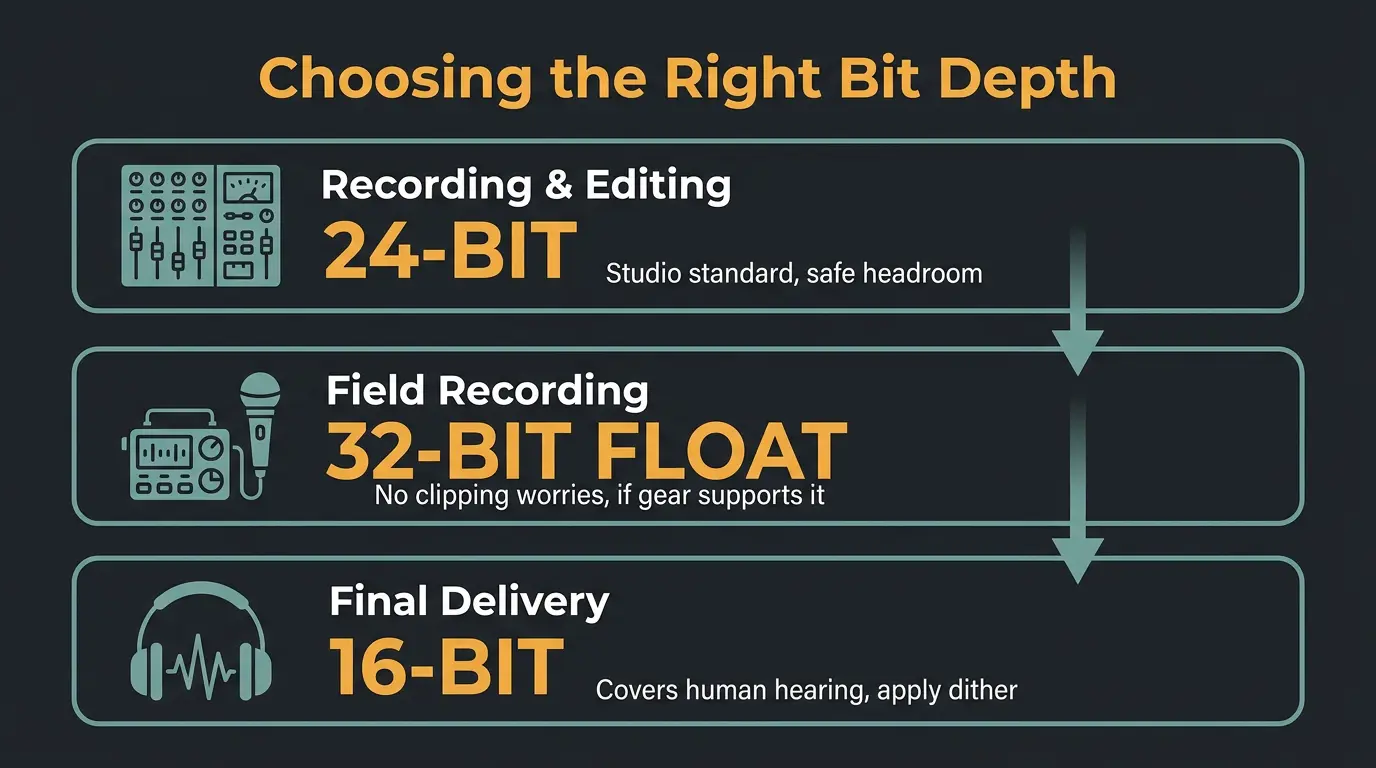
Choosing bit depth isn't about grabbing the biggest number. It's about matching the depth to the task. Less is more, and here's the short version:
- Recording and editing in the studio: 24-bit. It's the standard for a reason, and the headroom keeps you safe.
- Field recording or unpredictable levels: 32-bit float, if your gear supports it. Set it and stop worrying about clipping.
- Final delivery: 16-bit covers human hearing, and you apply dither on that last downconversion.
That's the whole framework. If you want to go deeper on the underlying math, this breakdown of bit depth and dynamic range is a solid read.
Bit depth cheat sheet
- Bit depth controls dynamic range and headroom, not the fidelity of a finished track.
- Track at 24-bit in the studio for the safety margin below 0 dBFS.
- 32-bit float forgives gain mistakes and unpredictable levels, but it's not unclippable and your mic is often the real limit.
- Deliver at 16-bit and apply dither on the final downconversion only.
Frequently Asked Questions (FAQs)
Does higher bit depth improve sound quality?
No, higher bit depth does not improve the audible quality of a finished track. It increases dynamic range and recording headroom. Once a file holds more range than your ears can hear, which 16-bit already does when dithered, extra bits only lower a noise floor you were never going to notice anyway.
Should I record in 24-bit or 32-bit float?
Record in 24-bit for controlled studio work where you can set levels properly. Use 32-bit float for field recording, interviews, or any situation with unpredictable levels, since you can fix the gain afterward with no added noise. In a stable room, a well-gained 24-bit take is just as clean.
What's the difference between bit depth and sample rate?
Bit depth controls dynamic range, the gap between the quietest and loudest sound a file can hold. Sample rate controls how many times per second the audio is measured, which sets the highest frequency it can capture. Two separate specs doing two separate jobs. Our post on <a href="/post/what-is-audio-sample-rate">audio sample rate</a> covers the other half.
Do I need dither when exporting?
Yes, apply dither whenever you export to a lower bit depth than your session, like a 24-bit mix down to a 16-bit file. Dither prevents truncation distortion so quiet sounds don't get chopped up. Do it only on the final downconversion, not on every render in the chain.
Is 16-bit good enough for streaming?
Yes, 16-bit at 44.1kHz is plenty for streaming and general listening. It carries about 96dB of dynamic range, more than most ears and playback systems can resolve. Hi-res options up to 24-bit exist now on Spotify, Tidal, and Apple Music, but the audible gain for most listeners is small.
Final Thoughts
Bit depth is one of those specs that sounds like it should matter more than it does. Strip the myth away and it's simple: dynamic range and headroom, nothing more. Track in 24-bit, reach for 32-bit float when levels are a gamble, deliver in 16-bit with dither, and stop losing sleep over the number.
Trust your ears over the spec sheet. They'll tell you the truth every time, even if the marketing won't.
Some of the links within this article are affiliate links. These links are from various companies such as Amazon. This means if you click on any of these links and purchase the item or service, I will receive an affiliate commission. This is at no cost to you and the money gets invested back into Audio Sorcerer LLC.