Phase cancellation happens when two signals of the same frequency are out of phase and cancel each other out. The result is a thinner sound and a low end that goes missing when you least want it to. It trips up a lot of people because they don't know it's happening — the tracks look fine on screen, but something feels weak in the room.
Quick correction up front, because you'll see this stated wrong all over the place: it's the same frequency canceling itself, not two different frequencies fighting. That distinction matters, and we'll get into why.
The good news is that phase cancellation is fixable, and most of the time it's preventable. Let's get into what it actually is and how to stop it from wrecking your recordings.
TABLE OF CONTENTS
What phase cancellation actually is
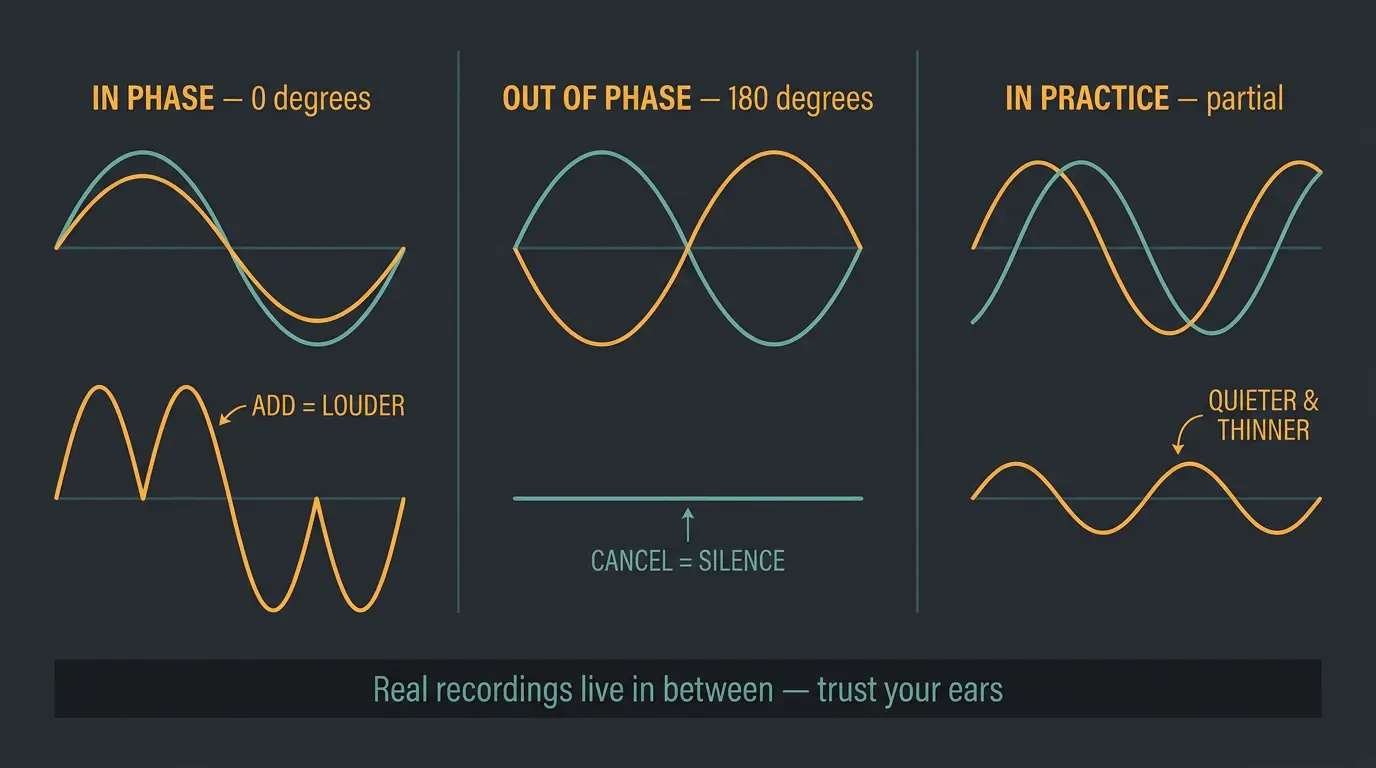
Take two signals of the same frequency. When they line up peak to peak, they're in phase — 0 degrees — and they add together and get louder. When one is flipped so its peaks land on the other's troughs, they're 180 degrees out of phase, and they cancel. Two identical signals 180 degrees apart will cancel completely.
That's the textbook version. Real recordings almost never live at a perfect 0 or 180. They sit somewhere in between.
Reflections, room tone, mic character, performance variation, level differences — all of that keeps you out of total cancellation territory. So in practice you're usually dealing with partial cancellation, not a full wipeout. Something gets quieter and thinner without disappearing entirely. Trust your ears here more than the theory.
Phase vs. polarity — they're not the same thing
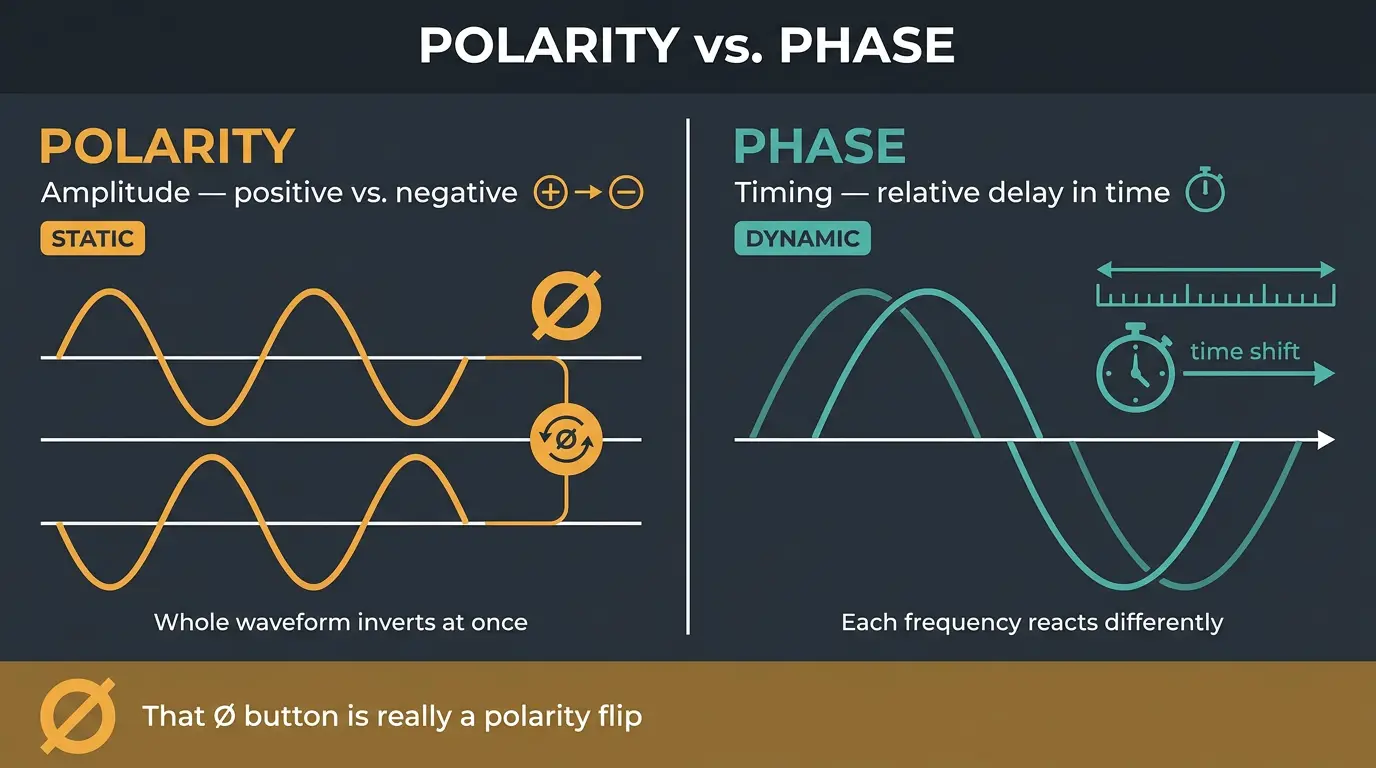
This is the part most people get muddy on, so let's clear it up. Polarity is about positive versus negative — voltage or sound pressure. It's static. Flip it and every part of the waveform reverses at once. Phase is about time. It's dynamic, based on the relative timing between waveforms.
On a complex musical signal, those two do genuinely different things. Flip the polarity of one signal and everything inverts together. Shift one in time and each frequency reacts differently — some sum, some partially cancel, some fully cancel. Same button label, very different result.
Here's the terminology mess: that little Ø button on your console or in your DAW, the one usually labeled "phase invert," is technically a polarity flip. Manufacturers have called it "phase" for decades, so we're stuck with it. Terminology matters, not to be picky, but because calling it the right thing helps you understand what you're actually doing. If you want to go deep on this, Sound On Sound's Phase Demystified is a solid read.
Comb filtering and why it's not just a volume drop
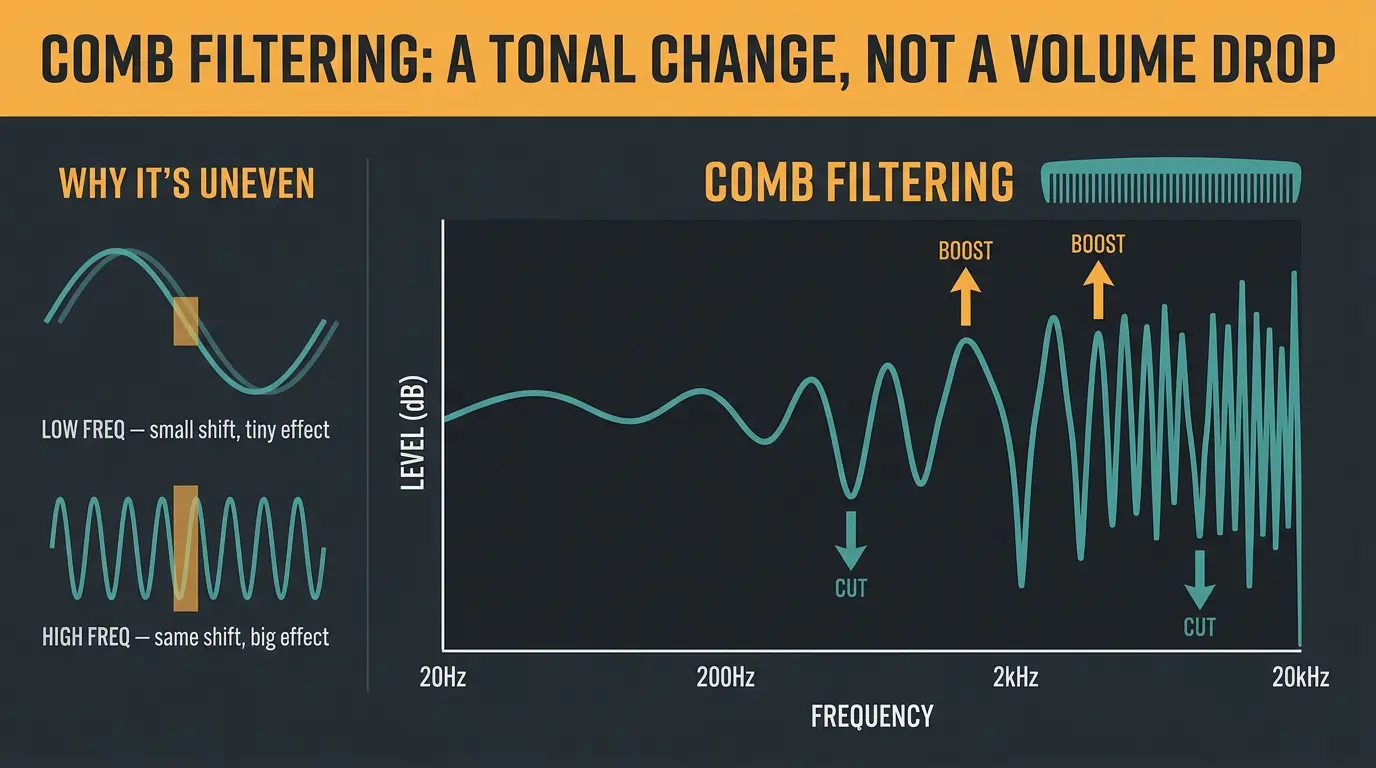
When you combine two real musical signals with different phase relationships, you don't get one clean level drop. You get comb filtering — regularly spaced peaks and valleys across the frequency response. Graph it and it looks like the teeth of a comb, which is where the name comes from.
Here's why it's uneven. A tiny timing shift is only a small fraction of a long, low-frequency wave, but it's a large fraction of a short, high-frequency wave. So the same shift barely touches your lows while it hammers your highs — or the other way around.
That means some frequencies cut while others actually boost, all at the same time. It's a tonal change, not a volume change. For a deeper look at how those peaks and valleys stack up, we've got a full breakdown of the comb filtering effect.
What causes it
The biggest troublemaker by far is multiple mics on one source at different distances. The same wave hits each mic at a slightly different time, and those timing differences create phase relationships that either make things sound huge or gut them.
Drum kits are the classic offender. Every mic picks up its target plus bleed from everything around it, so you've got a web of overlapping timing between the kick, snare, toms, and overheads. Get it right and the kit sounds massive. Get it wrong and it sounds small and hollow. If you're tracking drums, our guide on how to mic a drum kit covers placement in depth.
It's not just drums, though. Any time you record one source with two or more mics — or a mic and a DI on the same bass or guitar — you can run into it. And it can sneak in during mixing too, whenever you add delay or processing that shifts one track in time.
What it sounds like
Once you know the symptoms, you'll start catching it everywhere. It shows up differently depending on the instrument.
- Drums: less low-end weight in the kick, less body in the snare, cymbals that go washy and disconnected.
- Guitars: a hollow midrange or a weak, unfocused stereo image.
- Vocals: reduced intelligibility, especially with doubles, room mics, or artificial widening.
- Bass: the worst case of all — the note is right there on the screen but goes missing in the room.
That last one is the sneakiest. If you've ever had a bass line that metered fine but vanished the second you stood back from the speakers, phase is a prime suspect.
How to detect it
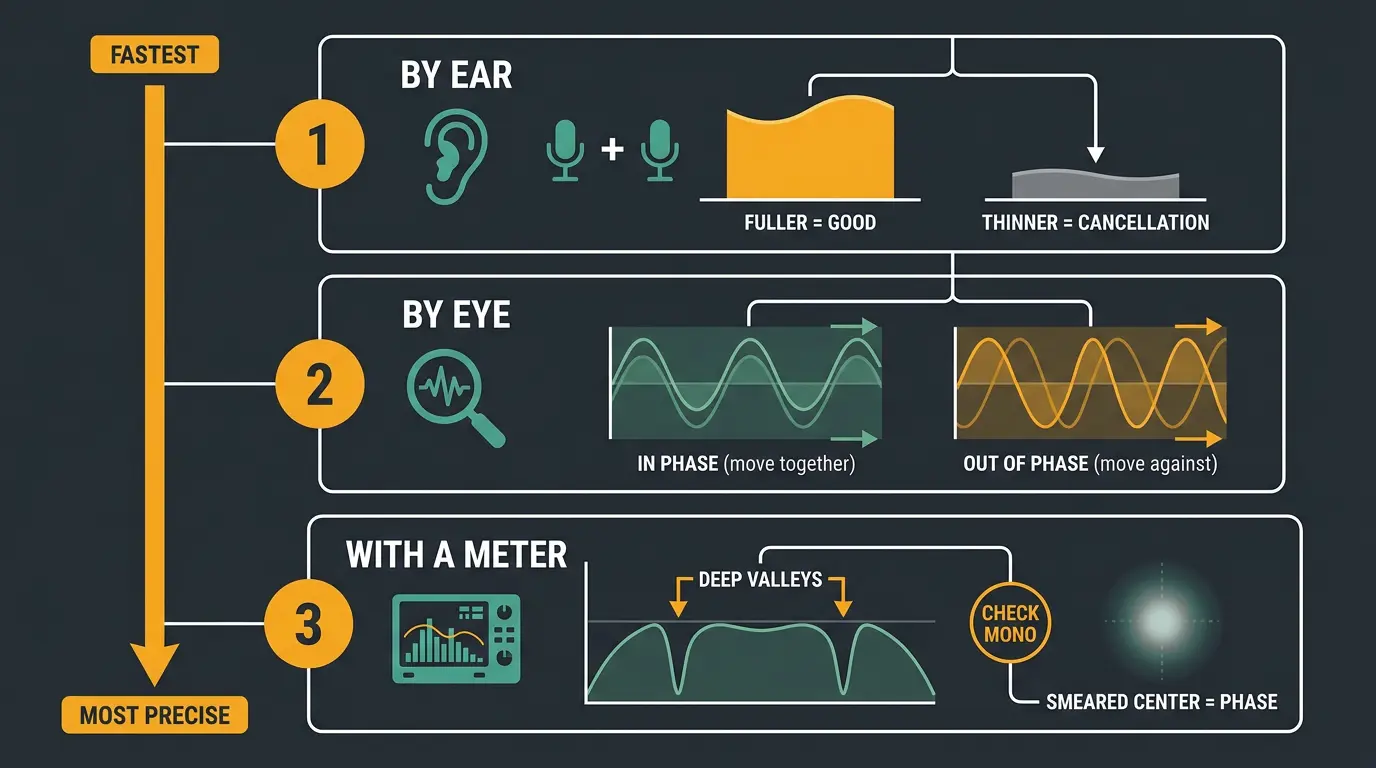
Three ways to catch it, from fastest to most precise.
By ear. Solo one mic, then add the second. It should get fuller and bigger. If it gets thinner instead, you've got cancellation. Simple as that, and it's the test I reach for first.
By eye. Zoom way into the two waveforms and watch how they move. When one goes up, the other should go up too. If they're moving against each other — one up while the other's down — that's your phase problem staring back at you.
With a meter. Pull up a spectrum analyzer and watch for deep valleys in the response. Check mono compatibility while you're at it, and listen for a smeared, unfocused center image. If the center feels vague, phase is often why.
How to fix and prevent it
The golden rule: fixing it at the source always beats fixing it later. A few minutes moving a mic saves you an hour of nudging waveforms.
Start with the 3:1 rule for multi-mic setups. Keep the second mic at least three times farther from the first than the first is from the source. So if mic one is a foot from the guitar, mic two should be at least three feet from mic one. That spacing keeps the bleed low enough to stay out of trouble.
For two mics on a single source, try coincident miking — get the capsules physically as close together as you can. On close-mic'd cabs, match the distance from the grille to each capsule. The closer they are, the less timing difference to fight. For more on this, our piece on proper microphone placement is worth a look.
When you're already tracked, a polarity flip is your quick check — flip one signal and see if the tone gets fuller or worse. Beyond that, manual time-alignment is still one of the most reliable fixes: zoom in and nudge one track until its peaks line up with the other.
One trick I love: flip the polarity on purpose, then move the mic or nudge the track until it sounds its absolute worst — thin, hollow, fully combed. Once it's at maximum cancellation, flip the polarity back. Now you've got beautifully in-phase tracks. Sounds backwards, works great. Less is more — you don't need to touch every track, just the ones that are actually fighting.
Quick phase-check checklist
- Add the second mic to the first — does it get fuller, or does it get thinner?
- Zoom into the waveforms — do the peaks move together, or against each other?
- Check a spectrum analyzer — are there deep, regular valleys in the response?
- Sum to mono — does the sound still hold up, or does it collapse and thin out?
Modern phase-alignment plugins
Here's what's changed since these became a normal part of the workflow. Phase-alignment plugins analyze the material in each track, detect where destructive interference is happening, then calculate and apply the small timing shifts needed to fix it — automatically or with your input. What used to be tedious manual nudging is now a couple of clicks.
The category leader is Sound Radix Auto-Align 2. It eliminates comb filtering, minimizes transient smearing, and spectrally optimizes the phase of each mic so you keep the full, defined sound the mics actually captured. The newer version speeds the whole thing up and adds a spectral phase correction module on top. On a multi-mic drum session, it's a genuine time-saver.
And no, you don't need to worry that a plugin is somehow the lesser option. Plugins are legitimately good now — this stuff works. With that being said, the honest caveat still stands: a plugin cleans up problems, but killing them at the source is still the better move. Fix the mic placement first, then let the plugin handle what's left.
Frequently Asked Questions (FAQs)
Is phase cancellation the same as polarity?
No. Polarity is a static flip of positive and negative, while phase is about the relative timing between signals. On a complex musical signal they do different things — a polarity flip inverts everything at once, but a phase shift affects each frequency differently. The Ø button on your console is technically a polarity control, not phase.
Can I fix phase cancellation after recording?
Yes, you can fix a lot of it after the fact by flipping polarity, nudging waveforms until the peaks line up, or using a phase-alignment plugin. But fixing it at the source with better mic placement always gives cleaner results than repairing it later. Repair when you have to, prevent when you can.
What is the 3:1 rule?
The 3:1 rule says to place your second mic at least three times farther from the first mic than the first mic is from the source. So if one mic sits a foot from a guitar, the second should be at least three feet from that first mic. It keeps bleed low enough to avoid most phase problems in multi-mic setups.
Does phase cancellation only affect low end?
No. Low end takes the most obvious hit, but phase cancellation creates comb filtering across the whole spectrum. A small timing shift barely touches long low-frequency waves while heavily affecting short high-frequency ones, so some frequencies cut and others boost. It's a tonal change, not just a drop in the bass.
Do I need a plugin to fix phase issues?
No, you don't need a plugin. Solid mic placement, a polarity flip, and manual time-alignment handle most phase problems on their own. That said, a tool like Auto-Align 2 speeds up the cleanup on complex multi-mic sessions. Run the basic checks first, then reach for a plugin if you still need it.
Final Thoughts
Phase cancellation feels mysterious until you know what to listen for, and then it's just another thing you check. Same frequency, out of phase, thinner sound — that's the whole story. Solo, combine, listen. If it gets fuller, you're good. If it gets thinner, you know where to look.
Get your mic placement right and you'll dodge most of it before it ever hits your DAW. The plugins are there when you need them, and they're genuinely good now. But your ears are still the best meter in the room, so trust them.
Some of the links within this article are affiliate links. These links are from various companies such as Amazon. This means if you click on any of these links and purchase the item or service, I will receive an affiliate commission. This is at no cost to you and the money gets invested back into Audio Sorcerer LLC.