Audio file formats look complicated, but the whole thing comes down to three buckets: uncompressed, lossless, and lossy. Get those three straight and you can sort any format you'll ever run into.
Here's the catch. A lot has changed in the last couple of years, and some of what you learned back then is flat-out wrong now. Spotify finally went lossless. MQA is basically dead. Dolby Atmos is a routine production step instead of some sci-fi future. So let's clear it all up in plain English, and I'll flag what the old guides still get wrong.
TABLE OF CONTENTS
The three buckets: uncompressed, lossless, lossy
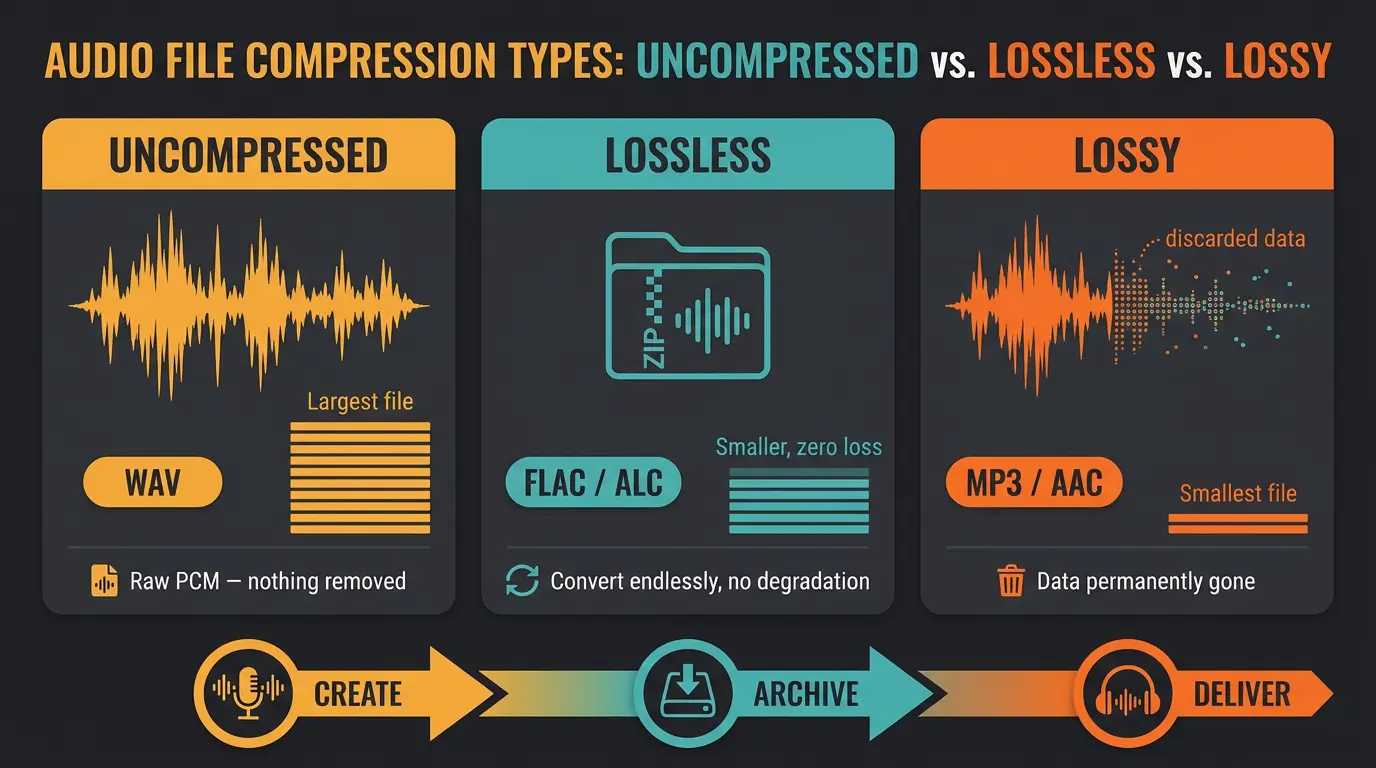
Every audio format fits into one of three groups. Once you know the groups, the individual formats stop being confusing.
Uncompressed stores the audio in its raw PCM form. Nothing is squeezed, nothing is removed. This is your WAV file. It's the full, pure recording, and it's also the biggest file on disk.
Lossless compresses the audio mathematically without throwing anything away. Think of it like a ZIP file for sound. The file gets smaller, but when it plays back you get every bit of the original. You can convert between lossless formats over and over with zero degradation.
Lossy permanently discards data to shrink the file way down. That data isn't coming back. In exchange, you get a file small enough to stream or email without a second thought.
Here's the workflow that falls out of this: uncompressed while you're creating, lossless for archiving, lossy for delivery. Keep that pattern in your head and most format decisions make themselves.
The formats you'll actually run into
There are dozens of audio formats out there, and most of them you'll never touch. There are even some wild lossless codecs built purely for maximum compression, like OptimFROG, that almost nobody uses in practice. Let's skip the museum pieces and walk through the handful that actually matter, grouped by bucket.
WAV and AIFF (uncompressed)
WAV and AIFF are raw PCM. Highest quality, biggest files, no compression at all. These are the formats you record in and bounce to while you're working.
A scenario where this matters: you're sending your session to a mastering engineer, or handing a track off to a collaborator who needs the full-quality file to work on. You want WAV or AIFF there, every time. If you're not sure what's doing the heavy lifting in that chain, our rundown of what a DAW actually is fills in the picture.
FLAC and ALAC (lossless)
FLAC is the big one here. It's open, free, royalty-free, and actively maintained (the latest stable release, 1.5.0, landed in early 2025). In audio quality it's equal to WAV, but it's roughly 40 to 60 percent smaller on disk thanks to lossless compression that fully reverses on playback.
ALAC is Apple's version of the same idea, usually living inside a .m4a file. Same deal: smaller than WAV, identical quality.
One correction worth making, because a lot of guides get it wrong: FLAC is not uncompressed. It's compressed, just losslessly. Those aren't the same thing, and the distinction matters. For building a hi-res library or archiving your masters, FLAC and ALAC are the sweet spot.
MP3, AAC, and Opus (lossy)
These discard data to get small, and they're very good at it. A 320 kbps MP3 or a roughly 256 kbps AAC are solid delivery choices. And let's be honest here: at 320 kbps, most listeners can't tell an MP3 from a lossless file in a blind test on typical consumer gear. That's not a knock, that's just true.
Opus is the modern one a lot of people haven't met yet. It's an efficient lossy codec used all over the web, in voice chat, and in streaming. It punches above its weight at lower bitrates.
No need to be snobby about lossy audio. It has a job, and it does that job really well.
Quick format cheat sheet
- Use uncompressed (WAV or AIFF) while you're creating, recording, and handing off full-quality files.
- Use lossless (FLAC or ALAC) for archiving your masters and building a hi-res library — same quality as WAV, much smaller.
- Use lossy (MP3, AAC, or Opus) for delivery and streaming, where small file size is the whole point.
What changed recently (and what old guides get wrong)
Here's where a lot of older articles will steer you wrong. If a guide still lists MQA as a current lossless option, close the tab. MQA entered bankruptcy in April 2023, Lenbrook bought up the assets later that year, and Tidal dropped every MQA track by mid-2024. No major streaming service delivers it to listeners now. It's a legacy format, full stop.
The bigger news: Spotify finally launched lossless in September 2025. Premium subscribers get FLAC streams up to 24-bit/44.1kHz across nearly the whole catalog. So the old "Spotify is lossy-only, 320 kbps max" line is dead too.
With that being said, lossless is now the norm, not a premium niche. By this point almost every major service delivers it, the raw quality gap between them is small, and over Bluetooth it's practically nil. The main holdout is YouTube Music, still capped at 256 kbps lossy.
Spatial audio: the present, not the future

Dolby Atmos used to get filed under "the future of audio." It's not the future anymore. It's a routine production step, baked into how a lot of singles and albums get made now.
The plain-English version: Atmos is object-based. Instead of fixing every sound to a left and right channel, each element gets placed as an object in a three-dimensional soundfield. Over 90 percent of new releases on Apple Music are mixed in Atmos these days.
One distinction that trips people up. Dolby Atmos is the format. Apple Spatial Audio is Apple's delivery of that format, with head tracking and dynamic tuning layered on top. Format versus delivery system — keep those separate and the marketing stops being confusing.
On the file side: Atmos rides inside MP4/M4A with metadata, FLAC handles high-res multichannel, and pros work in ADM BWF. Standard MP3 and basic AAC can't carry spatial metadata at all, so they're out of the picture here.
As for what's next, keep half an eye on the open stuff. Sony's 360 Reality Audio (built on MPEG-H) has lost ground since Tidal dropped it. Meanwhile Eclipsa Audio, from Samsung and Google, is open and royalty-free, built on the IAMF standard, and rolling into Samsung's 2025 TV lineup. Open and free tends to win eventually.
| Service | Max Quality | Spatial Audio |
|---|---|---|
| Apple Music | Up to 24-bit/192kHz ALAC | Yes (Dolby Atmos) |
| Tidal | CD-quality FLAC up to 24-bit/192kHz hi-res | Yes (Dolby Atmos) |
| Amazon Music Unlimited | Up to 24-bit/192kHz | Yes (Dolby Atmos) |
| Qobuz | Hi-res up to 24-bit/192kHz | No |
| Spotify | Lossless up to 24-bit/44.1kHz FLAC | No |
| YouTube Music | 256 kbps lossy | No |
Frequently Asked Questions (FAQs)
Is FLAC better than WAV?
FLAC and WAV sound identical — same audio quality, bit for bit. The difference is file size: FLAC is lossless but compressed, so it's roughly 40 to 60 percent smaller on disk. For archiving or building a library, FLAC saves space without costing you a thing in quality.
Can I hear the difference between lossless and a 320 kbps MP3?
Usually not. On typical consumer gear, most listeners can't tell a 320 kbps MP3 from a lossless file in a blind test. The difference exists on paper, but in real-world listening it's extremely hard to catch. Don't lose sleep over it.
Is MQA still worth caring about?
No. MQA is a legacy format now. The company went bankrupt in 2023, Tidal dropped every MQA track by mid-2024, and no major streaming service delivers it today. If a guide still lists it as a current lossless option, that guide is out of date.
What's the difference between Dolby Atmos and Apple Spatial Audio?
Dolby Atmos is the actual format — object-based audio placed in a 3D soundfield. Apple Spatial Audio is Apple's delivery of that format, with head tracking and dynamic tuning added on top. Think of Atmos as the content and Spatial Audio as Apple's wrapper around it.
Which audio format should I export for distribution?
Export a WAV for distributors and mastering, since they want the full-quality file. For listeners and casual sharing, a 320 kbps MP3 or 256 kbps AAC is plenty. Keep a lossless FLAC or your WAV master archived so you always have the source.
Final Thoughts
Formats feel like a maze until you remember it's just three buckets. Uncompressed while you create, lossless to archive, lossy to deliver. Nail that and you'll make the right call every time, no jargon worship required.
The landscape keeps shifting — Spotify went lossless, MQA faded out, Atmos moved from novelty to normal. So trust your ears, keep your masters safe in a lossless format, and don't let an old guide tell you the game hasn't changed. It has.
Some of the links within this article are affiliate links. These links are from various companies such as Amazon. This means if you click on any of these links and purchase the item or service, I will receive an affiliate commission. This is at no cost to you and the money gets invested back into Audio Sorcerer LLC.