AI vocal synthesis uses deep learning to model how humans actually sing — pitch, vibrato, phrasing, breath, even emotional delivery. Tools like ACE Studio take it a step further: you keep note-level control over the melody, and the AI handles the singing.
This post covers how the technology works, where it genuinely helps today, and where it still falls short. I've spent real time in ACE Studio, so the practical bits come from hands-on use, not a spec sheet. Let's get into it.
TABLE OF CONTENTS
What AI vocal synthesis actually is
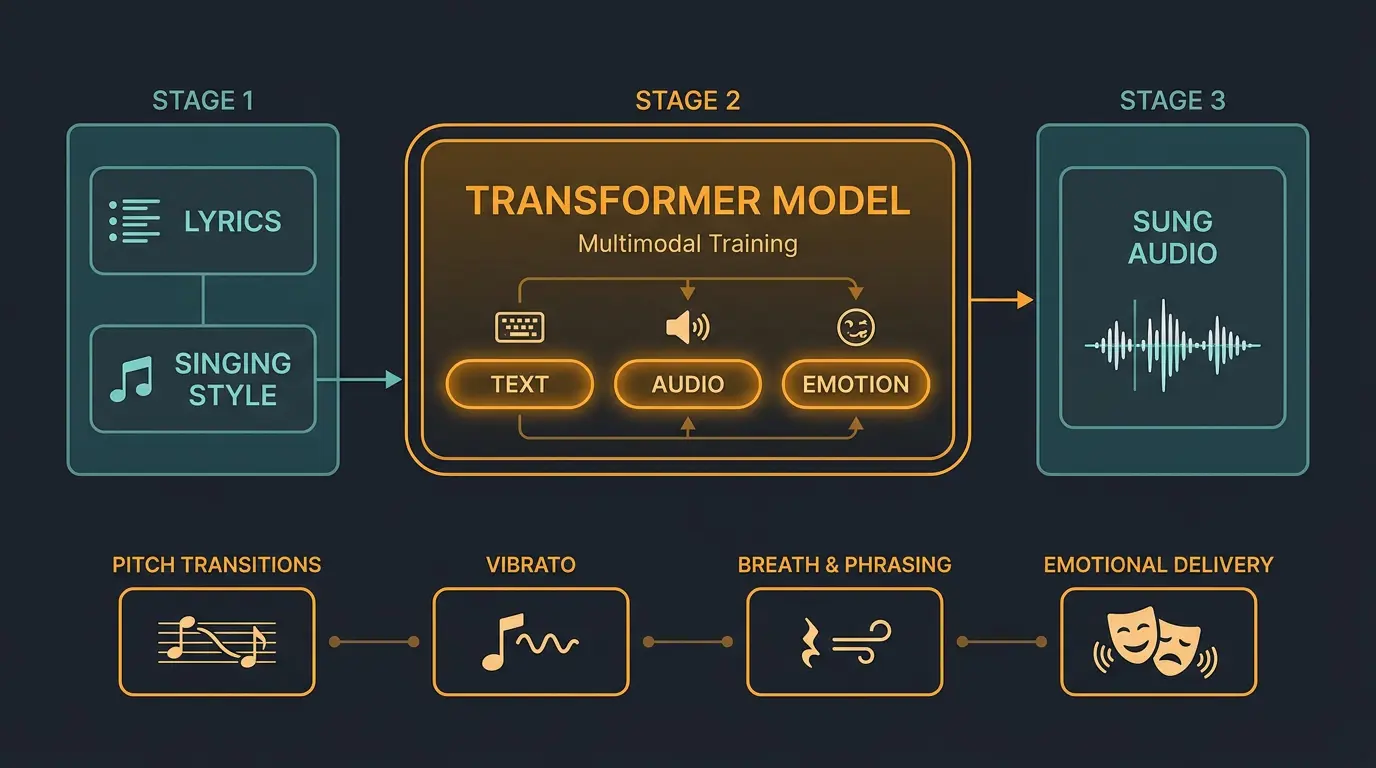
Singing voice synthesis is deep learning trained to reconstruct how a human produces a sung tone. The models analyze huge datasets of professional vocal performances and learn the patterns — how pitch transitions between notes, how vibrato sits on a long note, how breath and phrasing shape a line.
The pipeline is simpler than it sounds. You feed the model lyrics and a desired singing style, and it generates a spectrogram or waveform of the sung result. The important part is that modern systems don't just chase pitch. They model breathiness, phrasing, and emotional delivery too.
Under the hood, the current generation leans on transformer-based architectures with multimodal training — text, audio, and emotion labels learned together. You don't need to know the math to use these tools. But it helps to know the machine is interpreting musical cues in a way that's a lot closer to how a singer thinks than most people expect.
Where ACE Studio fits in the tool landscape

Here's the distinction that matters. ACE Studio sits between a prompt-based song generator and a traditional DAW. Tools like Suno and Udio spit out a whole track from a text prompt — a different category entirely. ACE Studio hands you note-level control over the melody, and the AI sings what you wrote.
It's built by Beijing TimedomAIn in collaboration with Accidental AI. Version 2.0 has grown from a vocal workstation into a full AI Music Workstation, running the new Verse25 vocal model with 140+ voices across 8 languages — English, Chinese, Japanese, Korean, Spanish, Italian, French, and Portuguese. Genres now stretch into country, rap, Afro, and theatre, and there are AI instruments powered by the Chorus25 model if you want strings or horns too. I dug into that side of it in my writeup on ACE Studio's AI instruments.
One point worth stating plainly: every voice in the library is royalty-free and cleared for commercial use — music releases, film scoring, game development. That's a big deal if you're worried about clearing a vocal for a real project. The philosophy here isn't one-click magic. It's control, with the AI doing the hard part of making a voice sound real.
How it works in practice
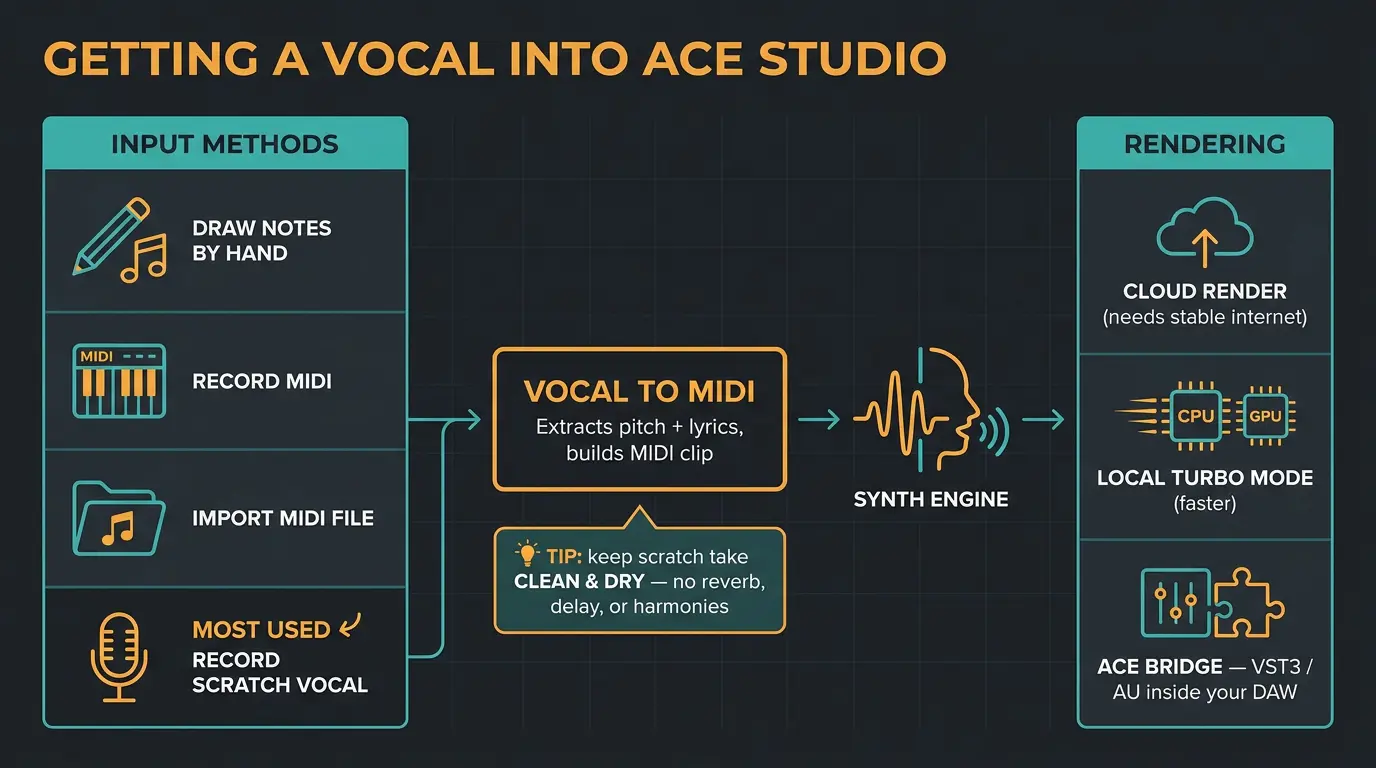
You get a vocal into ACE Studio a few different ways. You can draw notes in by hand, record MIDI, import a MIDI file, or — the one I use most — record a scratch vocal and run the Vocal To MIDI function, which pulls the pitch and lyrics out of your take and builds a MIDI clip for the engine.
Make sure your scratch recording is clean and dry for that last one. No reverb, no delay, no harmonies. If you start from a clean take, it's a genuinely efficient path even if you'd never call yourself a singer. You'll still do some editing afterward, but the heavy lifting is done.
For rendering, you've got cloud rendering plus a local Turbo mode if your CPU or GPU can handle it, which shaves time off the process. Just know the cloud route wants a stable internet connection. And if you live in a DAW, the ACE Bridge plugin runs as VST3 or AU right inside your session — no exporting files back and forth. That alone makes it feel less like a separate app and more like part of your setup. If you're new to the concept of a session hub, my primer on what a DAW actually is covers the ground.
The six expressive parameters
Whatever voice you load, you get six automatable parameters to shape the performance:
- Breath — adds real breaths into the line for realism.
- Air — the airy, breathy quality of the tone.
- Falsetto — pushes the voice into head-voice territory.
- Tension — how strained or relaxed the delivery reads.
- Energy — the intensity and push of the performance.
- Formant — shifts the perceived gender of the voice.
Here's the model to understand. The AI generates a starting pitch and expression curve, shown as a dark curve. When you edit, your changes override it and show up as a white curve. There's a lock tool to protect edits you like, so a later regeneration doesn't wipe them out.
One practical tip on vibrato. On a long note, the AI already adds vibrato. If you draw your own on top, the pitch goes chaotic fast. Draw a flat user pitch first, then add your vibrato — much more natural. Less is more here. It's easy to over-edit a performance until it sounds worse than what the AI handed you.
Realistic use cases for an AI singer
Here's the honest angle: for a lot of jobs, "close enough" is exactly what you need. Demos, prototypes, scratch vocals, background parts, virtual characters — current synthesis handles all of that well. If you're a producer or songwriter who thinks in melodies and doesn't want to book a session singer just to hear an idea, this fits your workflow.
Harmonies and doubling are a real strength. The Vocal Double feature spins up two more versions on new singer tracks, and the choir designer lets you build multi-part arrangements with different voice types, all driven by standard MIDI. Cross-lingual synthesis is handy too — you can carry a track's melody and emotion across multiple languages without re-tracking with different singers.
For songwriting specifically, it's about feedback. You get to hear how a melody and lyric actually sound sung before you commit to a session. You can also emulate a style in a copyright-safe way. Voice cloning exists — you upload samples and it trains a custom model — but temper expectations. Results lean hard on the quality of your training data, and it's not a trivial process.
Best jobs for AI vocals right now
- Demos and scratch vocals when you want a finished-sounding line without booking a session
- Backing vocals and harmonies, built fast with doubling and the choir designer
- Songwriting feedback — hearing a melody and lyric sung before you commit
- Character voices for games and film, where a distinct virtual performer is the point
The current limitations, honestly
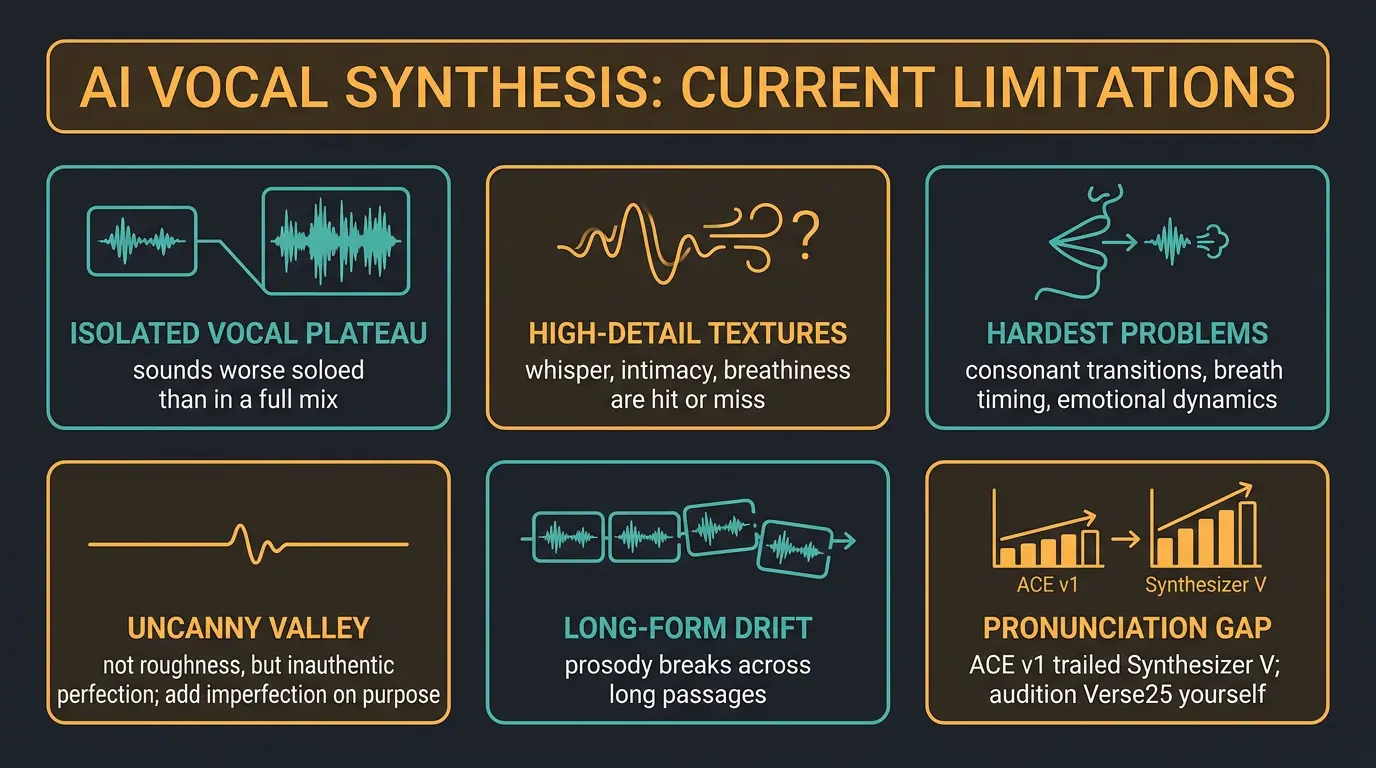
I'd be doing you a disservice if I only listed the wins. A cappella and isolated vocal quality has plateaued — an accompanied vocal in a full mix sounds noticeably better than the same vocal soloed. High-detail textures like whisper, intimacy, and heavy breathiness are hit or miss.
The hardest problems are consonant transitions, breath timing, and emotional dynamics. A real singer varies those constantly in ways that are brutally hard to program. You can get close with careful editing, but "close" still means real manual work.
And here's the counterintuitive part about the uncanny valley — it's not about roughness, it's about inauthentic perfection. Humans are messy. We pause, we stammer, we let emotion leak into a line. Those aren't errors; they're the point. So the trick is often to add imperfection on purpose rather than chase a flawless take.
Two more to flag. Long-form consistency drifts — each short chunk can sound great, but stitch a long passage together and the prosody can break. And ACE-specific: in the v1 era, English pronunciation trailed Synthesizer V, per Sound on Sound's review. Verse25 may have narrowed that gap — trust your ears and audition it yourself. Expect a learning curve either way.
Frequently Asked Questions (FAQs)
What is AI vocal synthesis?
AI vocal synthesis is deep learning trained to generate a sung vocal from lyrics and a chosen style. The models learn pitch, vibrato, phrasing, breath, and emotional delivery from large datasets of real performances, then render a new vocal that interprets your melody and words.
Are ACE Studio AI vocals royalty-free and safe for commercial release?
Yes. Every voice in ACE Studio's library is royalty-free and cleared for commercial use, including music releases, film scoring, and game development. That means you can put a synthesized vocal on a released track without chasing a separate clearance for the voice itself.
Can AI vocals replace a real singer?
Not for a lead performance yet, but they're excellent for demos, scratch vocals, harmonies, and character voices. The hardest things — consonant transitions, breath timing, real emotional dynamics — still need manual editing to sound truly human, so a great singer isn't out of a job.
What's the difference between ACE Studio and Suno or Udio?
ACE Studio gives you note-level control over the melody and sings what you write, while Suno and Udio generate a whole track from a text prompt. They're different categories — ACE Studio is closer to a DAW instrument, one-click generators are closer to a slot machine of finished songs.
Do you need a fast computer or internet connection to use ACE Studio?
You need a stable internet connection for cloud rendering, which is the default. If your CPU or GPU is capable, local Turbo mode renders faster on your own machine and cuts your reliance on the cloud, so strong hardware helps but isn't strictly required to get started.
Final Thoughts
AI vocal synthesis isn't magic, and it isn't a replacement for a great singer. What it is, right now, is a genuinely useful tool for getting a finished-sounding vocal onto an idea fast — demos, harmonies, scratch parts, character voices. ACE Studio's note-level control is what sets it apart from the prompt-and-pray crowd, and the royalty-free library takes a real worry off the table.
My advice: don't chase perfection. Let the AI hand you a starting point, edit lightly, and add a little human mess where it counts. Audition Verse25 for yourself before you form an opinion, and let your ears make the call.
Some of the links within this article are affiliate links. These links are from various companies such as Amazon. This means if you click on any of these links and purchase the item or service, I will receive an affiliate commission. This is at no cost to you and the money gets invested back into Audio Sorcerer LLC.