Here's the short version: gain is input, volume is output, and the difference comes down to where they sit in your signal chain. Gain hits first, volume hits last. That's it.
People mix these two up constantly, and it costs them clean recordings and clean mixes. Not because they're careless, but because the word "gain" gets used to mean three different things, and older explanations skipped the modern context entirely.
Because a lot has changed. 32-bit float recording and LUFS-based loudness normalization have quietly rewritten how this topic gets taught. So let's sort out what these controls actually do, and where the new tools fit in.
TABLE OF CONTENTS
The Core Difference: Input vs. Output
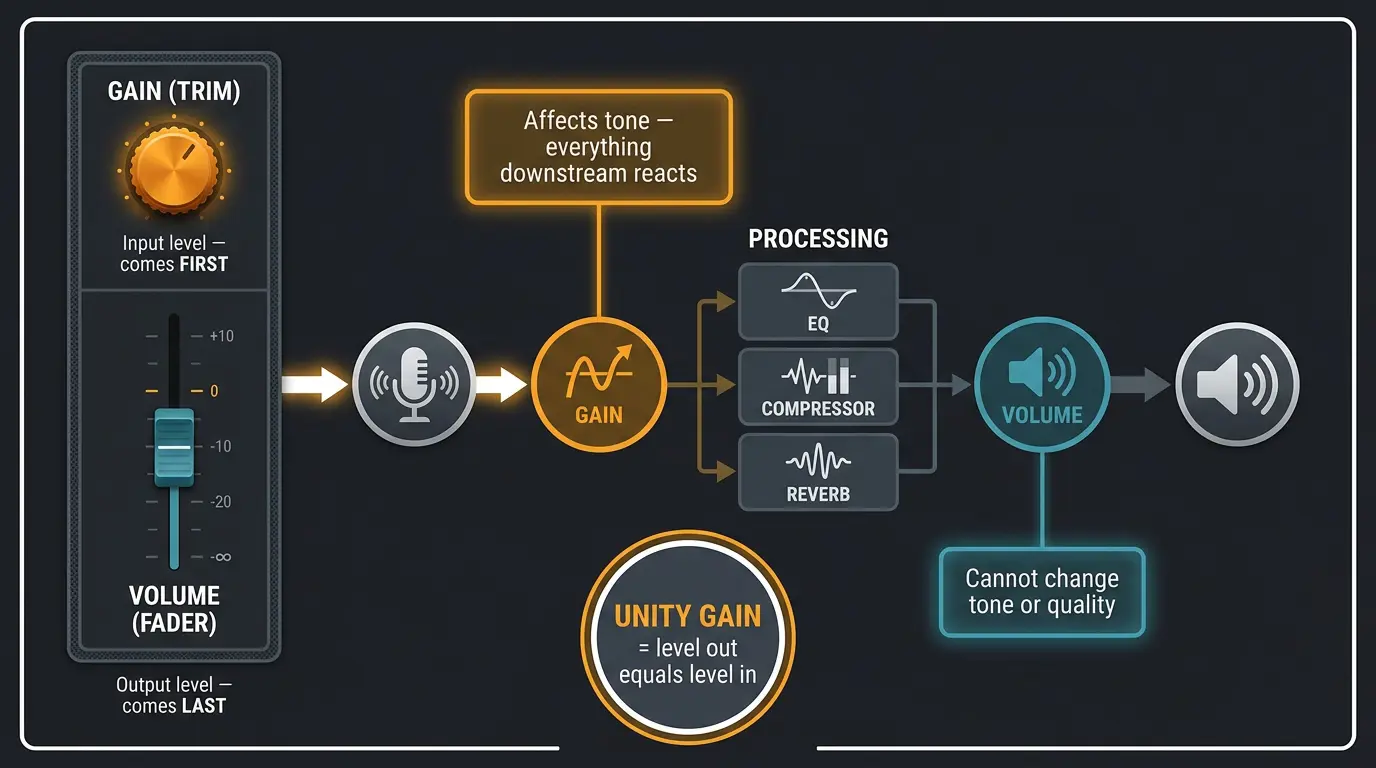
Gain controls the input level and comes first in the chain. Volume controls the output level and comes last. On a mixer channel, that maps to the layout you're already looking at — the gain (or trim) knob lives at the top, the fader lives at the bottom.
Here's the part that matters most. Because volume happens at the output, it can't change the tone or quality of your signal. Even if you crank a system until the speakers distort, the underlying audio signal is unchanged — you're just pushing it too hard at the very end.
Gain is a different animal. It happens before your processing, so it affects tone. Overload something at the input and everything downstream reacts to that hotter signal. And when the level going out equals the level going in, that's called unity gain — no boost, no cut.
Why 'Gain' Means Three Different Things
Most of the confusion isn't really about signal chains. It's that the word "gain" is overloaded, and it does at least three jobs depending on where you see it.
- Input level before processing. This is the most useful definition — gain sets how loud something is before it goes through anything else.
- A polite word for output volume. The "makeup gain" knob on a compressor is really just output volume wearing a different name tag. You cut level with the compression, then bring it back up.
- Distortion. This comes from guitar amps. Players would slam a ton of gain into the amp to overload it, then use the volume knob to keep things reasonably quiet. Overload the amp, get your dirt.
So when someone says "add some gain," it's worth a beat to figure out which one they mean. Same word, three completely different results.
Gain Staging and Why It Still Matters
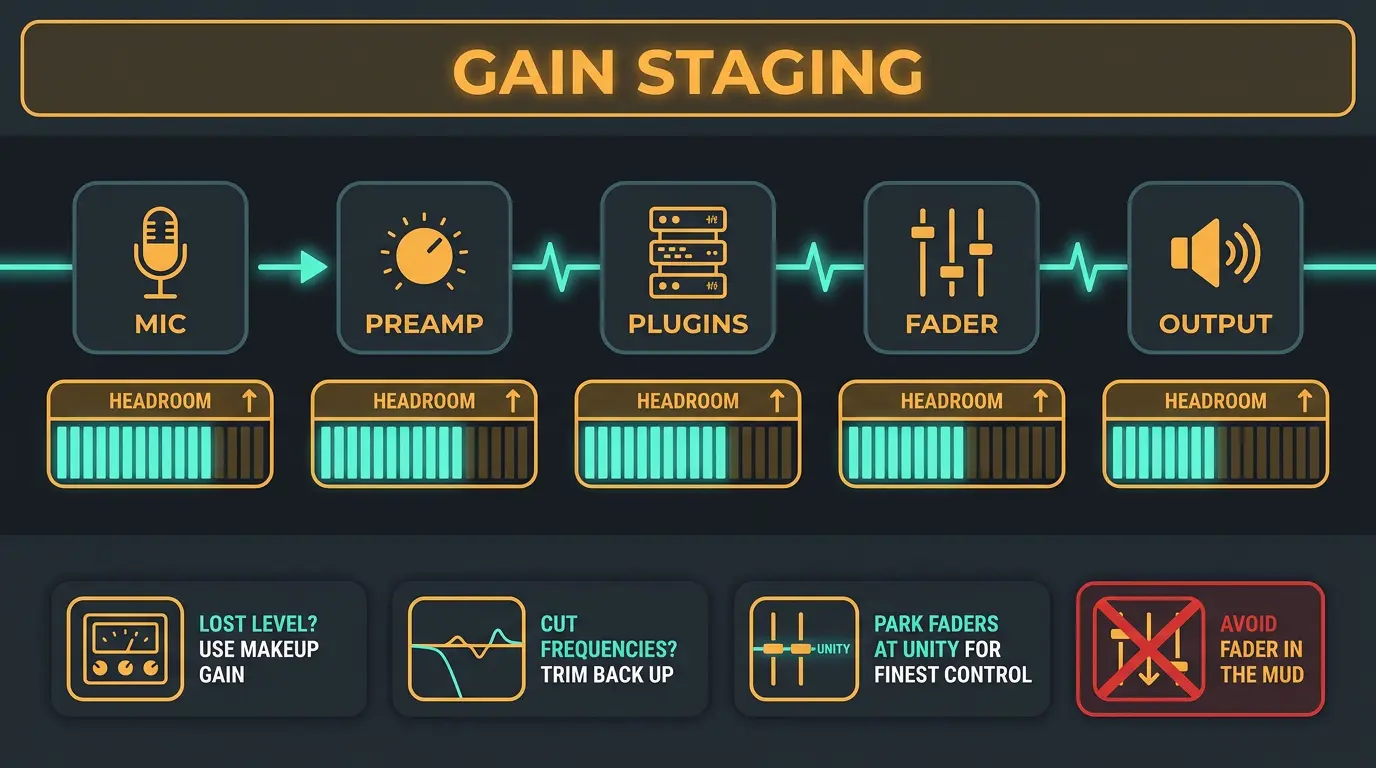
Gain staging is just setting the level at each amplification stage in your chain so nothing gets too hot or too quiet along the way. Every point where a signal gets amplified — the mic, the preamp, a plugin, the fader — is a stage. Get them balanced and everything downstream behaves.
There used to be a "record hot" mindset carried over from tape, where you printed loud to sit well above the hiss. That logic doesn't apply to digital, and chasing hot levels now just eats your headroom. Leave room instead.
Inside the box, the habit is simple: compensate as you go. Put a compressor on and lose some level? Use the makeup gain to bring it back. Cut a bunch of frequencies with an EQ and the track got quieter? Turn it back up.
One more thing. Faders have the most resolution right around unity, so parking them there by default gives you the finest control. Make sure you're doing your level moves with gain plugins and trim, not by dragging faders way down into the mud.
Quick Gain Staging Habits
- Compensate the level after every plugin — if a compressor or EQ pulls the signal down, bring it back up before you move on.
- Keep your faders near unity where they have the most resolution, and handle bigger level changes with trim or gain plugins.
- Leave headroom instead of tracking hot — the old tape-era 'record loud' advice doesn't buy you anything in digital.
How 32-Bit Float Changed the Conversation
32-bit float recording captures an enormous dynamic range — we're talking far more than you'll ever actually use. The practical upshot is that your exact input level while recording no longer matters for fidelity. If your take comes in too quiet or too loud, you rescale it after the fact in the DAW with no added noise or distortion.
There's one quirk to know about. When your DAW first reads a 32-bit float file, anything that went above 0 dBFS may look clipped on import, because files load with no gain applied by default. Pull the level down and it un-clips cleanly — the information was never lost.
With that being said, don't oversell it in your own head. 32-bit float doesn't eliminate clipping — it just moves the danger zone from the converter back to the mic and preamp stage. A loud enough source can still distort at a sensitive mic. It also won't rescue bad mic technique or a bad mic, and the files run about a third larger than 24-bit.
So it's workflow-dependent. In a traditional 24-bit setup, the old rules still hold — too low brings up noise, too high clips. In 32-bit float, that pressure at the recording stage is largely gone.
Volume, Loudness, and LUFS
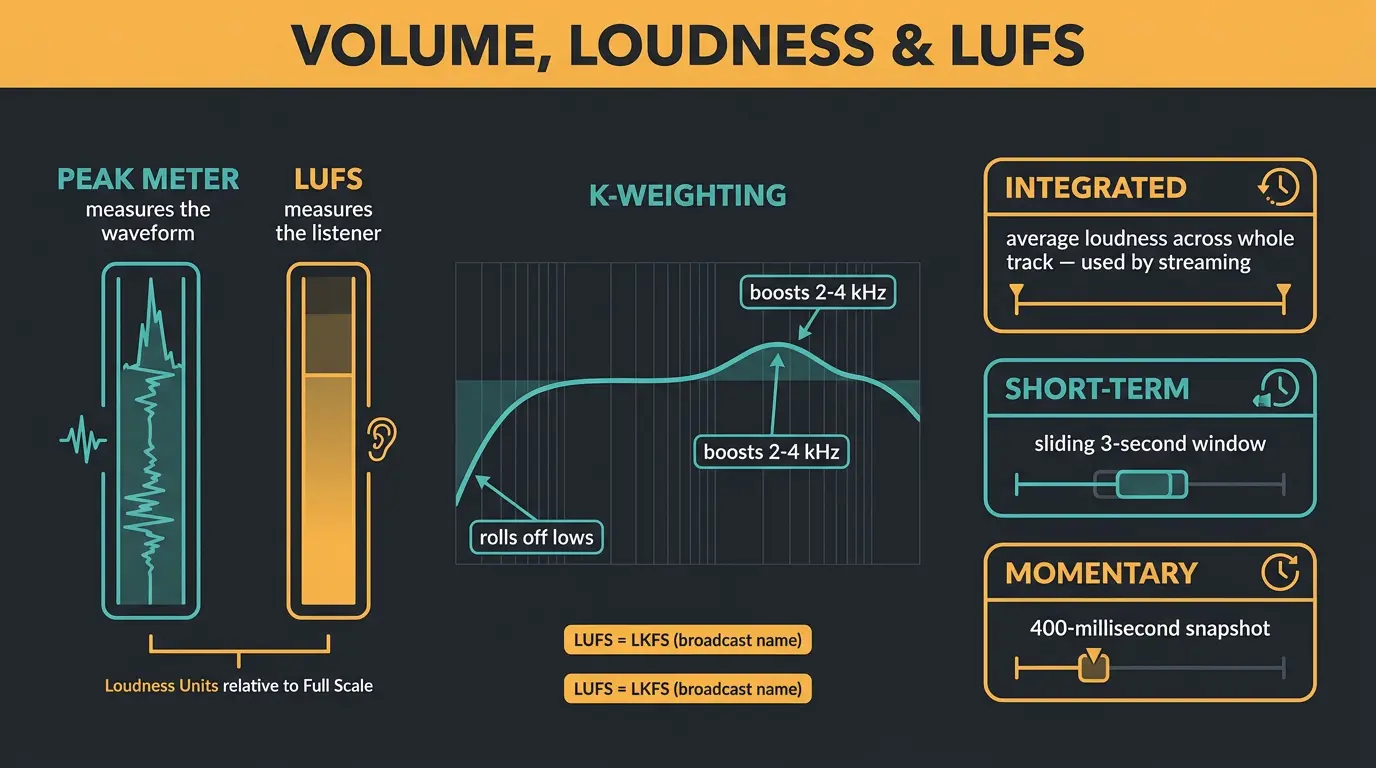
Saying volume is "measured in dB and it's subjective" doesn't cut it anymore. The industry measures perceived loudness — how loud something actually sounds to a human — in LUFS, short for Loudness Units relative to Full Scale.
LUFS uses K-weighting, which rolls off the lows and boosts the 2–4 kHz range our ears care most about. That's why a bass-heavy track and a vocal-heavy track can peak at the exact same level but feel worlds apart in loudness. Peak meters measure the waveform; LUFS measures the listener.
You'll also see LKFS floating around. Same measurement, different name — it's the broadcast world's label for the identical thing. There are three flavors worth knowing:
- Integrated: the average loudness across the whole track. This is what streaming platforms use.
- Short-term: a sliding 3-second window.
- Momentary: a 400-millisecond snapshot.
If you're building a track from scratch and want to see where these numbers land in a real project, it connects nicely to the whole workflow of making a song from start to finish.
Streaming Normalization and True Peak
Here's the big shift. Streaming platforms normalize every track to a target loudness, which means the old incentive to master ever-louder is largely gone. Turn something up past the target and the platform just turns it back down.
The current targets look like this:
- Spotify, YouTube, Amazon Music, Tidal: -14 LUFS integrated
- Apple Music: -16 LUFS via Sound Check
- Deezer: -15 LUFS
Spotify also offers listener modes — Loud around -11 LUFS, Normal at -14, and Quiet around -19. Most people never touch it; the vast majority leave it on the default Normal setting.
Now back to the gain and clipping thread. True Peak, measured in dBTP, accounts for inter-sample peaks that pop up when platforms transcode your file to a lossy format. A well-balanced master around -14 LUFS with -1 dBTP is generally safe everywhere. For more detail on the platform side, iZotope has a solid rundown on mastering for streaming platforms.
And to be clear — louder can genuinely sound better when it's done right. I'm not apologizing for pushing levels. But with normalization in play, chasing extreme loudness buys you very little. Less is more here.
Frequently Asked Questions (FAQs)
Is gain the same as volume?
No. Gain controls the input level at the start of your signal chain, while volume controls the output level at the end. The key difference is that gain affects tone because it happens before your processing, and volume doesn't because it happens last.
Does turning gain up hurt sound quality?
Turning gain up too far can hurt quality by overloading the signal before processing, which introduces distortion. Set at sensible levels it's harmless. Volume, by contrast, sits at the output and can't change the audio signal itself, even if your speakers distort at high levels.
Do I still need to gain stage carefully if I record in 32-bit float?
Not for fidelity. 32-bit float lets you rescale levels after recording with no added noise or distortion, so exact input levels don't matter the way they used to. You do still need good mic technique and a preamp that isn't clipping before the converter.
What LUFS should I master to for streaming?
Around -14 LUFS integrated with a -1 dBTP true peak is a safe target across most platforms, including Spotify, YouTube, Amazon Music, and Tidal. Apple Music runs a touch quieter at -16 via Sound Check, but a -14 master translates well everywhere.
Is louder always worse now that platforms normalize?
No — louder can genuinely sound better when it's done right, so don't be scared to push levels. But since streaming platforms normalize to a target loudness, chasing extreme loudness buys you almost nothing. You mostly just sacrifice dynamics for no real gain in perceived volume.
Final Thoughts
Gain in, volume out — once that clicks, most of the confusion falls away. The rest is just knowing which of the three "gain" meanings someone's talking about, and keeping your levels sensible from stage to stage.
The modern tools take a lot of the old pressure off. 32-bit float means you can stop sweating your record level, and LUFS normalization means you can stop entering the loudness arms race. Set good levels, leave some headroom, and trust your ears. That'll get you further than any single number.
Some of the links within this article are affiliate links. These links are from various companies such as Amazon. This means if you click on any of these links and purchase the item or service, I will receive an affiliate commission. This is at no cost to you and the money gets invested back into Audio Sorcerer LLC.