AI mastering isn't magic, and it isn't a genre preset dropped on your track. It's an analyze-then-process loop. The software listens to your stereo mix, figures out what it's working with, then builds a custom target and applies EQ, compression, stereo work, saturation, and limiting to hit it.
That's the whole idea. A machine doing the same job a mastering engineer does, just faster and without a coffee break. Here's what's actually happening under the hood, why LANDR gives you the results it does, and the current loudness targets for every major streaming platform, explained plainly.
TABLE OF CONTENTS
The core pipeline: analyze, build a target, process
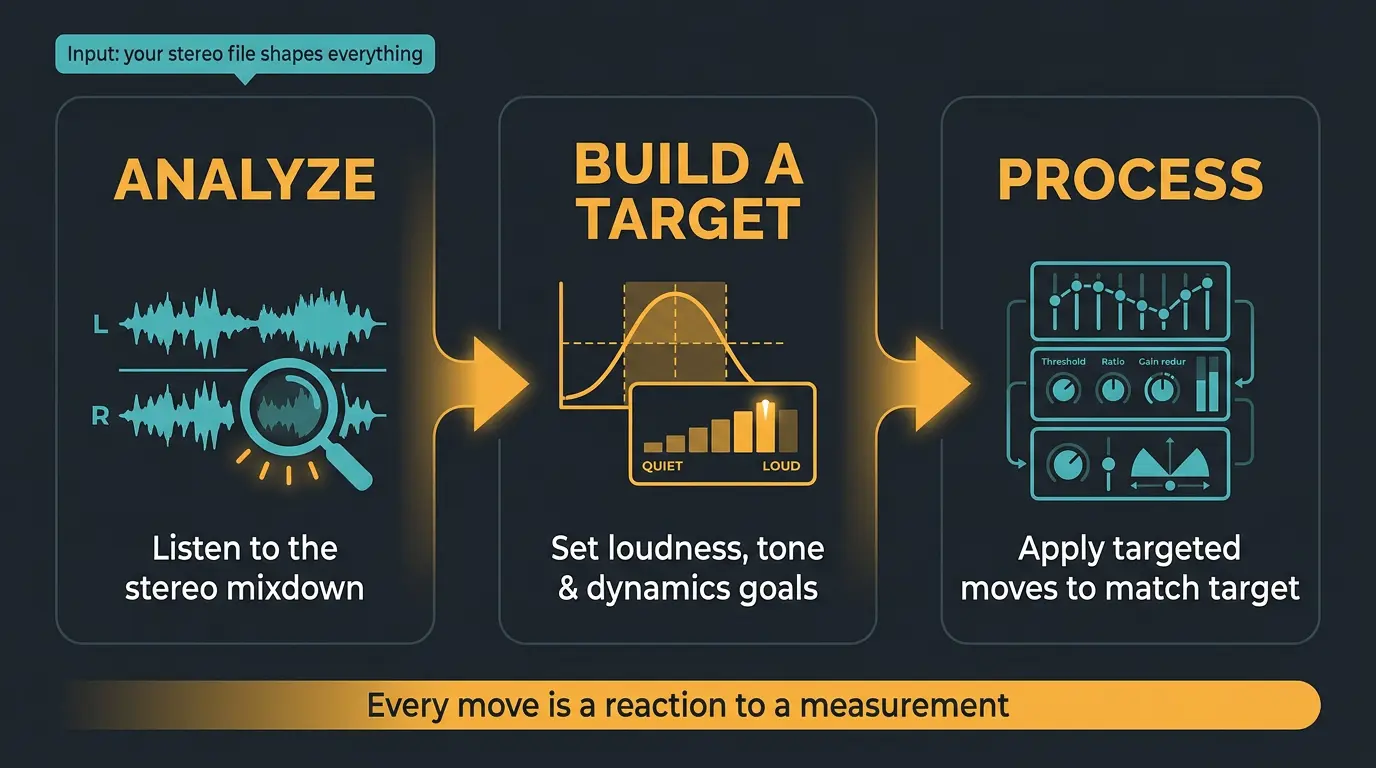
At the highest level, every AI mastering tool does three things in order. It listens to your stereo mixdown, it analyzes what's there, and then it applies a set of targeted processors to shape the dynamics, loudness, frequency balance, and stereo image. Not so different from what a human does at the desk.
The logic is more mechanical than mystical. If your mix comes in quieter than the target loudness, the limiter pushes gain until it hits the level. If the low end is sitting high against the target curve, the system either pulls the bass down or lifts other bands to balance it out. Every move is a reaction to a measurement.
That's why the line between mixing and mastering matters here. The algorithm can only work with the stereo file you hand it, so what you feed in shapes everything that comes out.
What the algorithm actually measures
When LANDR analyzes your track, the on-screen messages hint at a few things: frequency response, dynamics, and stereo width. Those are the headline measurements. But judging by the results, there's more going on behind the scenes than the interface lets on.
The parameters it's reading come down to four big ones:
- Frequency balance — how energy is spread across the spectrum
- Dynamic range — the gap between the quiet and loud parts
- Stereo image — how wide the mix sits
- Genre — the micro-genre detection step
That last one is the part that leans on machine learning. LANDR listens to the loudest section of your song to detect the genre and build the chain around it. iZotope's Ozone Master Assistant does the same thing, analyzing the loudest chunk to make its call.
Once it has that read, it deploys the usual mastering tools to react frame by frame: multi-band compression, EQ, stereo enhancement, limiting, and a touch of harmonic saturation. Standard mastering moves, applied automatically.
Reference matching and target curves: the real 'why'
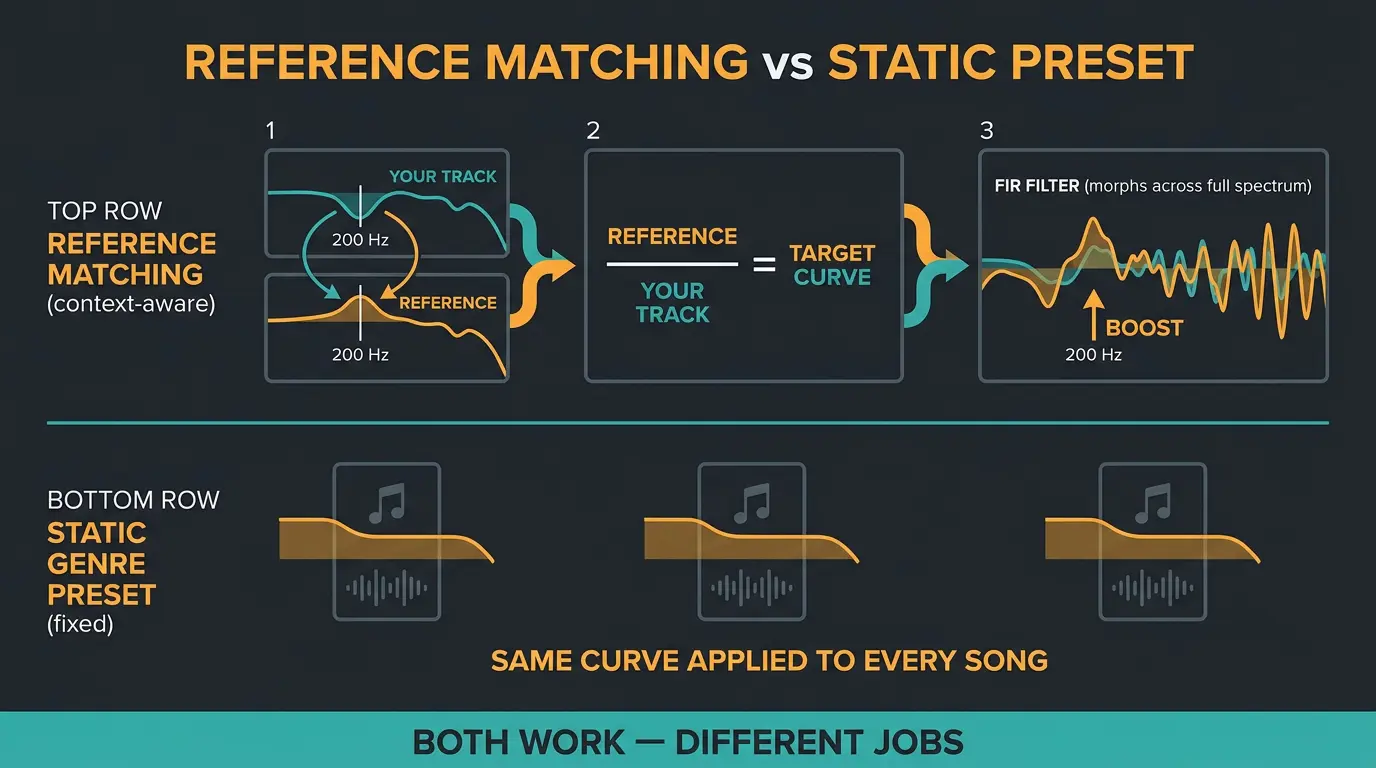
Here's the misconception worth killing. LANDR does not drop your track into a fixed genre bucket and slap on a canned preset. Even though the messages make it look like it's just picking a genre, LANDR say the plugin builds an individual target profile by comparing your track against a massive reference library spanning every genre, then constructs a signal chain to reach that target.
The clearest way to understand the math is the open-source tool Matchering, which spells out the concept publicly. It breaks the audio into tiny overlapping windows and calculates the energy footprint of each frequency band. That reveals the true tonal balance of both files.
Then it bridges the gap. If your source track dips at 200 Hz where the reference bumps, the software draws a filter to boost that exact region. This isn't a simple EQ curve — it's a dense finite impulse response filter that morphs across the whole spectrum. The one-line theory: divide the reference frequency signature by your track's signature, and the result is the exact curve needed to match them.
That's a different animal from a static genre EQ preset. Static presets apply the same curve to every song. Reference matching is context-aware — it builds a move for that specific pair of files. Ozone offers fixed genre target curves through Tonal Balance Control, which show you exactly where your master strays. Both approaches work. They're just doing different jobs.
Loudness targets, plainly
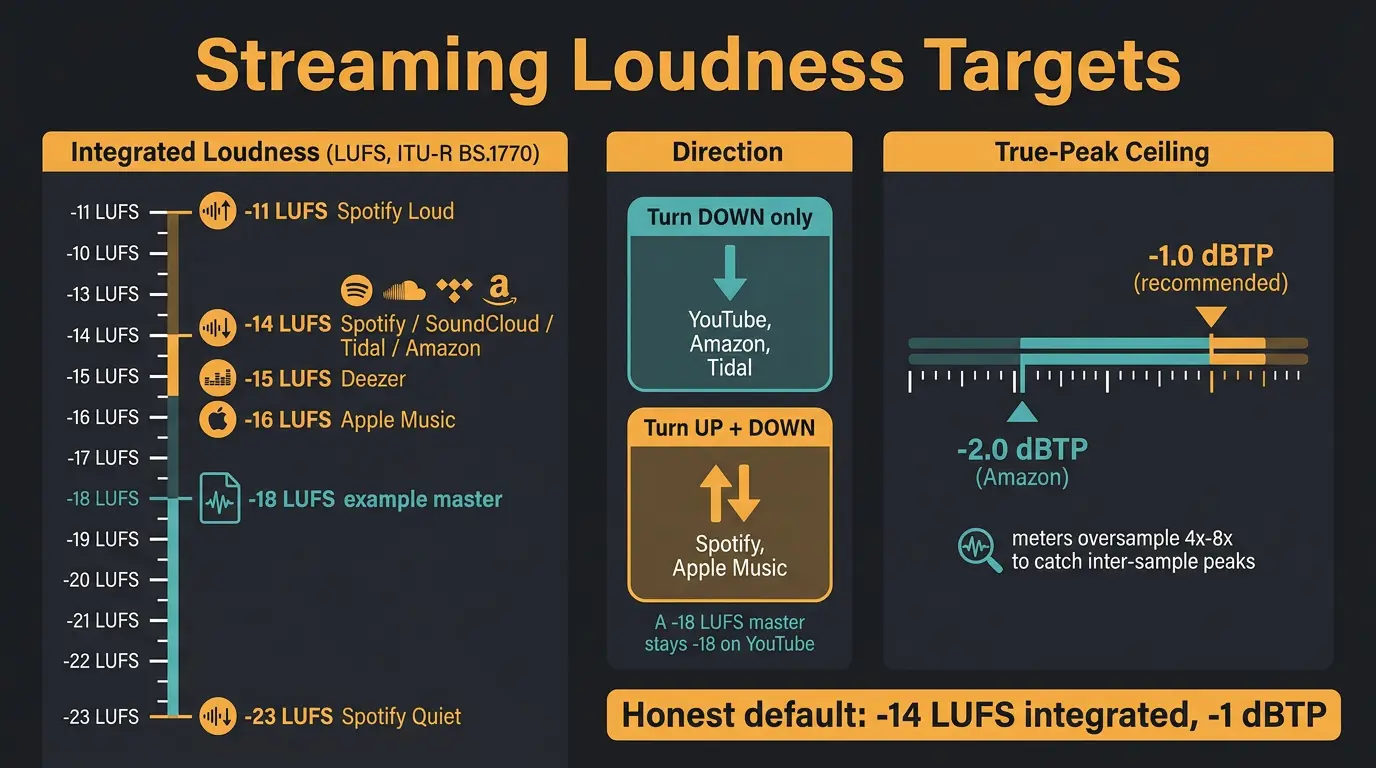
Loudness is where a lot of confusion lives, so let's keep it simple. The "target" every platform quotes is integrated loudness measured to the ITU-R BS.1770 standard. That's the gated whole-track average, not a peak reading. If you're fuzzy on the unit, our practical guide to LUFS covers it.
Here are the current numbers:
- Spotify — Normal at -14 LUFS (Quiet -23, Loud -11)
- Apple Music — the deliberate outlier at -16 LUFS
- Deezer — -15 LUFS
- SoundCloud and Tidal — around -14 LUFS
- Amazon Music — -14 LUFS with the strictest true-peak rule, -2 dBTP
Now the part people miss: direction. YouTube, Amazon, and Tidal only turn loud tracks down. They never boost quiet ones. A master at -18 LUFS plays back at -18 on YouTube, not -14. Spotify and Apple Music go the other way and boost quiet masters up to hit their targets.
Then there's the true-peak ceiling. Aim for -1.0 dBTP. Spotify's Ogg Vorbis encoder and Apple's AAC encoder both add inter-sample peaks above 0 dBFS when they transcode your WAV, and a -1 dBTP ceiling gives them room to do that without introducing audible distortion. True-peak meters predict this by oversampling the audio 4x to 8x to catch the peaks that fall between the digital samples. There's more on that in our guide to true-peak limiting. The honest default: about -14 LUFS integrated and -1 dBTP.
The honest streaming targets
- Aim around -14 LUFS integrated and -1 dBTP true-peak as your safe default for most music.
- Mastering louder than the target doesn't win anymore — the platform just turns you down and you keep the distortion you added to get there.
- -14 is a playback target, not a hard rule. Loud genres are legitimately mastered hotter, and that's fine.
Where AI mastering does well and where it struggles
Time for the honest part. AI mastering shines on consistent electronic material with steady dynamics. When the source is already tight and the target is a familiar sound, the results can be genuinely good.
The weaknesses are real too. Reviewers report over-compression, especially on the higher intensity settings, occasional excessive loudness, results that come out a little generic, and limited room to customize. It also stumbles on acoustic, jazz, and nuanced productions that lean on the kind of judgment a human engineer brings. Those are the tracks where you'll feel the ceiling.
It's worth remembering the AI isn't guessing from scratch. LANDR's engine is trained on the moves human mastering engineers actually make, and it's processed more than 25 million tracks since its first version launched back in 2014. That's a lot of reference material informing every decision.
The plugin has also grown up. It now does the analysis locally and gives you far more control than the old cloud-only workflow — tone presets like Warm, Balanced, and Open, plus parameters for stereo field, dynamics, character, saturation, and a three-band EQ, while the cloud still handles easy offline revisions. If you want a deeper look, Sound On Sound's review of the LANDR Mastering plugin digs into the details. When you set that intensity, remember less is more — a light touch usually reads more professional than a hot one.
Frequently Asked Questions (FAQs)
Does LANDR use genre presets?
No. LANDR builds an individual target profile by comparing your track against a large reference library across all genres, then constructs a custom signal chain to reach it. The interface hints at a genre, but under the hood it's context-aware reference matching, not a canned preset dropped on your song.
What LUFS should I master to for streaming?
Aim for about -14 LUFS integrated for most music. That lines up with Spotify, Tidal, SoundCloud, and Amazon's normalization targets. Apple Music sits at -16 and Deezer at -15, but a single -14 LUFS master works well everywhere since platforms normalize playback to their own levels anyway.
Why -1 dBTP instead of 0?
Because streaming encoders add inter-sample peaks above 0 dBFS when they transcode your file. Spotify's Ogg Vorbis and Apple's AAC encoders both do this, and a -1 dBTP true-peak ceiling leaves headroom for those peaks so you avoid audible distortion after encoding. Zero dBTP going in can clip coming out.
Is AI mastering as good as a human engineer?
For consistent electronic material with steady dynamics, it gets close and often sounds great. For acoustic, jazz, and nuanced productions, a human still wins because those tracks need judgment the algorithm doesn't have. AI mastering is a strong, fast option — just know where its ceiling is.
Does mastering louder make my track win on streaming?
No. Platforms normalize playback, so a hotter master just gets turned down and you keep whatever distortion you added to get loud. No platform restores dynamics you've already crushed. Mastering near the target beats mastering as loud as possible — though loud genres are legitimately mastered hotter on purpose.
Final Thoughts
AI mastering is a measurement-and-reaction loop dressed up in friendly language. Once you understand that it's building a target and processing toward it, the results stop feeling like a black box and start making sense. Loud comes back down, quiet gets boosted, and the tonal balance chases a reference. No magic, just math and a lot of training data.
Use it where it's strong, know where it struggles, and trust your ears over any target number. A tool that's mastered 25 million tracks still can't hear your song the way you can.
Some of the links within this article are affiliate links. These links are from various companies such as Amazon. This means if you click on any of these links and purchase the item or service, I will receive an affiliate commission. This is at no cost to you and the money gets invested back into Audio Sorcerer LLC.