AI vocals don't sound robotic because they're too rough. They sound robotic because they're too perfect. The timing lands dead on the grid, the pitch is mathematically locked, and the dynamics stay flat from the first word to the last.
Real singers don't do any of that. They rush, they drag, they drift a few cents sharp, they breathe. So the fix isn't cleaning the vocal up more — it's putting the human imperfection back in, on purpose.
This post is the hands-on moves for exactly that. No magic, no mystical talk. Just the timing, pitch, breath, and processing work that pulls the robot out of a synthetic vocal.
TABLE OF CONTENTS
Why AI Vocals Sound Robotic in the First Place
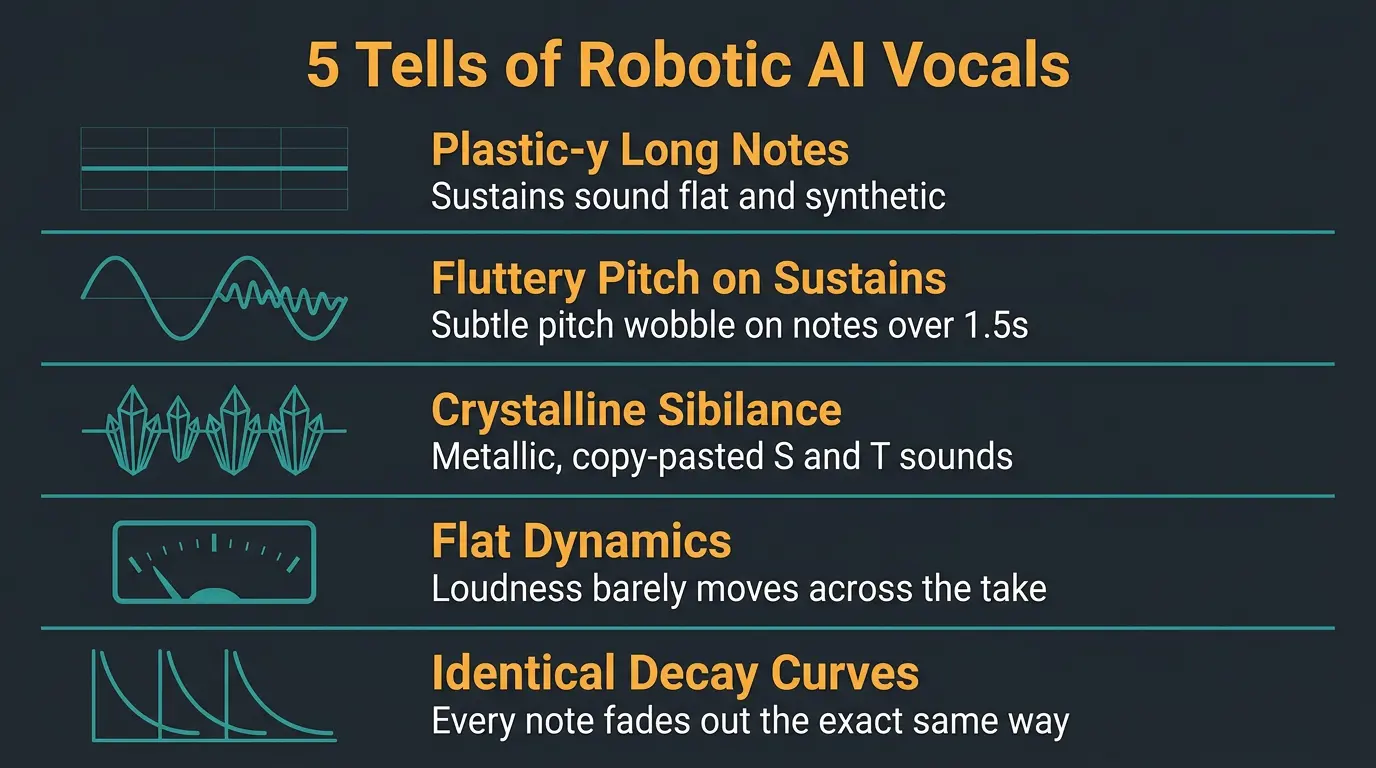
You can't fix a thing until you know what's wrong with it. And with AI vocals, the problem is almost always the same: mathematical precision that no human could ever pull off.
Once you know the tells, you'll hear them everywhere. Here's what a trained ear catches:
- Plastic-y long notes. Sustains sound weirdly flat and synthetic, like the note is being held by a machine that never gets tired.
- Fluttery pitch on sustains. On any note held longer than about 1.5 seconds, tools like Suno and Udio add a subtle pitch wobble that real singers just don't do.
- Crystalline sibilance. The S and T sounds have a metallic, copy-pasted quality. Real sibilance varies from word to word — AI sibilance sounds stamped out.
- Flat dynamics. The loudness barely moves across the whole take. Humans naturally lean into certain words and back off others.
- Identical decay curves. Every note fades out the exact same way. Real voices and real rooms add randomness to how sound dies off.
None of these are dealbreakers on their own. Stack them together, though, and your brain goes "that's a computer." Everything below is about undoing them one at a time.
Humanize the Timing (Don't Quantize It)
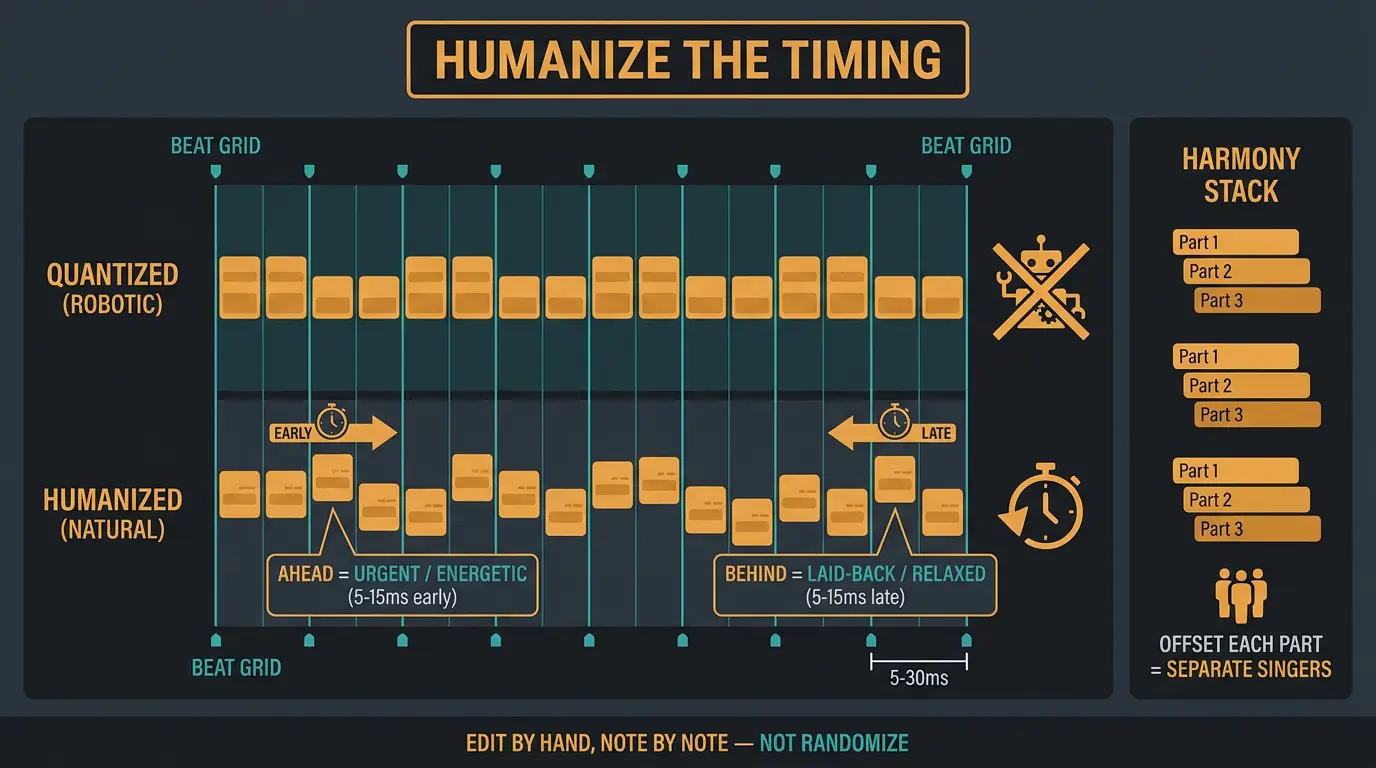
Here's the counterintuitive part. Your instinct might be to quantize the vocal and tighten it up. Don't. AI vocals are already glued to the grid — quantizing makes the robot problem worse, not better.
What you actually want is to push notes off the grid by hand. Human singers naturally drift 5 to 30 milliseconds off the beat, and it's not random — it's musical. They rush excited phrases and drag emotional ones.
So move the downbeat of each line 5 to 15ms early or late depending on the feel. Behind the beat reads laid-back and relaxed. Ahead of the beat reads urgent and energetic. Drag your emotional phrases slightly late and they'll breathe.
A scenario where this really matters is harmonies. If you leave every harmony part locked to the grid, you get the clone-army effect — a stack of identical robots. Offset each part by a few milliseconds so they sound like separate people who showed up to sing together.
Make sure you do this note by note in your DAW, not with a blanket randomize button. Randomization spreads the timing evenly, which is its own kind of unnatural. Hand editing is more work, but it's the difference between "processed human" and "still a machine."
Fix the Pitch and Vibrato
Same idea as timing — the pitch is too perfect. Real singers drift a little, so add controlled drift of 5 to 10 cents that moves around across a phrase instead of sitting locked and dead-center.
Now, that fluttery vibrato on sustained notes. This is the single most obvious AI pitch artifact, and here's the concrete fix. Load Melodyne or your pitch editor on the vocal, find every note held longer than 1.5 seconds, and cut the pitch modulation down to about 30 to 50 percent of what the AI generated.
If it's still wobbly, flatten the modulation to zero and add vibrato back by hand. Natural vibrato sits around 4 to 7 Hz, and singers rise into it — they don't start wobbling the instant the note begins. So add gentle vibrato only in the last 40 percent or so of the note, and deepen it slightly on emotional peaks.
Let's give it a listen with the modulation cut versus untouched, and you'll hear the plastic quality drop away fast. One more thing: give each vocal layer its own character. Identical vibrato on every part just builds a more convincing robot. Different rates and depths per layer sell it as separate performances.
Formant and Pitch-Shift Limits
Formants are the resonant frequency clusters that come from the shape of a singer's vocal tract. There are roughly three of them, and they're tied to how vowels are articulated. Shift them up or down and you change how big or small the voice sounds — deeper or higher — without touching the actual pitch.
That's a handy tool, but here's the warning that matters for AI vocals. Don't pitch-shift them more than about 2 semitones. Past that, formant artifacts get magnified and the synthetic quality comes screaming back. If you need a different key, regenerate the vocal in that key instead of forcing a big shift after the fact. Less fighting, better result.
Add Breath — The Single Biggest Lever

If you do one thing from this whole post, do this one. Breath is the change that flips a listener's brain from "AI vocal" to "processed human vocal" faster than anything else.
Real singers breathe, and we hear it at every phrase break whether we notice it consciously or not. AI vocals often skip it entirely, and that silence where a breath should be is a dead giveaway.
So add breaths at natural phrase breaks. You've got two easy ways in: prompt for breaths at generation time, or drop in samples from a breath library — Sound Dust, Production Music Live, and free packs on SampleFocus all work fine.
And whatever you do, do not strip the breaths out. That's the opposite move, and it makes things worse. This is about as high-impact and low-effort as vocal work gets.
Doubling, Layering, and Comping
Doubles add richness and width, and they're a natural fit for AI vocals because you can generate as many takes as you want. But the human feel doesn't come from stacking identical copies — it comes from the small pitch and timing differences between takes. Enough variation to feel alive, not so much that it sounds sloppy.
Two edits make doubles behave. First, strip the breaths out of the doubles completely with something like iZotope RX so breaths only live in the main vocal. Two breaths hitting at once sounds fake immediately. Second, de-ess the doubles harder so their S's and T's don't clash with the lead.
Now the underused angle: comp your AI takes the way a producer comps a real singer. Generate several takes, then pick the strongest phrasing line by line and assemble a composite. This is the closest thing to a real studio comp session, and it works for the same reason — you're keeping the best performance moment from each take, and those little differences carry real human variation into the final vocal.
A Processing Chain That Works
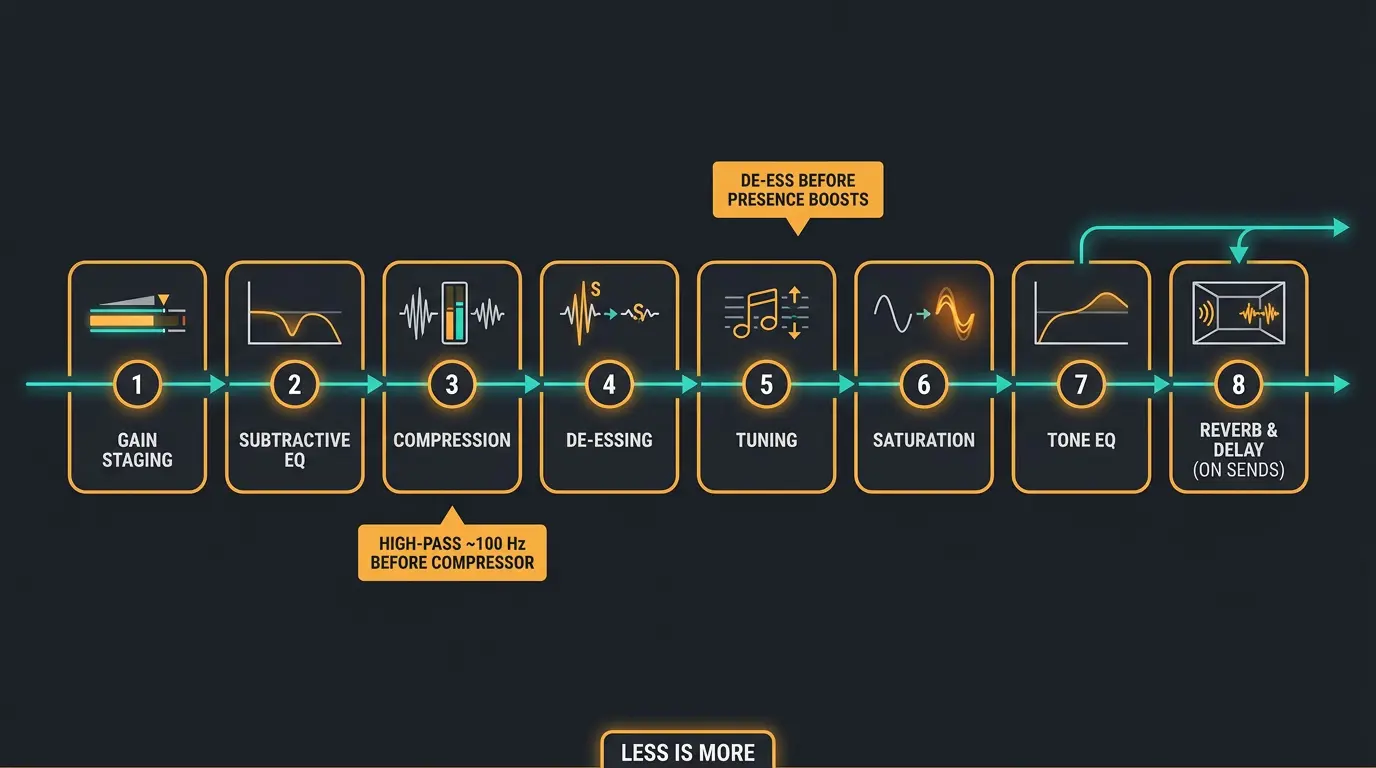
Order matters here because each plugin reacts to whatever the one before it hands off. Get the order wrong and you'll fight your own chain all day. A reliable flow looks like this:
- Gain staging — get levels sensible before anything else.
- Subtractive EQ — cut the problems, don't boost yet.
- Compression — even out the dynamics.
- De-essing — tame the sibilance.
- Tuning — pitch work, if you're doing it here.
- Saturation — warmth and harmonic character.
- Tone EQ — boosts for presence and air.
- Reverb and delay on sends — space, kept separate from the dry vocal.
A couple of the choices are worth explaining. High-pass around 100 Hz before the compressor, because low-end rumble on plosives and breaths will trigger gain reduction that should be flattening actual words. If you want the full breakdown of that move, our guide to high-pass filters covers it.
De-ess before you boost presence, not after. If you boost first, you amplify the sibilance and then have to claw it back. Flip the order and the de-esser works on the natural sibilance level while your boosts stay clean. There's more on taming those harsh S's in our piece on controlling sibilance.
Keep reverb last, on a send, and reach for a short room or plate for intimacy. For a solid reference chain from another angle, iZotope's write-up on crafting a basic vocal chain is worth a read. And remember — less is more. A tidy chain of a few well-set plugins beats a rack of twenty every time.
Frequently Asked Questions (FAQs)
Why do AI vocals sound robotic?
AI vocals sound robotic because they're too perfect, not too rough. The timing locks to the grid, the pitch holds mathematically dead-center, and the dynamics stay flat. Real singers drift in timing and pitch, accent certain words, and breathe. Adding that controlled imperfection back is what humanizes them.
Should I quantize AI vocals to tighten them up?
No, don't quantize AI vocals — they're already too close to the grid, so quantizing makes them sound more robotic. Instead, push notes 5 to 15 milliseconds off the grid by hand, dragging emotional phrases late and pushing energetic ones early. Musical placement beats mechanical tightening every time.
What's the single fastest fix for making AI vocals sound human?
Adding breath is the fastest, highest-impact fix for AI vocals. Realistic breaths at natural phrase breaks flip a listener's brain from "AI vocal" to "processed human vocal" faster than anything else. Prompt for them at generation or drop in samples from a breath library, and never strip them out.
Can you pitch-shift AI vocals to a different key?
You can, but don't shift AI vocals more than about 2 semitones or formant artifacts get magnified and the synthetic quality returns. If you need a different key, regenerate the vocal in that key instead of forcing a large pitch shift after the fact. It's less fighting and a cleaner result.
Which tools work best for humanizing AI vocals?
Melodyne is the go-to for taming AI vibrato and adding controlled pitch drift, iZotope RX handles stripping breaths from doubles, and doubler plugins with humanize controls add width and variation. None of them are magic — the real work is knowing which imperfection to add and doing it by ear.
Final Thoughts
None of this is a trick. It's the same craft you'd use on any real vocal — timing, pitch, breath, and a clean chain — just aimed at a source that's too perfect instead of too rough. The goal isn't a flawless vocal. It's a believable one.
Start with breath and timing, since those two moves do the most heavy lifting. Then trust your ears the rest of the way. There isn't one right answer here, and if it sounds human to you, it'll sound human to your listener.
Some of the links within this article are affiliate links. These links are from various companies such as Amazon. This means if you click on any of these links and purchase the item or service, I will receive an affiliate commission. This is at no cost to you and the money gets invested back into Audio Sorcerer LLC.