Most compression pulls the loud parts down. Upward compression does the opposite — it pushes the quiet parts up. Same goal, which is a smaller gap between your loudest and softest moments, but it works from the floor instead of the ceiling.
It's not some obscure secret anymore. It's built into modern mastering suites and covered by every major plugin maker. It's just underrated. So let's clear up what it actually does, how it's different from parallel compression, the tools that do it well, and when to actually reach for it.
TABLE OF CONTENTS
What upward compression actually does
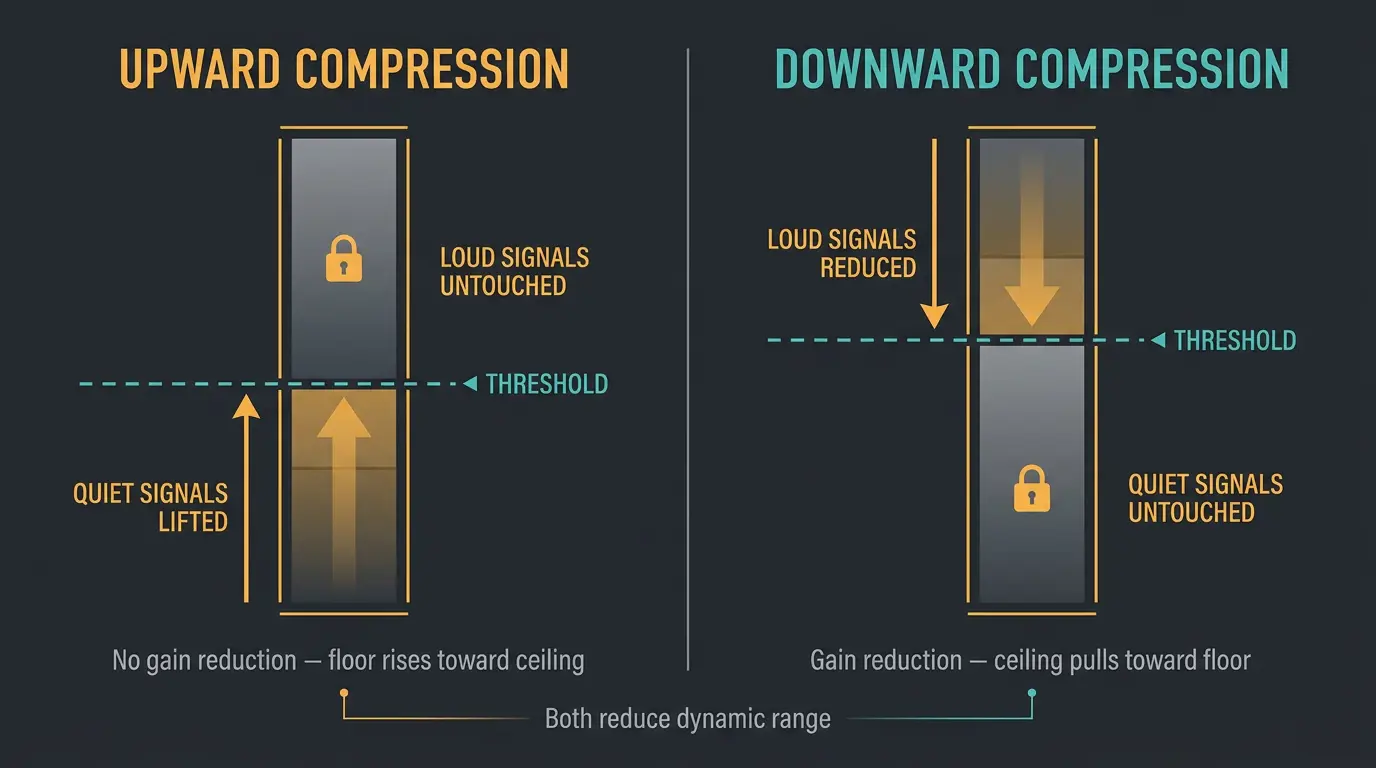
Upward compression raises the volume of quiet signals below the threshold. Louder signals above the threshold stay untouched. That's the whole idea.
Here's the key nuance most people miss: true upward compression applies no gain reduction at all. Nothing gets turned down. It shrinks your dynamic range by lifting the bottom up toward the top, not by pulling the top down.
Compare that to downward compression, which is the version nearly every compressor defaults to. Downward compression reduces the loud stuff above the threshold and leaves the quiet stuff alone. Both reduce dynamic range — one from the ceiling, one from the floor. When someone just says "compression," they almost always mean downward.
Upward compression vs. parallel compression vs. makeup gain
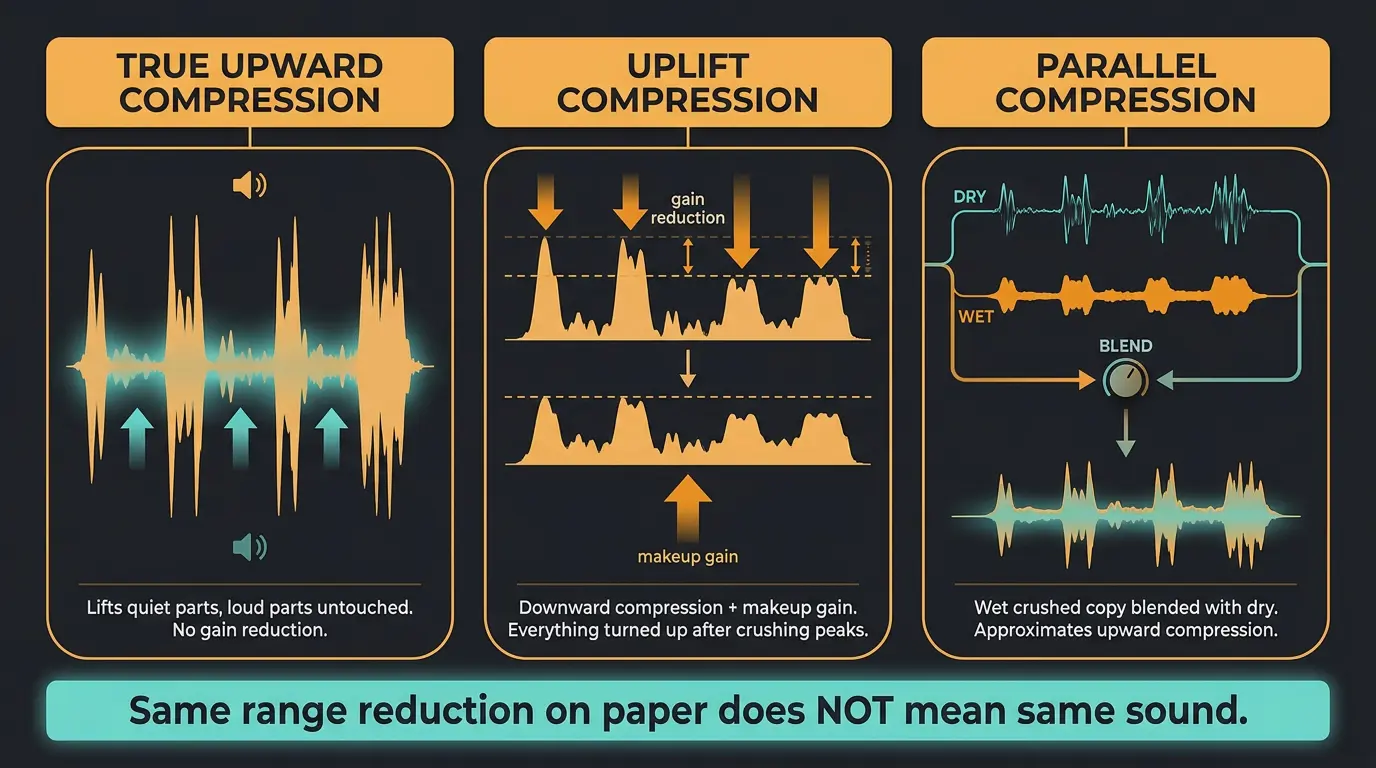
This is where the topic gets muddy, so let's untangle it. People conflate three different things:
- True upward compression — lifts the quiet parts, leaves the loud parts alone. No gain reduction.
- "Uplift" compression — this is just downward compression plus makeup gain. The loud bits get squashed, then the whole thing rides back up. The quiet parts end up louder, but only because you turned everything up after crushing the peaks.
- Parallel compression — a wet, heavily compressed copy blended back with your dry signal.
Bob Katz coined the term parallel compression and described it as an implementation of upward compression — making the softer passages more audible. That's why the two get grouped together. Parallel approximates upward compression: you squash a copy hard so the low signals jump way up, then blend it back with the dry, which reduces the range from the floor.
There's a nice perceptual reason it works. Our ears notice loud sounds suddenly dropping way more than they notice soft sounds rising. Parallel compression leans on exactly that. If you want the deeper walkthrough, I've got a full guide on when and how to use parallel compression.
One practical gotcha: a bare wet/dry mix knob with no real makeup gain can just give you "less compression" instead of a genuine low-level lift. You dial the wet copy back and think you're getting upward behavior, but you're really just softening the effect. To get real low-level amplification, you need the wet signal blended so the quiet detail comes up while the loud stuff returns to unity.
Sound On Sound makes the sharpest point here: upward compression and uplift compression do not achieve the same result, even when the amount of dynamic-range reduction looks identical on paper. One squashes the loud bits. The other lifts the quiet ones. Different process, different sound.
A note on the ratio
You'll see fractional ratio math thrown around here, and honestly, it confuses more people than it helps. Skip it.
Think of it as a transfer curve instead. Input level on one axis, output on the other. Signal below the threshold gets boosted, and the ratio sets how much. Higher ratio, more lift. That's all you really need to hold in your head. Set it, listen, adjust. Trust your ears over the numbers on this one.
When to reach for upward compression
The core principle: upward compression shines when most of your track sits at a good level, but one quiet section makes the whole thing too dynamic. Instead of crushing everything down to match that quiet bit, you set a threshold to catch just the quiet part and bring it up. Surgical, not blunt.
A few spots where it really earns its keep:
- Mastering. This is the strongest case. When a finished mix has too much dynamic range, bringing up the quiet parts is often more transparent than crushing the peaks.
- Drums and cymbals. It highlights the natural resonance and decay — the tail of a cymbal, the ring of a snare.
- Background vocals and harmonies. Lifts the soft layers so they sit in the bed without you riding faders all day.
- Classical and jazz. Genres where the quiet passages have to stay audible without flattening the whole performance.
- Restoration. Old, noisy recordings with wildly variable levels.
- Reverb tails. Lifting the tail adds depth and focus to lower-level detail.
One thing worth knowing: true upward compression is largely a plugin-domain technique. It's rare in analog hardware, so don't go hunting for a classic outboard box to do it. This one lives in the box.
Quick tips for using upward compression
- Use small amounts. On a bus, 1 to 2 dB goes a long way — less is more here.
- Lift the quiet bit rather than squashing the whole track. That's the entire point of the tool.
- No dedicated upward compressor? Approximate it with parallel compression and real makeup gain.
- Watch out for a plain mix knob that just gives you less compression instead of a genuine low-level lift.
Plugins that do upward compression well
You've got solid options for this, and a few of them you might already own.
iZotope Ozone is my go-to for true, simple upward compression. It's clean and easy to dial in, and the module that ships in Ozone Advanced can be run as a plugin outside the Ozone wrapper, so you're not stuck opening the whole suite just to lift some quiet detail.
Waves MV2 is a dedicated dual compressor with a Low Level fader for upward and a High Level fader for downward. It's dead simple, and it does great work on busses where there's a lot going on at both ends of the level range.
Waves MaxxVolume handles both directions too, with low-level compression pushing the bottom up so you're compressing the range from the floor as well as the ceiling.
Xfer OTT is the multiband up/down staple you've heard on half the electronic records of the last decade. It flattens dynamics and pulls synths, drums, and vocals forward. It's aggressive by nature, so keep the mix knob in check.
For combined up/down options, the Techivation M-Compressor gives you separate thresholds for each direction, and the stock Cubase Squasher is genuinely good if you're already in that DAW. For more further reading on the concept itself, Waves has a solid write-up on upward compression as an overlooked mix hack.
A quick word on upward expansion
To round out the four-types picture: upward expansion is the opposite move. It amplifies parts of the signal above the threshold — boosting only the transient peaks, for example, instead of lifting the quiet stuff.
iZotope makes a neat point that a little upward expansion can sometimes do the job of an EQ boost. Faced with a dull snare, your instinct might be to grab EQ, but a touch of upward expansion on the transient might get you there just as well. Just don't mix the two up — upward compression lifts the soft parts, upward expansion pushes the loud parts louder. Different tools, opposite ends of the signal.
Frequently Asked Questions (FAQs)
Is parallel compression the same as upward compression?
Not exactly, but they're closely related. Bob Katz coined parallel compression as an implementation of upward compression, and parallel does approximate the effect by lifting quiet detail from the floor. True upward compression lifts the quiet parts directly with no gain reduction, while parallel gets there by blending a heavily squashed copy back with the dry signal.
Does upward compression apply gain reduction?
No. True upward compression applies no gain reduction at all — it raises the quiet signals below the threshold and leaves everything above it untouched. It still reduces dynamic range, but by lifting the bottom rather than pulling down the top. That's what sets it apart from downward compression.
When should I use upward vs downward compression?
Use downward compression to tame loud peaks and control transients, which is the everyday job. Reach for upward compression when most of the track sits at a good level but the quiet sections are too soft. It's especially handy in mastering, where lifting quiet parts is often more transparent than crushing the peaks.
What's the best plugin for upward compression?
iZotope Ozone is a great pick for true, simple upward compression, and its module runs outside the full suite. Waves MV2 and MaxxVolume both handle it well on busses, and Xfer OTT is the standard in electronic production. Pick based on what you already own and what you're mixing.
Can I do upward compression with analog hardware?
Rarely. True upward compression is largely a plugin-domain technique — you won't find many classic outboard boxes built for it. If you want an analog-style approach, the closest you'll get is parallel compression with real makeup gain, which approximates the same low-level lift.
Final Thoughts
Upward compression isn't magic and it won't fix a bad mix. What it does is give you a way to control dynamics from the bottom up, which is exactly what you want when crushing the peaks would kill the life in a track. Especially in mastering, that quiet lift can be the more transparent choice.
Start small — a decibel or two on a bus — and let your ears make the call. Less is more here, and once you hear what it does, you'll wonder why you reached for downward compression for everything.
Some of the links within this article are affiliate links. These links are from various companies such as Amazon. This means if you click on any of these links and purchase the item or service, I will receive an affiliate commission. This is at no cost to you and the money gets invested back into Audio Sorcerer LLC.