AI vocals from Suno, Udio, and the rest sound synthetic for a reason, and it's not your prompts. The models build audio from spectrograms and compressed representations, which bakes in a metallic sheen, digital ringing in the highs, and dynamics that sit dead flat.
The good news is you can fix most of it. It just takes a different chain than you'd use on a real singer. Here's the order I work in to clean up AI vocals, tame the harshness, and put some space and life back in.
TABLE OF CONTENTS
Why AI vocals need a different approach
Here's the root cause. AI models generate audio from spectrograms and compressed latent representations, then reconstruct a waveform from that. Rebuilding a clean waveform from a spectrogram isn't perfect, so you get phase issues, digital noise, and that metallic warble in the upper mids.
Most current models also run at limited internal sample rates and roll off hard above roughly 14 kHz. That's why the top end feels closed-in even before you touch anything.
The key thing to understand is this isn't a bug Suno or Udio will patch away. It's how the models work. That's why mixing AI vocals differs from mixing a real performance — you're treating damaged source audio, not shaping a clean recording.
The artifacts to listen for first
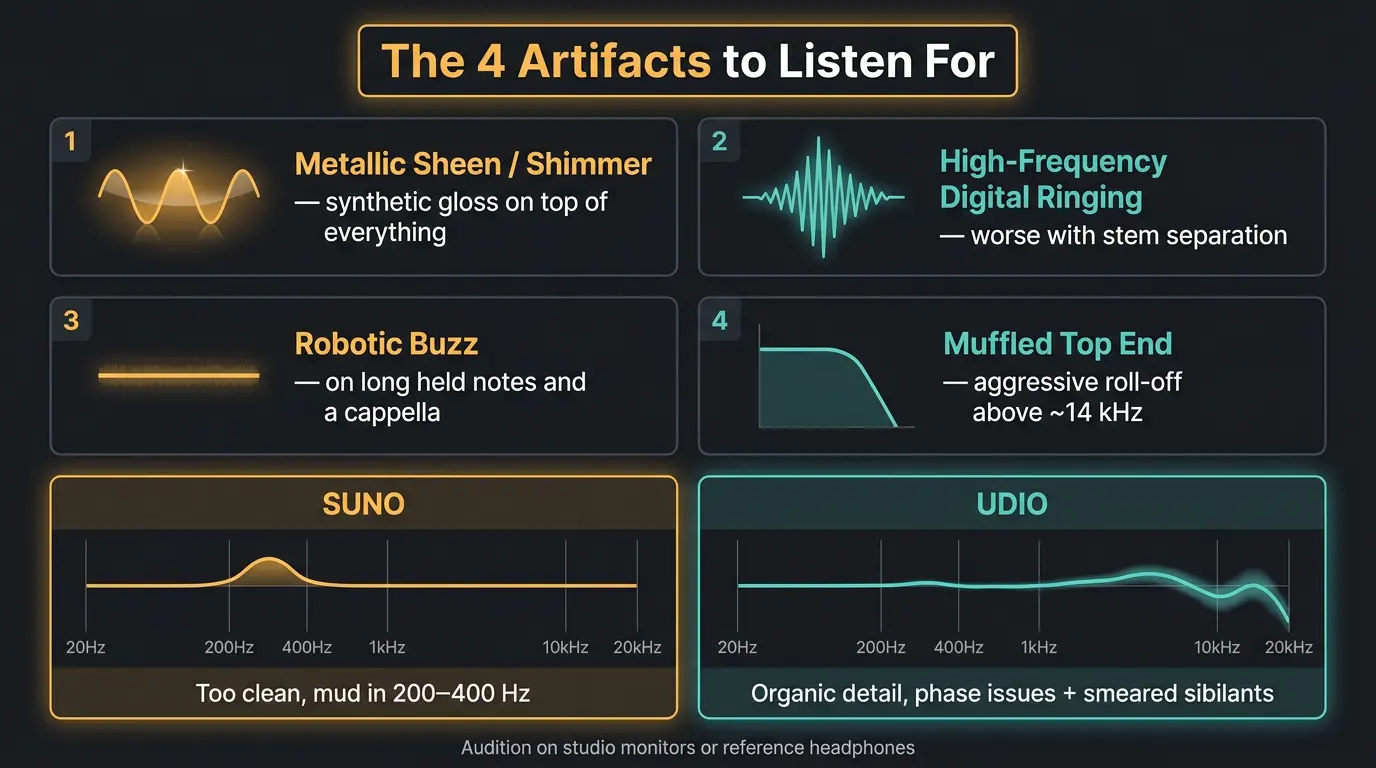
Before you reach for a single plugin, you need to know what you're hearing. Let's give it a listen — on studio monitors or reference headphones, not earbuds or your laptop speakers. These artifacts hide on cheap playback.
There are four you'll run into most:
- Metallic sheen or shimmer — a synthetic gloss that sits on top of everything, regardless of the arrangement.
- High-frequency digital ringing — a filtered, ringing noise up in the highs, often worse if the vocal was pulled out with stem separation.
- Robotic buzz — shows up on long held notes and exposed a cappella sections.
- Muffled top end — that aggressive roll-off above ~14 kHz that kills the air.
One thing worth knowing: Suno and Udio have different artifact profiles because they're built differently. Suno tends to sound almost too clean, with mud baked into the 200–400 Hz range. Udio gives you more organic detail but brings phase problems and smeared sibilants, where the "s" and "sh" sounds spread across a wider band and go washy.
Quick artifact cheat sheet
- Metallic sheen — listen in the high mids for a synthetic gloss that never goes away
- Digital ringing — a filtered, ringing noise usually camped around 9–12 kHz
- Robotic buzz — worst on long held notes and exposed, clean sections
- Muffled top end — high frequencies rolled off above roughly 14 kHz
The mixing chain, in order
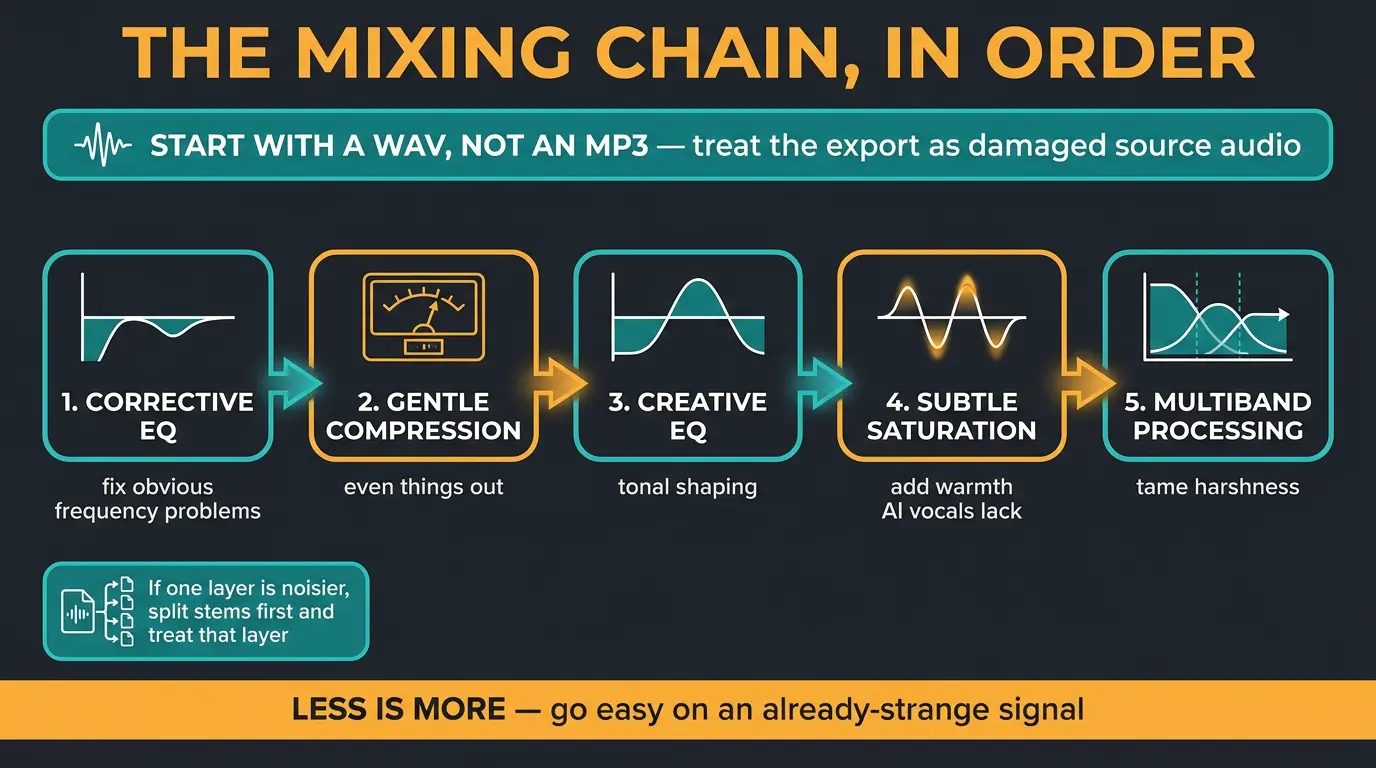
Treat the export as damaged source audio first, then mix it like normal. That mindset shift matters more than any single plugin.
Start by working from a WAV, not an MP3. Compressed files bake in more artifacts before you even open your DAW, so always export the best quality the generator will give you. If you're fuzzy on why, our guide to audio file formats breaks it down.
If the noise is worse on one layer — which happens a lot when vocals get isolated with stem separation — split stems first and treat the noisy one instead of hammering the whole mix. Then work through this order:
- Corrective EQ to fix the obvious frequency problems
- Gentle compression to even things out
- Creative EQ for tonal shaping
- Subtle saturation for the warmth AI vocals lack
- Multiband processing to keep harshness in check
Less is more here. Every move you make on an already-strange signal is a chance to make it stranger, so go easy.
EQ moves that actually fix AI vocals
This is where the bulk of your ai vocal processing happens. A few targeted moves fix most of the damage.
First, notch the digital ringing. Use a high-Q bell and hunt around 9–12 kHz for the harshest resonance, then dip it. Be careful not to stack up too many notches — do that and you'll introduce comb filtering, which is its own kind of ugly.
From there:
- High-pass below 80–100 Hz to clear out rumble the vocal doesn't need.
- On Suno tracks, cut the mud between 200–400 Hz — the model over-bakes that range by default.
- Cut a little around 3–4 kHz to pull back the plastic, digital quality.
- Add a gentle high shelf around 8–10 kHz for breath and air.
If harshness only shows up on louder phrases, reach for dynamic EQ. A dynamic bell cut around 3.8 kHz tames the harshness when the vocal gets loud, then leaves that area alone when things calm down. For a deeper dive on vocal frequencies generally, iZotope's ultimate guide to EQing vocals is a solid reference, and our own EQ cheat sheet covers the ranges you'll keep coming back to.
De-essing and taming harshness
De-essing an AI vocal isn't the same job as de-essing a real singer. One broadband de-esser cranked hard will suck the life right out. Instead, go multiband, narrow, and gentle — multiple light passes beat one heavy clamp.
And don't limit yourself to the "s" sounds. Any harsh or overbearing element above 3 kHz is fair game for a de-esser, and AI vocals have plenty of those. If sibilance itself is giving you trouble, our guide on controlling sibilance goes deeper.
Spectral denoise — the RX-style stuff — is a decent alternative when EQ alone won't cut it. Drop it at the start of your chain or right after your notch EQ and denoise the high end very lightly.
Here's the misconception to bust, though: aggressive denoise does not fix everything. It works great on steady background noise, but when the artifact is woven into the music itself, cranking it just leaves watery, smeared edges. Use it with a light hand.
Compression for vocals that lack dynamics
AI vocals barely have any dynamic range to begin with — the model already flattened them. So heavy compression just makes them sound more artificial. Go gentler than your instincts tell you.
Use a slower attack to protect whatever transients the model did create. Keep ratios around 2:1 to 3:1 with a soft knee, and be conservative with makeup gain. If you're rusty on how those controls interact, the compressor cheat sheet is a quick refresher.
Multiple gentle stages beat one aggressive pass every time. And if you want punch without squashing what little life is there, try parallel compression — blend a heavily compressed copy under the original and you get body while keeping the transients.
Adding space and life back in
AI vocals feel flat and airless because they were never in a real room. Your job is to fake one convincingly.
Reach for subtle room tone with early reflections rather than an obvious reverb tail. I like layering two reverbs — a short one for reflections and a longer one for the tail — to build depth without drowning the vocal. Short delays around 20–40 ms sell the room feel, and longer filtered delays add depth behind it. If you're deciding between the two, our breakdown of reverb vs delay is worth a read.
Then add a touch of tape or tube saturation for the harmonic warmth AI vocals are missing. Just a touch.
I'll be honest — a lot of this is subtle. On its own each move might not jump out, but together they add up. Use headphones, trust your ears, and stop when it sounds right rather than chasing a number.
Frequently Asked Questions (FAQs)
Can you fully remove AI vocal artifacts?
No, you can't fully remove them, but you can reduce them enough that they stop drawing attention. The artifacts are baked into how the model generates audio, so you're treating damaged source rather than erasing it. Notch EQ, gentle multiband de-essing, and light denoise get you most of the way.
Should I export WAV or MP3 from Suno or Udio?
Always export WAV. MP3 compression bakes in extra artifacts before you even start mixing, and you can't get that detail back. Work from the highest-quality file the generator will give you, and keep that WAV as your source for everything downstream.
Why do my AI vocals sound metallic?
AI vocals sound metallic because the models reconstruct audio from spectrograms and compressed data, which introduces phase-incoherent texture in the upper mids. It's not a settings problem or a bad prompt — it's how the models work. A high-Q notch around 9–12 kHz and a small cut near 3–4 kHz help tame it.
Do AI vocals need de-essing?
Yes, most AI vocals need de-essing, but with a lighter touch than real vocals. Use narrow, gentle multiband passes instead of one heavy broadband de-esser, and treat any harshness above 3 kHz, not just the "s" sounds. Udio tracks generally need less de-essing than others.
What's the difference between mixing AI vocals and real vocals?
You mix AI vocals as damaged source audio first, then treat them like a normal vocal. They lack dynamic range, carry digital artifacts, and have a rolled-off top end, so you go gentler on compression and spend more time on corrective EQ, denoise, and adding artificial room and warmth.
Final Thoughts
Cleaning up AI vocals isn't magic — it's just a different starting point. Once you accept you're fixing damaged source before you mix, the whole process gets a lot calmer. Notch the ringing, tame the harshness gently, compress with a light hand, and give it a room to live in.
Trust your ears over any preset. There isn't one right chain, and the settings I use are a starting point, not gospel. Get the artifacts out of the way and let the song do the rest.
Some of the links within this article are affiliate links. These links are from various companies such as Amazon. This means if you click on any of these links and purchase the item or service, I will receive an affiliate commission. This is at no cost to you and the money gets invested back into Audio Sorcerer LLC.