What is audio normalization is a question many often ask. Almost always another question arises from that one being should I normalize my audio. Well, these are questions we are going to answer.
Audio normalization has been around since the dawn of audio production and has become somewhat of a controversial topic. The goal of this article is to clear up any preconceived notions you may have about it. We want you to be able to make an educated decision on whether or not to use it.
In this article, we will discuss what audio normalization is, does normalizing audio affect quality, how I use audio normalization, and should you normalize your audio. With that being said, lets first look at what audio normalization is.
TABLE OF CONTENTS
What Is Audio Normalization?

Audio normalization is the process of increasing the amplitude of a recording by a constant amount of gain to reach a target decibel level. The overall dynamics and signal-to-noise ratio stay the same since the amount of gain applied is constant. This process is typically done within a digital audio workstation (daw). There are two types of audio normalization; peak and loudness normalization. Lets first discuss peak.
Peak Normalization
Peak normalization looks at the highest level of signal present in a recording and uses it as the reference point. For example, if the loudest part in the song is -6 decibels, then everything will be brought up by 6 dB. This is assuming your target level is 0 dB. If you wanted to normalize all the individual tracks in a session then this is the type of normalization you would use. Peak is probably the most popular method of audio normalization.
Loudness Normalization
Loudness normalization is based on the overall loudness measurement of a recording. The volume of a recording is adjusted to bring the overall gain to a specified target level. This can be looked at through several different measurements such as RMS, but in today's industry LUFS has become the standard. Loudness normalization happens during the audio mastering process sometimes without any thought that it's actually happening.
One of the most popular places to see loudness normalization is in audio streaming platforms. For example, Spotify uses -14 LUFS as their standard. If they receive a song that is at -10 LUFS then they will turn it down 4 dB. They do this so that when you listen to songs from different artist you don't have to constantly change the volume on your playback device. With playlist formats being the most popular this is a must.
The biggest problem with streaming platforms today is that they can't agree on a standard loudness normalization level. This makes it tough for audio mastering engineers and why many choose to ignore them all. Hopefully in the near future an agreement will come about.
Does Normalizing Audio Affect Quality?

When talking about what is audio normalization we must discuss does normalizing audio affect quality? The short answer is no. If you do peak normalization the dynamic range of your song or track will stay in order. You are also not increasing any noise in the recording in regards to signal. Loudness normalization also doesn't have a negative effect on the recording in the streaming world.
My recommendation is that if you are sending your tracks off to a mix engineer, ask them what they want you to do with your tracks. They are the professional and they will do what is best for you and your music. Some may chose to normalize your tracks and some may not. There is no standard workflow to audio success.
How I Like To Use Audio Normalization
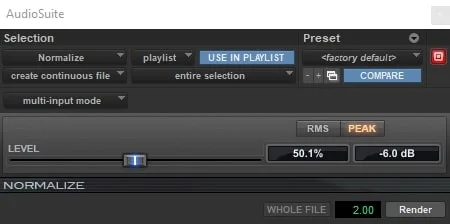
My favorite way to use audio normalization is get all the tracks within my session to the same peak level. The reason I do this is because audio plugins are meant to react to specific levels and these levels are what I set out to achieve. Plugin sweet spots are different but are mostly within a similar range.
My overall goal is to get all my tracks to a peak level of -6 dB. This level works great for the initial plugin in my chain which is the Slate Digital Virtual Tape Machine. This plugin uses a VU meter for referencing and recommends you shoot for hitting 0 on it.
With all my tracks peak normalized at -6 dB I know that my gain staging is setup properly and I'm ready to mix. Gain staging is one of the most important techniques in mixing and it must be done right. Please use my tip above to help get better mixes!
Should You Normalize Audio?
Based upon my previous recommendation on how to normalize audio I would say you definitely should! Now, you don't have to use peak normalization to achieve proper gain staging. You can also do clip gain adjustments. The problem with this method is that it takes way longer and as we know, time is money! Peak normalization is super fast, easy, and effective.
Frequently Asked Questions (FAQs)
What is audio normalization and how does it work?
Audio normalization is the process of adjusting the overall level of an audio file so that its loudest point or average loudness reaches a defined target value. There are two primary types of normalization — peak normalization and loudness normalization. Peak normalization raises or lowers the entire level of a file so that its highest peak reaches a set ceiling, typically 0 dBFS or a value just below it like -1 dBFS, without changing the relationship between any of the individual elements within the audio. Loudness normalization, which is the method used by streaming platforms, adjusts the level of a file based on its integrated LUFS measurement — the perceived average loudness over the entire duration of the track — rather than its peak level. Both methods apply a uniform gain adjustment across the entire file, meaning normalization does not compress, limit, or alter the dynamics of the audio in any way — it simply raises or lowers the overall level to meet the target.
Should you normalize your audio tracks before mixing?
Normalizing individual tracks before mixing is generally unnecessary and can actually create problems if not approached carefully. The primary argument for pre-mix normalization is gain staging — ensuring that every track enters the mix at a consistent, workable level rather than having some tracks dramatically quieter or louder than others. However, gain staging is better handled through careful trim and fader management than through normalization, which applies a fixed gain increase to the entire file including any noise floor, room tone, or artifacts that exist in the quieter sections of the recording. Normalizing a track with a noisy floor will raise that noise by the same amount as the signal, which can become audible and problematic in the mix. A better approach is to use your DAW's clip gain or trim controls to bring tracks to a consistent working level, keeping average signals hitting channel faders at a healthy level without resorting to normalization.
What is the difference between peak normalization and loudness normalization?
Peak normalization and loudness normalization are two distinct methods that use different reference points to set the output level of an audio file. Peak normalization finds the single loudest sample in the file and raises or lowers the entire signal so that peak lands at a defined ceiling — typically 0 dBFS or -1 dBFS. The limitation of peak normalization is that it tells you nothing about how loud the track actually sounds to a listener, since two tracks can have identical peak levels but wildly different perceived loudness depending on their dynamic range and average energy. Loudness normalization measures the integrated LUFS value of the entire track — a psychoacoustic measurement that better reflects how humans perceive loudness over time — and adjusts the file's level so that measurement meets a defined target. Streaming platforms use loudness normalization rather than peak normalization precisely because it produces a more consistent and perceptually uniform listening experience across a catalog of tracks with varying dynamics and production styles.
Does streaming normalization mean you should normalize your masters before uploading them?
No — streaming platforms apply their own loudness normalization automatically on playback, so manually normalizing your masters before uploading is redundant and potentially counterproductive. Services like Spotify, Apple Music, and YouTube measure the integrated LUFS of every uploaded track and adjust playback gain on their end to match their target loudness level — currently around -14 LUFS for most platforms. If you upload a track that is already louder than the platform target, it will be turned down on playback. If your track is quieter, it may be turned up. Manually normalizing your master before upload does not give you any advantage in this system and can introduce problems if the normalization process clips peaks or alters the carefully balanced level relationships in your master. The correct approach is to deliver a properly mastered file that hits approximately -14 LUFS integrated with a true peak ceiling of -1 dBTP and let the platform's normalization system handle the rest.
Can normalization damage audio quality, and are there situations where you should avoid it?
Normalization itself — as a simple gain adjustment — does not inherently damage audio quality, since raising or lowering the level of a digital file uniformly is a mathematically lossless operation when performed correctly. However, there are several situations where normalization can introduce problems or should be avoided. If peak normalization raises a file's level to the point where intersample peaks — peaks that exist between the digitally recorded samples and become apparent during the encoding process — exceed 0 dBFS, clipping and distortion can occur during playback or format conversion even if the file's recorded peak appears compliant. This is why a true peak ceiling of -1 dBFS rather than 0 dBFS is the standard recommendation. Normalizing noisy recordings raises the noise floor along with the signal, making unwanted artifacts more audible. Normalizing individual clips within a multitrack session can disrupt carefully established gain staging relationships between tracks. And applying normalization to a finished master that has already been carefully metered and limited for streaming compliance can undo that work entirely, which is why normalization should be considered a utility tool used with clear intent rather than a default step applied automatically to every file.
Final Thoughts

I hope through reading this article you understand what is audio normalization. It is an important process both in the studio and in the streaming world. Whether you decide to use it or not, the process is there waiting for you. If you have any further questions, feel free to reach out to us here at Audio Sorcerer. Also, check out our other great content on audio recording, mixing, and mastering. Peace out!
"Some of the links within this article are affiliate links. These links are from various companies such as Amazon. This means if you click on any of these links and purchase the item or service, I will receive an affiliate commission. This is at no cost to you and the money gets invested back into Audio Sorcerer LLC."