AI is all over music production right now, and most of the noise treats it like a fight — AI versus the human. That's the wrong frame. What's actually happening in 2026 is an assistant model: the tools handle the repetitive groundwork, and you keep the creative control.
The easiest way to think about it is three tiers. There's analysis (a tool that listens to your audio and understands it), assistance (a tool that suggests settings), and generation (a tool that creates new audio or MIDI from scratch). Different jobs, different verdicts.
Here's the honest thesis up top: AI won't write your song, and it won't replace a great engineer. But it removes the boring parts — gain-staging, corrective EQ, basic mastering, sorting samples — so you spend more time on the decisions that actually matter. Let's walk the whole chain and be honest about each piece.
TABLE OF CONTENTS
The Three Kinds of AI You'll Actually Meet
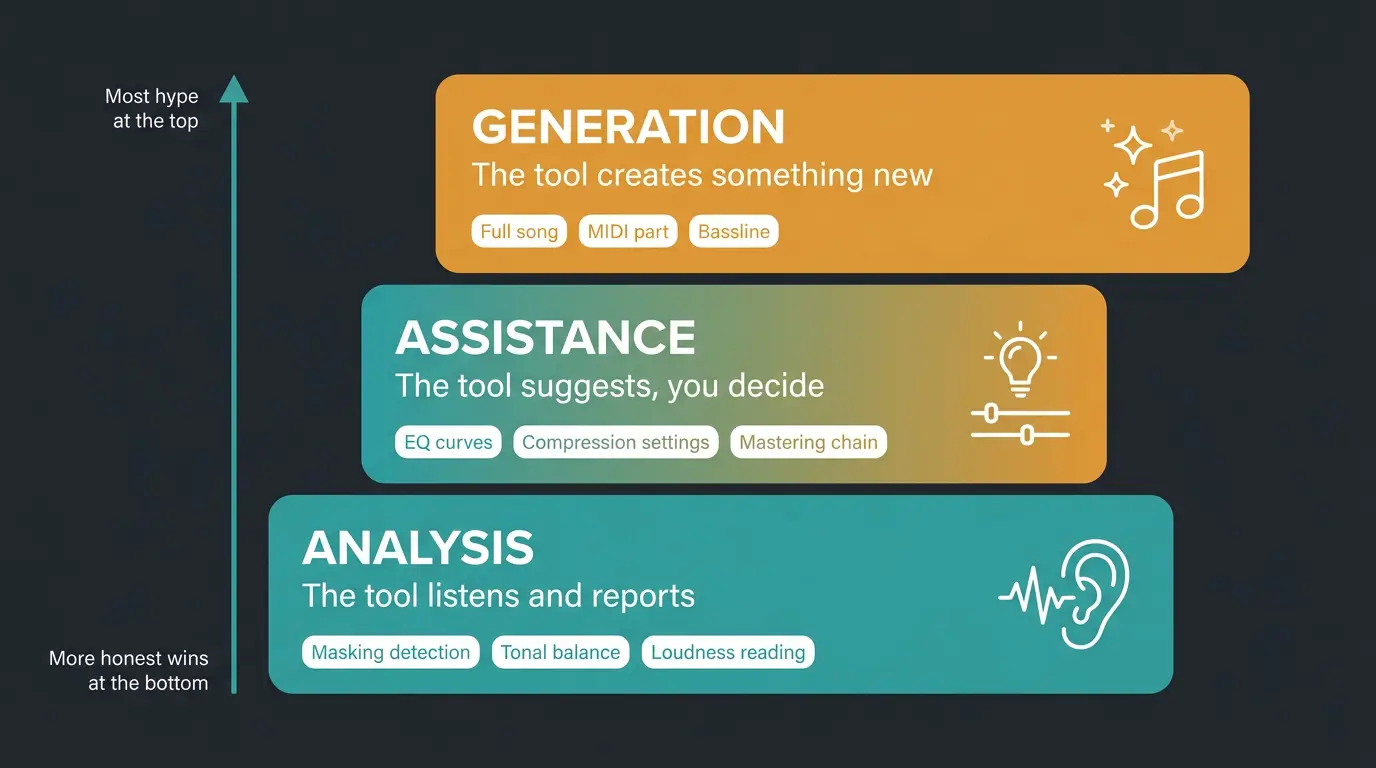
Carry this lens through the whole post and every tool gets easier to judge. There are really only three kinds of AI you'll run into in a production workflow.
- Analysis — the tool listens to your audio and figures out what's going on. Masking detection, tonal balance, loudness reading. It doesn't touch anything, it just tells you.
- Assistance — the tool listens, then suggests moves. EQ curves, compression settings, a starting mastering chain. You keep the final say.
- Generation — the tool creates something new. A full song, a MIDI part, a bassline. This is the tier people argue about most.
Most of the honest wins live in analysis and assistance. Generation is the flashy one, but it's also the one where the hype outruns the reality. Keep that in mind as we go.
AI Songwriting and Generation
This is the tier everyone points at, so let's give it a listen honestly. Tools like Suno, Udio, and AIVA have genuinely crossed the line from novelty to usable. Suno's v5 and Udio's late-2025 model both spit out full three-minute songs with real structure — intro, verse, pre-chorus, chorus, bridge, outro — instead of looping one idea until you fall asleep.
The vocals hold up too. Suno v5 keeps pitch and vibrato consistent across a whole verse-chorus-verse, with believable ad-libs and harmonies. For background music, social content, and quick demos, it passes a casual listen without a problem.
With that being said, here's where it stops. The connection between an artist and a fanbase comes from voice, identity, and lived experience — none of which a generator has. It's a co-pilot, not an autopilot ghostwriter. The people who'll actually benefit are the ones using it to draft faster and ship more demos, then bringing their own taste to the table. If you want the deeper mechanics, we broke that down in how AI music generators actually work.
A Word on Copyright and Licensing
This is a moving target, so read this as a snapshot and not gospel. In 2025 and 2026 the legal ground shifted hard — Warner Music settled with Suno, and Udio settled with both Warner and Universal. Suno's rolling out new licensed models that replace its current versions in 2026.
Here's the nuance people get wrong. On a paid Suno or Udio plan, the platform grants you a commercial-use license to the specific output you made — not traditional copyright ownership. Those are different things. Free-tier generations are personal-use only and shouldn't be released at all.
The U.S. Copyright Office generally won't register a work made entirely by AI with no meaningful human input. That doesn't make AI music illegal to release, though. For most independent artists the real question isn't "can I copyright this," it's "does my license let me put this out." Make sure you read each platform's terms directly before any commercial release — the language has changed multiple times, and it'll change again.
Stem Separation: The Biggest Genuine Win
Quick terminology note before we go, because it matters: "stems" technically means submixes, and individual isolated parts are really multitracks. Everybody calls this stem separation anyway, so I'll use the common term — just know the difference.
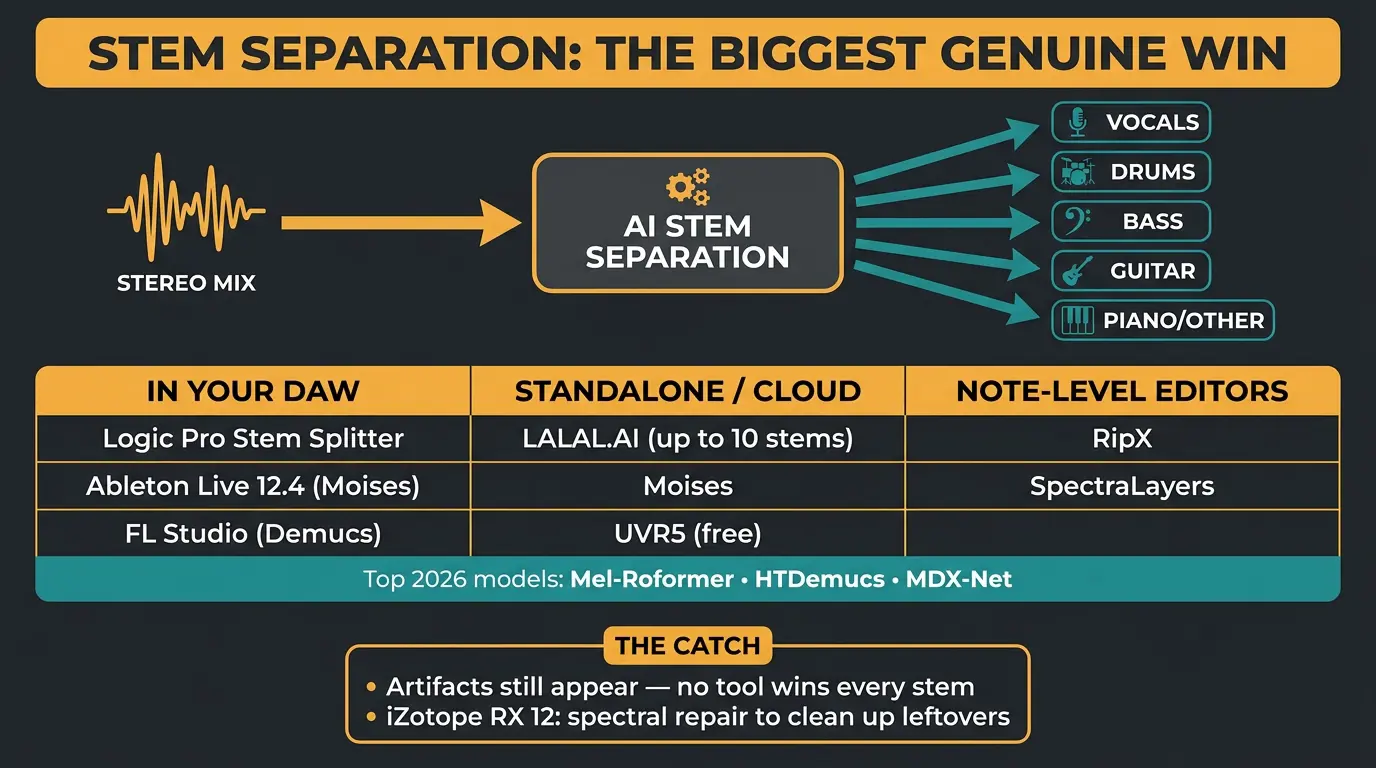
This is where AI has advanced the most, full stop. Pulling vocals, drums, and bass out of a finished stereo file was science fiction not long ago. Now it's routine. The best models in 2026 — Mel-Roformer, HTDemucs, and MDX-Net — give you separations that hold up in real professional work, not just demo clips.
It's baked into DAWs now, too. Logic Pro's Stem Splitter handles vocals, drums, bass, guitar, piano and more on Apple silicon and won MusicRadar's 11-tool test. Ableton Live 12.4 Suite ships a splitter running the Moises engine, and FL Studio's runs on Demucs. Outside the DAW you've got LALAL.AI (up to 10 stems in cloud mode), Moises, the free UVR5, plus note-level editors like RipX and SpectraLayers.
The honest caveats: no single tool wins every stem, and artifacts still show up. That's why iZotope RX 12 is worth knowing — it's still the only separation tool with spectral repair sitting right next to it, so you can clean up the mess every splitter leaves. And free doesn't mean effortless; UVR5 is the quality ceiling of free separation, but you pay in setup time instead of money. If you're doing this specifically to pull a vocal, we've got a full walkthrough on how to remove vocals from music tracks.
AI Mixing Assistants
Don't confuse mixing AI with creative AI. Mixing AI sits on individual tracks and suggests EQ, compression, and dynamics moves — think Sonible, Neutron, soothe. Creative AI generates or transforms audio inside the mix. Different animals.
iZotope Neutron 5 is the standard track-level assistant: Mix Assistant, masking analysis, smart EQ and compression per instrument. Pair it with Tonal Balance Control, which reads your full output against genre curves and flags imbalances the individual assistants missed. Used well, this saves a competent producer hours per track. For a deeper look, here's a solid Neutron 5 review.
Where it doesn't help: it can't fix a mix that isn't roughly balanced yet. AI assists, it doesn't fix structural problems — get your arrangement and levels in the ballpark first. If that part trips you up, start with how to arrange a song.
The other limit is character. These tools are built to be transparent. If you want pumping, color, and vibe, reach for analog-modeled plugins instead — that's not what a mix assistant is for. The verdict: it's a faster path to your taste, not a substitute for it. Less is more still applies.
AI Mastering
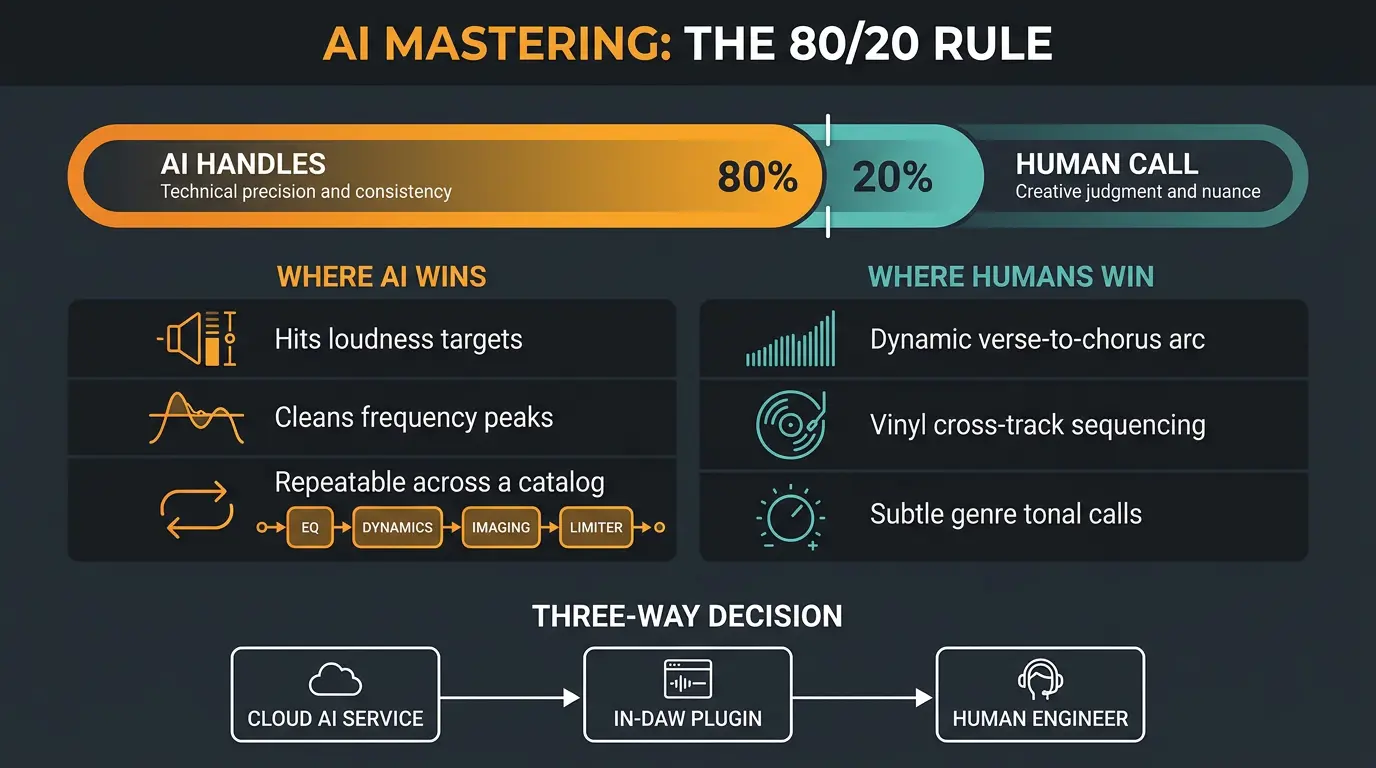
The honest framing here is 80/20. AI mastering handles about 80 percent of what most producers need. The nuanced 20 percent — the high-stakes calls — still goes to a human.
The strengths are real. AI is great at technical consistency: hitting loudness targets, cleaning up frequency peaks, and delivering repeatable results across a whole catalog. iZotope Ozone's Master Assistant listens, references a target loudness and tone, then assembles a full chain — EQ, dynamics, imaging, limiter — in seconds, and leaves every module open for you to tune. It's not a "make it loud" button. And for the record, louder used right does sound better, so don't be shy about pushing it when the material wants it.
Think of it as a three-way decision rather than a yes/no: cloud AI services, in-DAW plugins, or a human engineer. Each fits a different stage.
Where it falls short is dynamic interpretation. A human treats a quiet verse building into a loud chorus differently on purpose. AI tends to flatten that arc because it optimizes for average loudness, not musical intention. So for dynamic material, vinyl releases that need cross-track sequencing, and genres where subtle tonal calls define the sound — hire a person.
The Honest Verdict at a Glance
- Stem separation is the standout win — pulling clean vocals, drums, and bass from a stereo file is genuinely usable now, artifacts and all.
- Mixing and mastering AI gets you fast to your taste and saves real hours, but it won't replace a great engineer on nuanced or dynamic material.
- Song generation is a sketch pad and demo tool, not a ghostwriter — the voice, identity, and lived experience still have to come from you.
- Always check the licensing before you release anything, especially on free tiers, because the terms keep changing.
Frequently Asked Questions (FAQs)
Can AI replace a mixing or mastering engineer?
No, not for high-stakes work. AI mixing and mastering tools are genuinely good in 2026 and will save a competent producer hours, but they can't fix a poorly balanced mix and they flatten dynamic material. Use them as a faster path to your taste, not a substitute for a great engineer.
Is AI-generated music legal to release commercially?
Usually yes, if you're on a paid plan that grants a commercial-use license to your output. Free-tier generations are personal-use only and shouldn't be released. The terms change often, so read each platform's current license directly before you put anything out.
What's the best AI stem separation tool?
There's no single winner — the top models are Mel-Roformer, HTDemucs, and MDX-Net, and each is stronger on different stems. LALAL.AI and Moises are strong paid options, UVR5 is the free ceiling if you'll spend the setup time, and iZotope RX 12 lets you clean up leftover artifacts.
Does AI mastering sound as good as a human?
For roughly 80 percent of material, yes — AI hits loudness targets and cleans up peaks reliably. The other 20 percent, like dynamic songs, vinyl, and genres defined by subtle tonal calls, still benefits from a human who shapes the emotional arc instead of optimizing for average loudness.
Can you copyright a song made with AI?
Purely AI-generated work generally can't be registered with the U.S. Copyright Office, since it lacks meaningful human input. That doesn't make it illegal to release. For most independent artists the real question is whether your generator's license permits commercial use, not whether you can register the copyright.
Final Thoughts
AI in music production isn't the end of anything. It's a set of tools that are great at the boring parts and mediocre at the human parts, which is honestly a pretty good deal. Let it handle the groundwork so you can spend your time on the choices that make a song sound like you.
My advice is simple: try the ones that fit your workflow, trust your ears, and don't outsource your taste. That last part is still the whole job.
Some of the links within this article are affiliate links. These links are from various companies such as Amazon. This means if you click on any of these links and purchase the item or service, I will receive an affiliate commission. This is at no cost to you and the money gets invested back into Audio Sorcerer LLC.