Here's the short version: AI mastering is good enough for a lot of releases, and it's better than it was a few years ago. But it can't fix your mix, and it can't read what you were going for. That's the whole tension in one sentence.
I master records for a living, so I've run plenty of mixes through these tools next to what I'd do by hand. BandLab AI mastering is the one most people reach for first, because it's free, it runs in your browser, and it takes about ten seconds. Let's talk about what it nails, where it stumbles, and when free AI mastering is genuinely enough for the song you're putting out.
TABLE OF CONTENTS
What BandLab AI mastering actually is
BandLab Mastering is a free, browser-based tool that works on your finished stereo mix. You upload the file, pick a preset, apply it, and download the result. No install, no DAW, no plugin chain to build.
Under the hood it uses machine learning to apply EQ, dynamics, stereo width, and loudness normalization tuned to a style target. You're not turning knobs — you're picking a flavor and letting the model do the moves it thinks fit that flavor.
One heads-up: the preset lineup has shifted over time, and different sources list different names. So don't trust any fixed list you read online, including mine. Make sure you check the live presets yourself before you commit to one. If you want a deeper walkthrough of the tool, this breakdown of what BandLab Mastering actually does is a solid read.
You'll also see marketing about "Grammy-winning" presets and being "10x faster." Treat that as marketing. It doesn't tell you anything about how your specific song will come out, and free AI mastering doesn't need the hype to be useful.
What the algorithms handle well
The core win is loudness targeting. These tools reliably hit streaming targets like -14 LUFS, and they get there without a lot of drama. If you're fuzzy on what that number even means, our practical guide to LUFS and loudness covers it.
On a quiet, well-mixed source, BandLab lifts the track up to streaming loudness cleanly — no obvious pumping, no brittle over-limited edge. That's genuinely impressive for something that costs nothing.
Album consistency is real too. Run ten tracks through the same preset and you get a coherent tonal balance across the record, which is a big part of what mastering is supposed to do. And because it's free and instant, you can re-master after every mix tweak without paying or waiting.
The free tier has also stayed stable — it hasn't been quietly stripped down over the years, which isn't always the case with free tools. And honestly, it's a legit learning tool. Comparing your raw mix to a masters helps you build the listening skills the whole craft depends on.
Where AI mastering earns its keep
- Reliable loudness targeting that hits streaming levels consistently
- Clean, natural-sounding lift on well-mixed sources
- Consistent tonal balance across a full album
- Unlimited free re-masters with near-instant turnaround
Where AI mastering falls short
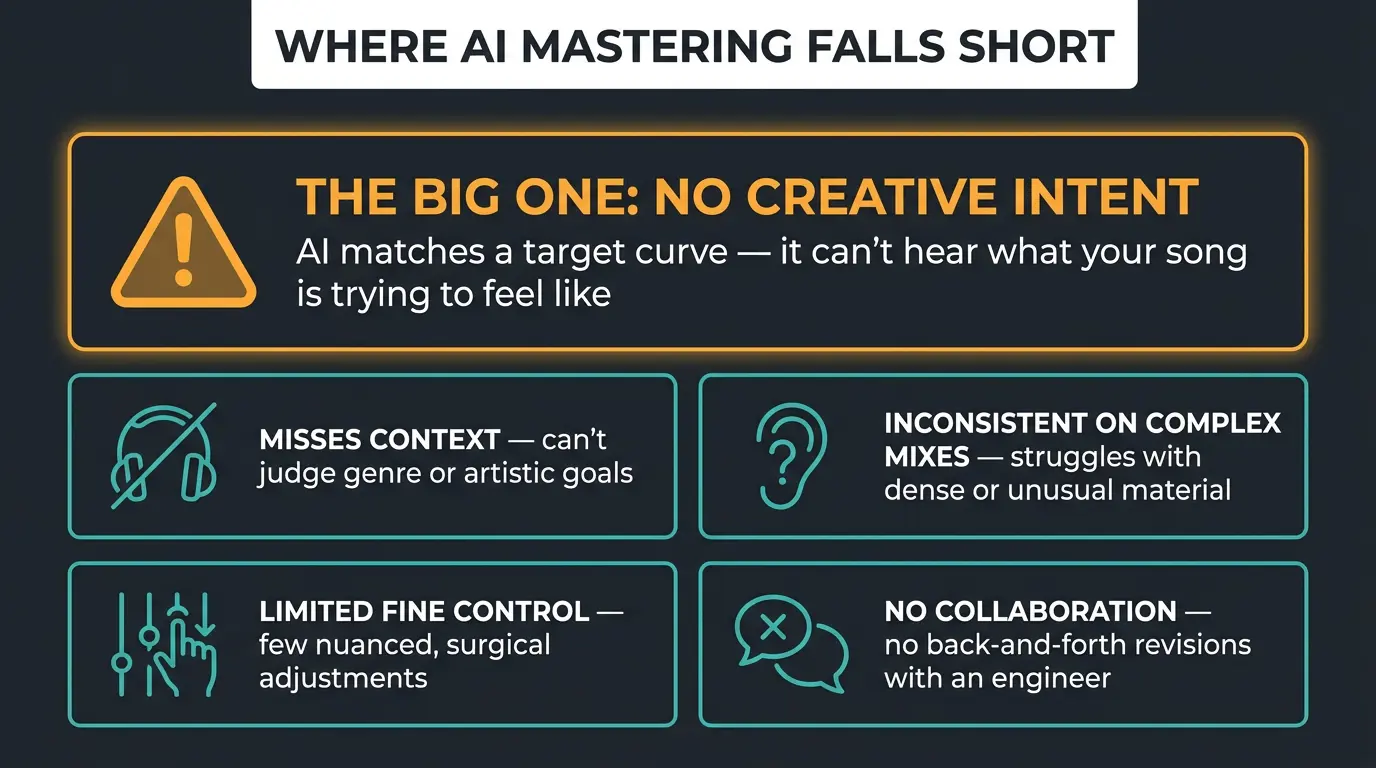
None of this is doom and gloom — it's just where the limits are. Once you know them, you know when to trust the tool and when to bring in a human. Here's the big one first, then the rest.
It can't fix your mix
This is the single most important thing to understand. Mastering works on one stereo file — the two channels of your bounced mix. That means it physically cannot pull up a buried vocal, un-clash your kick and bass, or clear out a muddy low end. Those problems live inside the mix, and by the time it's a stereo file, they're baked in.
A preset makes the whole thing louder and a touch brighter. It does not balance anything. If two elements are fighting, they'll fight louder.
Here's the twist: AI actually depends on a good mix more than a human does. A skilled engineer can nudge things a little to compensate, but the model just enhances what you feed it. So make sure you get the mix right first. If you want a checklist, our guide on preparing your mix for mastering walks through it.
It misses context and intent
AI is great at standardizing and enhancing a track that's already in good shape. Where it falls apart is judgment. It recognizes patterns; it doesn't understand music.
Quick example. The AI can hear that something is out of tune, but it doesn't know what key the song is in, so it can't actually help. Ask it to make the drums "hit harder" and it just piles on low end — when hitting harder usually means working transients, parallel compression, or midrange punch. It reaches for the obvious lever every time.
It'll also happily "fix" imperfections you left in on purpose. That raw edge you fought for? The model might smooth it right off, because it has no idea it was intentional.
It flattens dynamics and skips customization
Because these tools optimize for the loudness number rather than the right feel, some material gets squashed. Pop can end up over-compressed. Acoustic and vocal tracks can lose the dynamics that made them breathe in the first place. It's not that the result is broken — it's that the tool chased a target instead of a vibe.
Customization is limited too. BandLab gives you presets and an intensity slider, but no real tonal control and no reference-track matching. Higher-tier tools now build their whole workflow around dropping in a reference song and matching it. That's a tradeoff you're accepting for speed and simplicity, not a failure — just know it's part of the deal.
When AI mastering is good enough
Plenty of the time, it's genuinely enough. Demos, singles, quick tests, high-volume releases, and tracks that are already well mixed — AI handles all of that fine. If your mix is solid, you'll often be happy with what comes out.
With that being said, for the songs you truly care about, a human still wins on the things that require judgment: how a vocal translates across systems, and the genre-specific calls that don't come down to a number. If you want to compare a paid automated service head to head, our LANDR mastering review gets into that.
My honest recommendation is to treat AI as a first pass or a reference, not the final word. A hybrid workflow works great — master with BandLab for speed, and bring in an engineer for the final pass when the project actually demands it. And the trajectory is real: these tools are better this year than they were three years ago, and that's not slowing down.
Two loudness myths worth clearing up
First myth: louder is automatically better, so master as hot as possible. Louder can sound better when it's done right — I'll defend that any day. But the -7 LUFS arms race is over. Master too hot and Spotify just turns it down on playback, so your squashed "loud" master ends up quieter and worse than a track done to the right level in the first place. You lose the war by trying too hard to win it.
Second myth: -14 LUFS is a hard production rule you must hit. It's a playback reference, not a target you master to. Listeners can even override it — Spotify offers Quiet, Default, and Loud settings, so the number moves depending on how someone's listening. You can't master to a value the listener gets to pick. Aim for the right feel, keep an eye on the meters, and stop chasing a single digit. Less is more. For the full rundown, see our guide on mastering for streaming services.
Frequently Asked Questions (FAQs)
Is BandLab AI mastering free?
Yes, BandLab AI mastering is free and runs in your browser with no install. You upload your stereo mix, pick a preset, and download the result. There's a paid membership with extra presets and an intensity slider, but the core free mastering has stayed genuinely free and stable for years.
Can AI mastering fix a bad mix?
No, AI mastering can't fix a bad mix. It works on one finished stereo file, so it can't pull up a buried vocal, separate a clashing kick and bass, or clean a muddy low end. A preset just makes everything louder and brighter. Fix the mix first, then master.
Is BandLab mastering good enough for a real release?
For many releases, yes — BandLab is good enough for demos, singles, high-volume drops, and tracks that are already well mixed. For songs you truly care about, a human engineer still makes better calls on vocal translation and genre-specific decisions. Use it as a first pass and judge with your own ears.
What LUFS should I master to for streaming?
Aim for roughly -14 LUFS integrated for most streaming, but treat it as a reference, not a hard rule. Streaming platforms normalize playback, and listeners can override the level with Quiet, Default, or Loud settings. Master for the right feel and dynamics rather than chasing one exact number.
Is AI mastering better than a human mastering engineer?
No, a human still wins on judgment — reading intent, catching subtle problems, and making genre-specific calls AI misses. AI is faster, free, and reliable at loudness targeting on a good mix. The best approach is often hybrid: AI for a quick pass, a human for the releases that really matter.
Final Thoughts
AI mastering has quietly gotten good. If your mix is solid and the song is a demo, a single, or one of many, BandLab will get you a clean, loud, streaming-ready master in seconds — and there's no shame in that.
Just remember what it can't do. It can't fix your mix, and it can't read your intent. Get the mix right, use the tool for what it's great at, and bring in a human when the song earns it. Trust your ears over any preset name or loudness number — that part never changes.
Some of the links within this article are affiliate links. These links are from various companies such as Amazon. This means if you click on any of these links and purchase the item or service, I will receive an affiliate commission. This is at no cost to you and the money gets invested back into Audio Sorcerer LLC.