A monitor controller sits between your interface and your speakers, and it does a few simple jobs really well: switching sources, switching speakers, feeding your headphones, and giving you one good volume knob to grab.
You don't need analog gear or a big console to benefit from one. Even if you mix entirely in the box, a real volume knob beats dragging a fader with your mouse, and instant speaker switching builds better monitoring habits. It's about convenience, and honestly, about trusting what you hear.
We kept this list to five real options at different levels of complexity. Some do everything. One just does volume, and does it beautifully. The right pick depends on how much you're juggling, so trust your own workflow here.
TABLE OF CONTENTS
What a monitor controller actually does for you
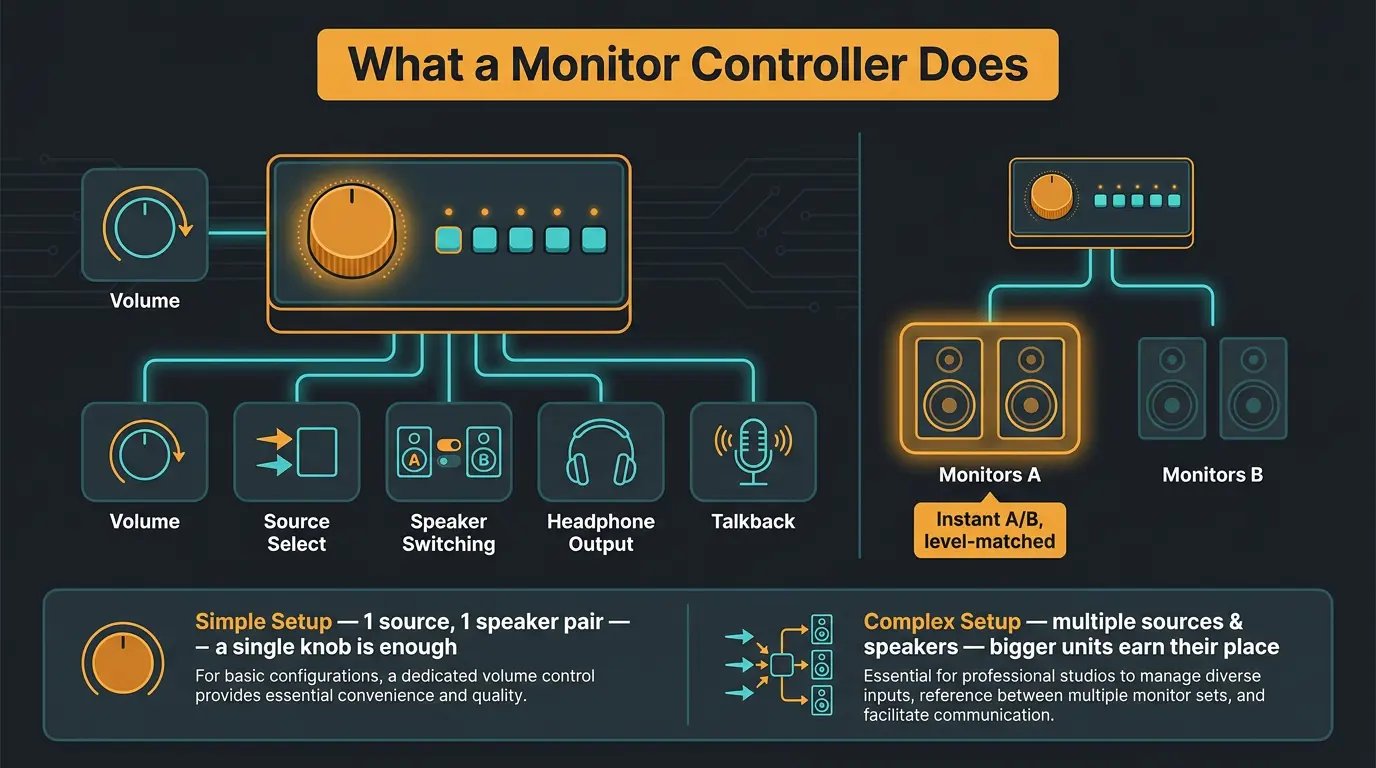
At its core, a monitor controller handles a handful of things: volume, source selection, speaker switching, headphone outputs, and sometimes talkback. That's it. The fancier units just do more of each.
A scenario where this really shines: say you're mixing on two pairs of monitors and want to A/B them instantly. One button press and you're hearing your mix on a different set of speakers, matched in level, no reaching around the back to swap cables. That kind of quick comparison is how you catch problems you'd otherwise miss. If you're deciding between speaker types in the first place, our breakdown of near field vs far field monitors is worth a read.
Here's the honest part, though: not everyone needs the deluxe unit. If you've got one pair of speakers and one source, less is more. A simple knob will make you happier than a hub full of buttons you never touch. The more sources and speakers you juggle, the more the bigger units earn their spot on your desk.
PreSonus Monitor Station V2

#1
Best Overall
PreSonus Monitor Station V2
The Monitor Station V2 is the do-everything desktop hub. It handles input and output routing, source selection, an S/PDIF digital input, and a built-in talkback mic. But the headline feature is the four headphone outputs, each with its own level control.
That's what makes this the pick for a studio where multiple people need their own headphone mix. Tracking a band, working with a client, running a session with an assistant, you can hand everyone their own volume without a separate headphone amp cluttering the desk.
Honest take: it's not the newest thing on the block. But it's still a current, well-stocked product, and it covers the widest range of needs of anything here. If you want one box that quietly handles a busy room, this is it.
Pros
- Four headphone outputs, each with independent level control
- Handles multiple sources and outputs in one box
- S/PDIF digital input and built-in talkback mic
- Great fit for studios where several people need their own headphone feed
Cons
- Not a USB interface, so it's an extra box in the chain
- More features than a simple one-speaker setup will ever use
Mackie Big Knob 4x3 Studio Monitor Controller

#2
Runner-up
Mackie Big Knob 4x3 Studio Monitor Controller
This is the Big Knob Studio+, and its trick is that it's a monitor controller and a USB audio interface in one box. You get switching for four input sources and three pairs of speakers, output trim controls, two Onyx mic preamps, two headphone outputs, and talkback.
A scenario where that combo pays off: you're setting up a project studio and you'd otherwise be buying a monitor controller and an interface separately. This does both jobs from one unit, which means fewer cables, less desk clutter, and one thing to update instead of two.
Honest take: the value here is real if you actually need both roles. If you already own an interface you love, you're paying for something you don't need. But for someone building out a room from scratch, this is a smart way to knock out two purchases at once.
Pros
- Monitor controller and USB interface in a single unit
- Switches four input sources and three pairs of speakers
- Two Onyx mic preamps plus talkback
- Fewer boxes and cables on the desk
Cons
- Redundant if you already own an interface you like
- Only two headphone outs if you track multiple people
Behringer Studio XL Monitor Controller

#3
Top Pick
Behringer Studio XL Monitor Controller
The Studio XL is feature-heavy for this segment. You get two Midas mic preamps with +48V phantom power, a 192kHz 2x4 USB interface, and switching between three monitors with individual level adjustment on each.
The part that stands out is the volume control. It's an extra-large VCA knob running on its own high-precision amp circuit, separate from the rest of the signal path. If you're the type who wants a big, satisfying knob for level and a stack of I/O behind it, this is aimed right at you.
Honest take: this is the loaded option for people who want a lot in one box and that oversized precise volume control front and center. It's a whole lot of connectivity for one desktop unit, and if you use all of it, it earns its footprint.
Pros
- Two Midas mic preamps with +48V phantom power
- 192kHz 2x4 USB interface built in
- Large VCA volume knob on its own high-precision amp circuit
- Switches three monitors with individual level control
Cons
- More I/O than many home setups will use
- Takes up real desk space
Audient Nero Desktop Monitor Controller

#4
Top Pick
Audient Nero Desktop Monitor Controller
The Nero is the audio-quality pick. It uses David Dearden-designed circuitry, drawing on Audient's monitor control heritage from their recording consoles. This one isn't chasing the most I/O. It's chasing the cleanest, most precise level control you can get.
The measured performance backs that up. Sound On Sound noted channel matching within 0.1dB across the entire range, inaudible 0.25dB steps, and up to 105dB of attenuation. In plain terms: as you turn it down, both speakers stay perfectly matched, and the steps are so fine you'll never hear them jump. You can read the full Sound On Sound review of the Audient Nero for the deep dive.
Honest take: if you care most about a transparent, pristine signal path and precise level control, this is the one. It won't replace your interface, and it doesn't try to. Trust your ears here. On a quiet reference listen, a clean path like this is the kind of thing you feel more than you consciously hear.
Pros
- David Dearden-designed circuitry with console heritage
- Channel matching within 0.1dB across the range
- Inaudible 0.25dB level steps and up to 105dB attenuation
- Transparent, precise signal path
Cons
- No built-in audio interface
- Focused on level control rather than piles of I/O
Mackie Big Knob 2x2 Studio Monitor Controller

#5
Lowest Price
Mackie Big Knob 2x2 Studio Monitor Controller
This is the smaller Big Knob Studio, the entry point into the range. You get 96kHz/24-bit recording, dual Onyx preamps, built-in talkback, three sources including USB playback, and switching between two pairs of monitors. There's independent gain trim on inputs and outputs, plus two headphone outs each with separate level control.
One thing to flag honestly: the naming can trip you up. Mackie's own current spec chart lists this model as 3x2 for source and monitor with 2x2 USB I/O, so if the label reads a little differently, that's why. Same box, just spec-sheet math.
This is the simplest, most direct way into a proper monitor control setup for a smaller room. If you've got one interface, a couple pairs of speakers, and you want a real knob and clean switching without a mountain of features, make sure you give this one a look. Pair it with a solid set of studio monitors that punch above their weight and a small room comes together nicely.
Pros
- Simplest, most direct way into the Big Knob range
- 96kHz/24-bit recording with dual Onyx preamps
- Switches two pairs of monitors with independent trim
- Two headphone outs with separate level control
Cons
- Fewer sources and speaker pairs than the bigger units
- Naming and spec labels can be confusing
ART Pro Audio MyMonitor II
#6
Top Pick
ART Pro Audio MyMonitor II
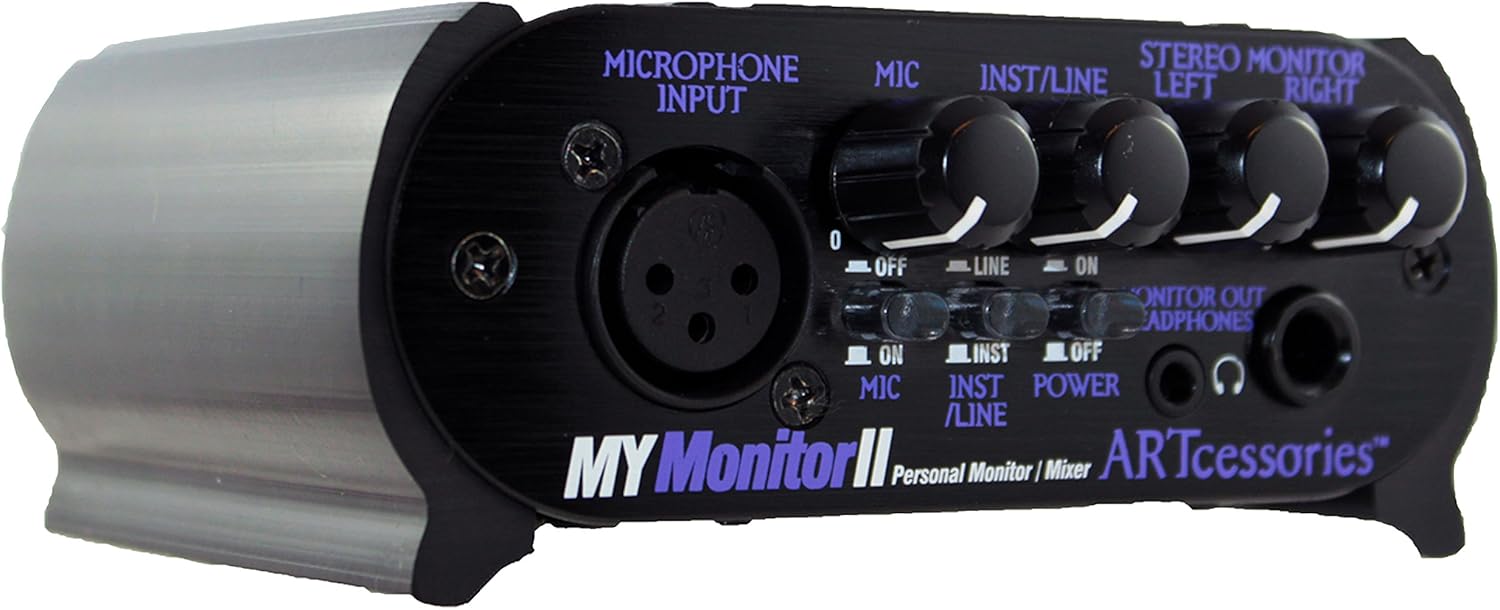
The MyMonitor II is a compact personal monitor mixer that lets you build your own headphone mix without leaning on the FOH engineer. You blend three sources — your mic, an instrument, and a stereo monitor feed — then pass everything clean to the PA through buffered thru outputs. The technical side holds up: independent bench testing measured very low added distortion and noise, plus generous mic headroom you'd have to work hard to overload. Sound On Sound called it simple and very effective, and that tracks — it's a well thought-out box that does exactly what it says.
Pros
- Full control of your own monitor mix, on stage or in the studio
- Dual 1/4-inch and 1/8-inch headphone outputs, so no adapter hunting for in-ears
- Runs on battery for 25-plus hours (alkaline) or 80-plus (lithium), great for mobile use
Cons
- Doesn't generate phantom power itself — it only passes it from a console or interface
- The mic thru is buffered, not a true passive pass-through, and clips a hair earlier than you might expect
| Model | Sources / Speakers | Interface | Headphone Outs | Best For |
|---|---|---|---|---|
| PreSonus Monitor Station V2 | Multi-source with source select | No | 4 | Studios where several people need their own headphone mix |
| Mackie Big Knob 4x3 Studio+ | 4 sources / 3 speakers | Yes (USB) | 2 | Project studios wanting control and an interface in one box |
| Behringer Studio XL | 3 speakers | Yes (192kHz USB) | 2 | Loaded I/O with a big, precise VCA volume knob |
| Audient Nero | Transparent level control | No | 1 | Cleanest, most precise level control and signal path |
| Mackie Big Knob 2x2 Studio | 3 sources / 2 speakers | Yes (96kHz USB) | 2 | The simplest way into monitor control for a smaller setup |
| ART Pro Audio MyMonitor II | 2 sources / 1 XLR, 1 1/4" | No | 2 | Precise control of their monitor mix on stage or in the studio |
Frequently Asked Questions (FAQs)
Do I need a monitor controller if I mix in the box?
You don't strictly need one, but it makes in-the-box mixing better. A real volume knob beats dragging a fader, and instant speaker or headphone switching helps you catch problems faster. It's about convenience and better monitoring habits, not analog worship. Plenty of people mix great without one.
What's the difference between a monitor controller and an audio interface?
An interface converts audio between your computer and the analog world; a monitor controller manages your speakers, sources, headphones, and volume. Some units, like the Mackie Big Knob Studio models and the Behringer Studio XL, do both in one box, which is handy if you're building a setup from scratch.
Do monitor controllers hurt sound quality?
A good one won't hurt your sound in any way you can hear. Units like the Audient Nero measure channel matching within 0.1dB and level steps too fine to notice. A cheap, poorly built controller could add noise or throw off channel balance, so the quality of the box matters more than the concept.
What features actually matter when choosing a monitor controller?
Focus on how many sources and speaker pairs you switch, how many headphone feeds you need, and whether you want a built-in interface. Everything else is secondary. Less is more here, so don't pay for buttons you'll never press. Match the box to your actual workflow, not the spec sheet.
What's the difference between a passive and active monitor controller?
A passive controller uses no power and just attenuates the signal, keeping the path simple and clean; an active one is powered and can add features like preamps, talkback, and headphone amps. Passive is great for pure volume control, while active makes sense once you need routing, headphones, and extras.
Final Thoughts
There's no single best monitor controller here, just the right one for how you work. If you run a busy room with a lot of headphone mixes, the PreSonus Monitor Station V2 is hard to beat. If you want the cleanest possible level control and don't need piles of I/O, the Audient Nero is the one. And if you're keeping things simple, the smaller Big Knob Studio does exactly enough.
Figure out how many sources and speakers you actually juggle, then buy for that. Once you've got the switching sorted, a good pair of monitor stands is the next thing worth dialing in for your room.
Some of the links within this article are affiliate links. These links are from various companies such as Amazon. This means if you click on any of these links and purchase the item or service, I will receive an affiliate commission. This is at no cost to you and the money gets invested back into Audio Sorcerer LLC.