A great pair of studio monitors sitting on a bad surface won't tell you the truth. That's the whole thing in one sentence.
Vibration coupling into your desk, reflections bouncing off the surface, tweeters sitting below ear level — any of those will color what you hear before the sound ever reaches you. You end up mixing against a lie, then wondering why your low end falls apart in the car.
Stands fix that. They stabilize the monitor, get the tweeter to the right height, and decouple it from whatever it's sitting on. There's no single right answer here — it depends on your room and your monitors. So here are five worth your time, with honest pros and cons for each.
TABLE OF CONTENTS
What actually matters in a monitor stand
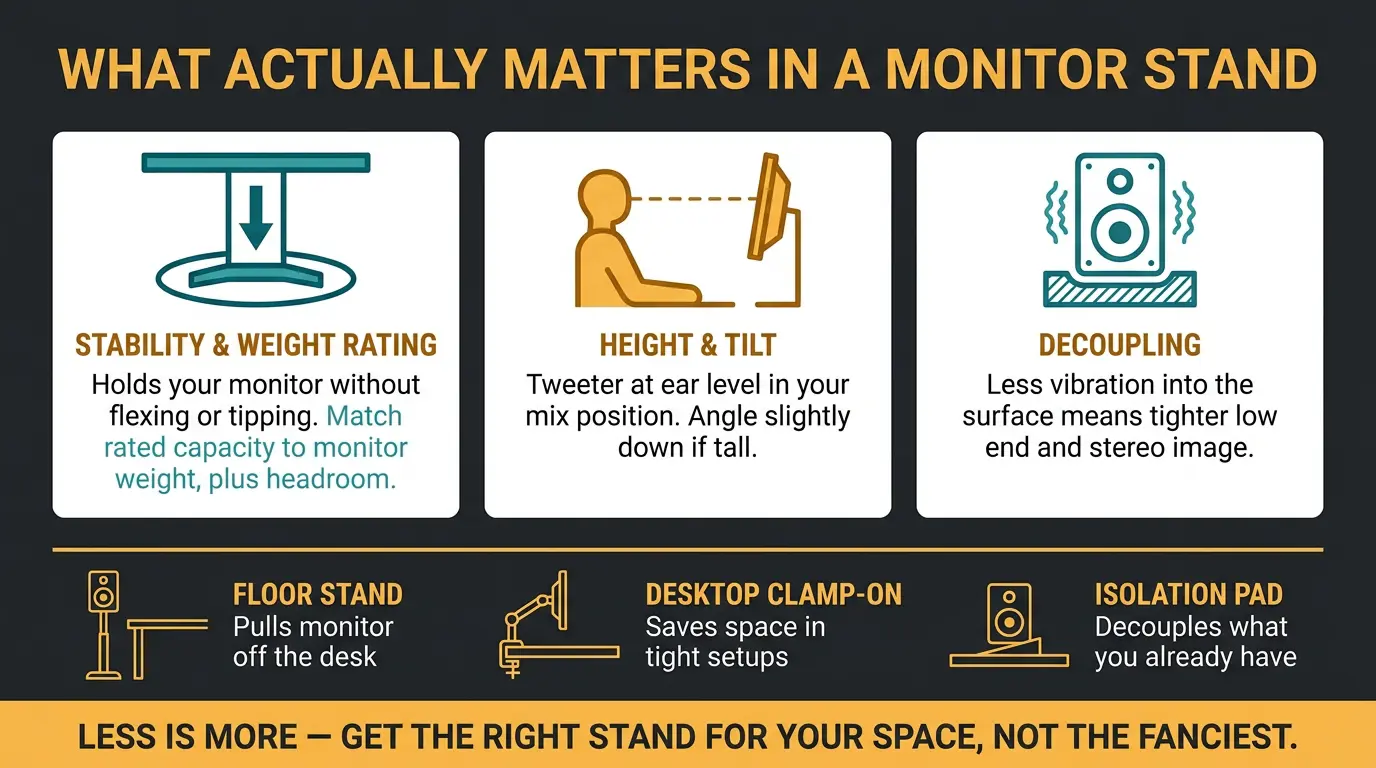
Three things really matter, and the rest is mostly noise.
- Stability and weight rating. The stand has to hold your monitor without flexing, leaning, or tipping. Check the rated capacity against your actual monitor weight, with a little headroom.
- Height and tilt. You want the tweeter at ear level when you're seated in your mix position. A stand that gets you there — and lets you angle slightly down if you're tall — is doing its job.
- Decoupling. The less vibration that travels from the speaker into the surface and back into the room, the tighter your low end and stereo image read.
Floor stands, desktop clamp-ons, and isolation pads each solve a different problem. A floor stand pulls the monitor away from your desk entirely. A clamp-on saves space in a tight setup. An isolation stand sits on top of what you already have and decouples it.
Less is more here. You don't need the fanciest stand on the shelf — you need the right one for your space. A stand that's overkill for your room is just an expensive way to take up floor area.
On-Stage SMS6000 Monitor Stands

#1
Best Overall
On-Stage SMS6000 Monitor Stands
If you want your monitors fully off the desk and planted in a proper listening position, the On-Stage SMS6000 (current SKU SMS6000-P) is the reliable workhorse. The wide 18-inch triangular bases support powered or unpowered speakers up to 90 pounds — and quick honesty note, a few retailers list it as 100 lbs, but I'd stick to 90 to be safe.
Height adjusts from 36.5 to 54 inches with pin-locking positions every 4 inches, so dialing in tweeter height is straightforward. There's a wire holder to keep cables tidy, and three leveling spikes that help it sit stable on carpet.
A scenario where this shines: a dedicated mixing room where you want the monitors decoupled from the desk entirely, away from desk reflections and clutter. It's sold per stand, though, so order two.
Pros
- Solid, stable build with a wide triangular base
- High 90 lb weight rating handles most monitors with headroom
- Generous 36.5-54 inch height range with pin-lock positions
- Built-in cable management and leveling spikes for carpet
Cons
- Takes up floor space you may not have
- Isolation is basic compared to dedicated isolation stands
- Sold as singles, so factor in buying a pair
Ultimate Support MS-90 Studio Monitor Stands

#2
Runner-up
Ultimate Support MS-90 Studio Monitor Stands
The MS-90 is the cleaner-looking floor option, and it's now part of the MS MKII Series with current Revision A models. It's a column stand built from 6000 series aluminum with internal cable channels, so your wires run inside the stand instead of dangling down the back.
Capacity is 75 pounds, and it comes in fixed 36-inch and 45-inch heights, in black or red. The whole MKII line includes sonic isolation and decoupling components top to bottom, so you're getting built-in decoupling without bolting on extra pads.
One nice freshness touch: the current models expand with the MS-80B desktop stands if you want to grow the setup later. If you care about the look and want cables hidden with isolation baked in, this is the pick.
Pros
- Internal cable channels keep wiring hidden and clean
- Built-in sonic isolation and decoupling throughout the MKII line
- Black or red color options
- Expandable with MS-80B desktop stands
Cons
- Fixed-height variants rather than fully adjustable
- Lower weight rating than the On-Stage SMS6000
Gator Frameworks Desktop Clamp-On Monitor Stands

#3
Top Pick
Gator Frameworks Desktop Clamp-On Monitor Stands
No room for floor stands? This is your answer. The Gator Frameworks clamp-on (model GFWSPKSTMNDSKCMP, sold as a pair) clamps to a desk up to 2.25 inches thick and lifts your monitors off the surface, which cuts down desk reflections and frees up workspace.
Each one has a 12x9 platform with a soft EVA-lined surface, powder-coated steel construction, and a max capacity of 60 pounds. You get tilt up to 15 degrees and a 3-year warranty, which is a nice sign of confidence in the build.
Honest note on specs: the height range listings vary a little across retailers — some say roughly 10 to 13.5 inches, others a touch more — so check the exact listing you're buying. A scenario where this shines: a tight desk setup where floor stands just aren't happening.
Pros
- Saves desk space by clamping to the edge
- Lifts monitors off the surface to reduce reflections
- Up to 15 degrees of tilt adjustment
- Strong 3-year warranty and comes as a pair
Cons
- Needs a desk edge it can actually clamp to
- Limited height range compared to floor stands
IsoAcoustics Iso-155 Speaker Isolation Stands

#4
Top Pick
IsoAcoustics Iso-155 Speaker Isolation Stands
This one's a different animal — it's not a floor stand, it's an isolation stand that sits on top of your desk or existing stand to decouple the monitor. The ISO-155 is the current-generation ISO Stands design, updated from the older ISO-L8R series with a lower profile and improved isolators.
It measures 6.1 inches wide by 7.5 deep, handles up to 40 pounds per pair, and gives you 14 height and tilt variations to bring your tweeters to ear level. Let's give it a listen on something with real low end and you'll hear what it's doing.
I'll be straight with you: the isolation gains are real, but they can be subtle depending on your setup. Listen for tightened low end and sharper stereo focus rather than a night-and-day transformation. Sizing matters too — if your monitors are heavier, point yourself at the 2024 ISO-200 (up to 60 lbs), and for compact monitors there's the smaller ISO-130.
Pros
- Proven, well-regarded isolation design
- Tightens low end and sharpens stereo imaging
- 14 height and tilt variations for precise placement
Cons
- 40 lb limit, so heavier monitors need the ISO-200
- Gains can be subtle in an already well-treated room
Gearlux Studio Monitor Stands

#5
Lowest Price
Gearlux Studio Monitor Stands
If you're setting up your first monitoring position and just need something to get the speakers off the desk, the Gearlux stands (SKU SMSPAIR) are an easy entry point. They're steel, come as a pair, and offer four pin-locked height positions from 28 to 42.5 inches.
Each one has a padded 9x9 metal plate rated up to 125 pounds and triangle bases with optional floor spikes. The stated capacity is high on paper, but I'd take it with a grain of salt.
Here's the honest part. Stock is spotty — some listings are open-box only — and a few users report uneven assembly or a slight lean with heavier monitors on top. So make sure you verify it's actually in stock before you commit, and don't overload them. For lighter monitors and a starter rig, they'll get you going.
Pros
- Friendly entry point for a first monitoring setup
- High stated weight capacity on paper
- Four height positions to dial in ear level
- Comes as a pair
Cons
- Build quality is basic
- Assembly can lean with heavier monitors
- Stock availability is inconsistent
| Model | Type | Max Weight | Height/Tilt |
|---|---|---|---|
| On-Stage SMS6000 | Floor stand | 90 lbs | 36.5-54 in, pin-lock every 4 in |
| Ultimate Support MS-90 | Floor column | 75 lbs | 36 or 45 in fixed |
| Gator Frameworks Clamp-On | Desk clamp | 60 lbs (pair) | ~10-14 in, 0-15 deg tilt |
| IsoAcoustics ISO-155 | Isolation stand | 40 lbs | 14 height/tilt variations |
| Gearlux | Floor stand | 125 lbs | 28-42.5 in, four positions |
Frequently Asked Questions (FAQs)
Do studio monitor stands actually make a difference?
Yes, monitor stands make a real difference because they stabilize the speaker, get the tweeter to ear level, and decouple the monitor from vibrating surfaces. That tightens your low end and sharpens your stereo image. In a treated room the change can be subtle, but it's almost always worth it.
How high should monitor stands be?
Monitor stands should put the tweeter at ear level when you're seated in your mix position. That's the target, not the top of the cabinet. If your tweeter is the lower driver, adjust for that specific driver. A slight downward tilt is fine if the stand sits taller than your ears.
Do I need isolation pads if I already have stands?
Not always, but isolation pads or isolation stands can still help even on floor stands, since they reduce vibration coupling into the surface. If your low end feels boomy or your imaging feels smeared, adding isolation is worth trying. In a solid, decoupled setup the gains may be subtle.
Floor stands, desktop clamp-ons, or isolation stands — which is right for me?
Choose floor stands if you have the space and want monitors fully off the desk, clamp-ons if your desk is tight on room, and isolation stands if your monitors already sit well but you want tighter low end and imaging. It comes down to your room and how much desk space you've got.
How much weight capacity do I need for monitor stands?
Pick a stand rated above your monitor's actual weight, with a little headroom to spare. Check your monitor's spec sheet, then match it. Don't run a stand at its absolute max — that's where leaning and instability creep in, especially on lighter, lower-priced stands.
Final Thoughts
Your monitors are only as honest as the thing holding them up. Get the tweeter to ear level, kill the vibration, and keep it stable — that's the whole game.
If you've got the floor space, the On-Stage SMS6000 is the one I'd reach for. Tight room? The Gator clamp-ons. Already happy with your monitors and just chasing tighter imaging? The IsoAcoustics ISO-155, sized to your speaker weight. Pick the one that fits your space, not the one with the longest spec sheet. Trust your ears from there.
Some of the links within this article are affiliate links. These links are from various companies such as Amazon. This means if you click on any of these links and purchase the item or service, I will receive an affiliate commission. This is at no cost to you and the money gets invested back into Audio Sorcerer LLC.