A vocoder takes your voice — the modulator — and uses it to shape a synth — the carrier. That's the classic robot-vocal sound, and a whole lot more once you start pushing it. If you've ever wanted your voice to sing a chord or turn into a talking synth pad, this is the tool.
Every plugin on this list runs in the box and sounds great doing it. The old "you need real hardware for this" argument doesn't apply here. These models hold their own next to the classic units they're chasing.
I've ranked these five, but the ranking depends on what you actually need. A sound-design monster isn't the right pick if you just want a quick classic tone. Read what each one does, then trust your ears.
TABLE OF CONTENTS
How we picked these vocoder plugins
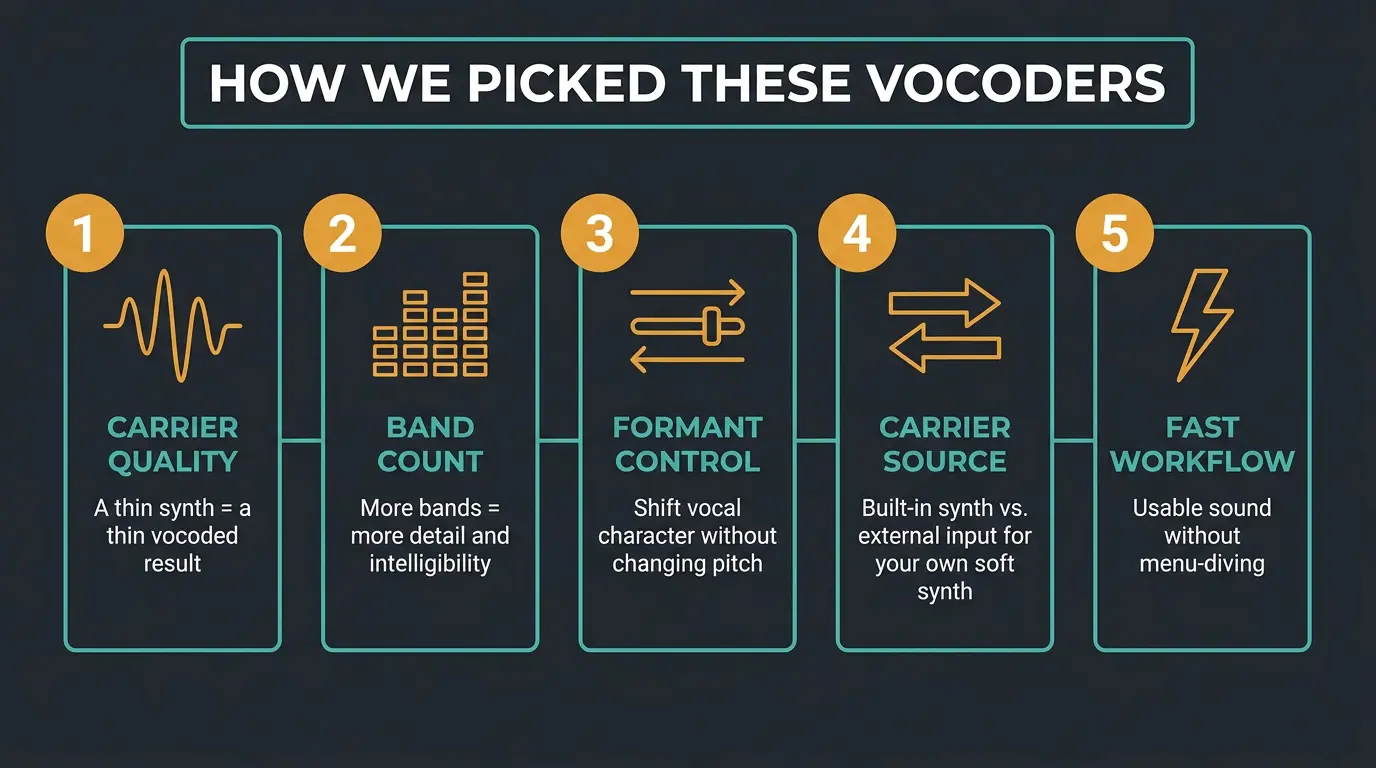
A vocoder is only as good as the synth driving it. The carrier is what your voice shapes, so if the synth sounds thin, the vocoded result sounds thin. That's the first thing I listen for.
After that, it's about band count and formant control. More bands generally means more detail and intelligibility, and good formant shifting lets you move the character of the voice around without changing the pitch. Both of those decide how expressive the thing feels.
Workflow matters too. Some of these have a built-in synth carrier that you play over MIDI, and some let you feed in your own signal. That distinction is a big deal depending on how you like to work — if you want to vocode with your favorite soft synth, an external carrier input is the feature you care about. The last thing I weighed was how fast you can get a usable sound without menu-diving.
Antares Auto-Tune Vocodist Vocoder Plugin
#1
Best Overall
Antares Auto-Tune Vocodist Vocoder Plugin
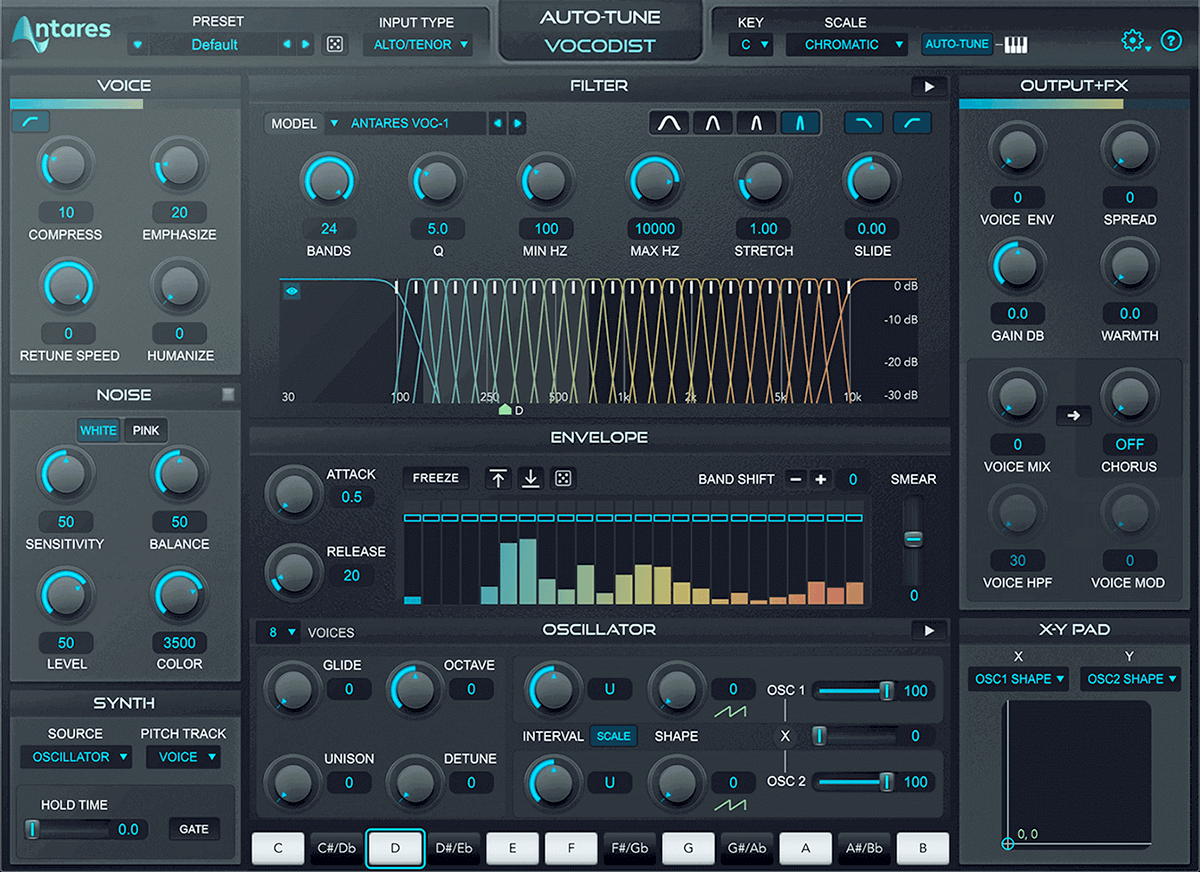
Vocodist is the only vocoder I know of with Auto-Tune built right in. That means you can tune the vocal and vocode it without ever leaving the plugin, which is a genuinely handy workflow if pitch correction is already part of your process. No bouncing, no routing headaches.
It gives you replicas of iconic analog vocoder models plus Antares' own VOC-1 for a more modern sound, so you can chase a vintage vibe or something cleaner and current. Runs as VST3, AU, and AAX.
One correction worth making: the old line that this was subscription-only isn't true anymore. It's now available as a standalone perpetual purchase from the major retailers as well as through Auto-Tune Unlimited. If you want to read a deeper breakdown, Sound On Sound's review of Vocodist is a solid reference.
A scenario where this shines: you already live in the Auto-Tune world and want tuning and vocoding in one box. If that's you, there's nothing else quite like it. And if you're newer to pitch correction in general, our guide on how to use Auto-Tune pairs nicely with this one.
Pros
- Only vocoder with Auto-Tune built in
- Replicas of classic analog vocoders plus the modern VOC-1
- Now available as a standalone perpetual purchase, not just a subscription
- Tuning and vocoding in a single plugin saves real time
Cons
- Best value comes if you're already in the Auto-Tune ecosystem
- Less of a deep sound-design tool than some others here
Zynaptiq Orange Vocoder IV Plugin
#2
Runner-up
Zynaptiq Orange Vocoder IV Plugin
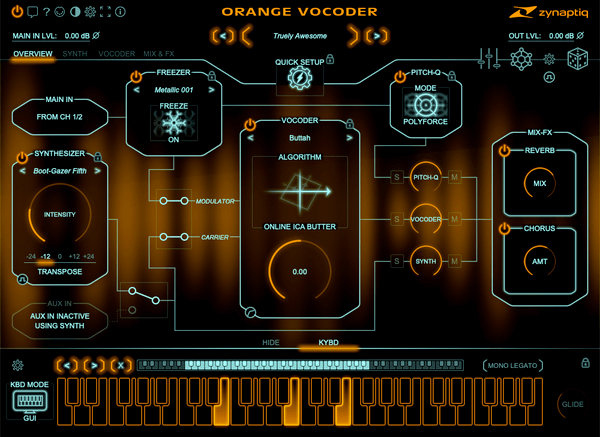
If you want to go way past the classic robot voice, this is the one. Orange Vocoder IV gives you 24 vocoding and cross-synthesis modes, and each one has its own character. That's a lot of territory to explore, from familiar vocoder tones into genuinely strange resynthesis.
The vocoder section handles formant shifting and stereo operation across all 24 algorithms, the synth section was rewritten, and there's a MIDI-controlled pitch quantizer with five modes — including a zero-latency pitch enforcer. It's a deep box, and it rewards digging in.
It's also actively maintained, which I appreciate. The latest 4.0.6 update was a free fix for load and crash issues on older pre-AVX2 CPUs, so Zynaptiq is still looking after it. You'll need an iLok account, though no hardware dongle is required if your machine's online.
A scenario where this shines: sound designers and producers who treat the voice as raw material and want to warp it into something new. If that's your idea of fun, this is your playground.
Pros
- 24 vocoding and cross-synthesis modes with real variety
- Formant shifting and stereo operation across every algorithm
- Rewritten synth section and a flexible pitch quantizer
- Actively maintained with free updates
Cons
- Deeper than a lot of folks need for basic vocoding
- Requires an iLok account
Softube Vocoder Plugin
#3
Top Pick
Softube Vocoder Plugin
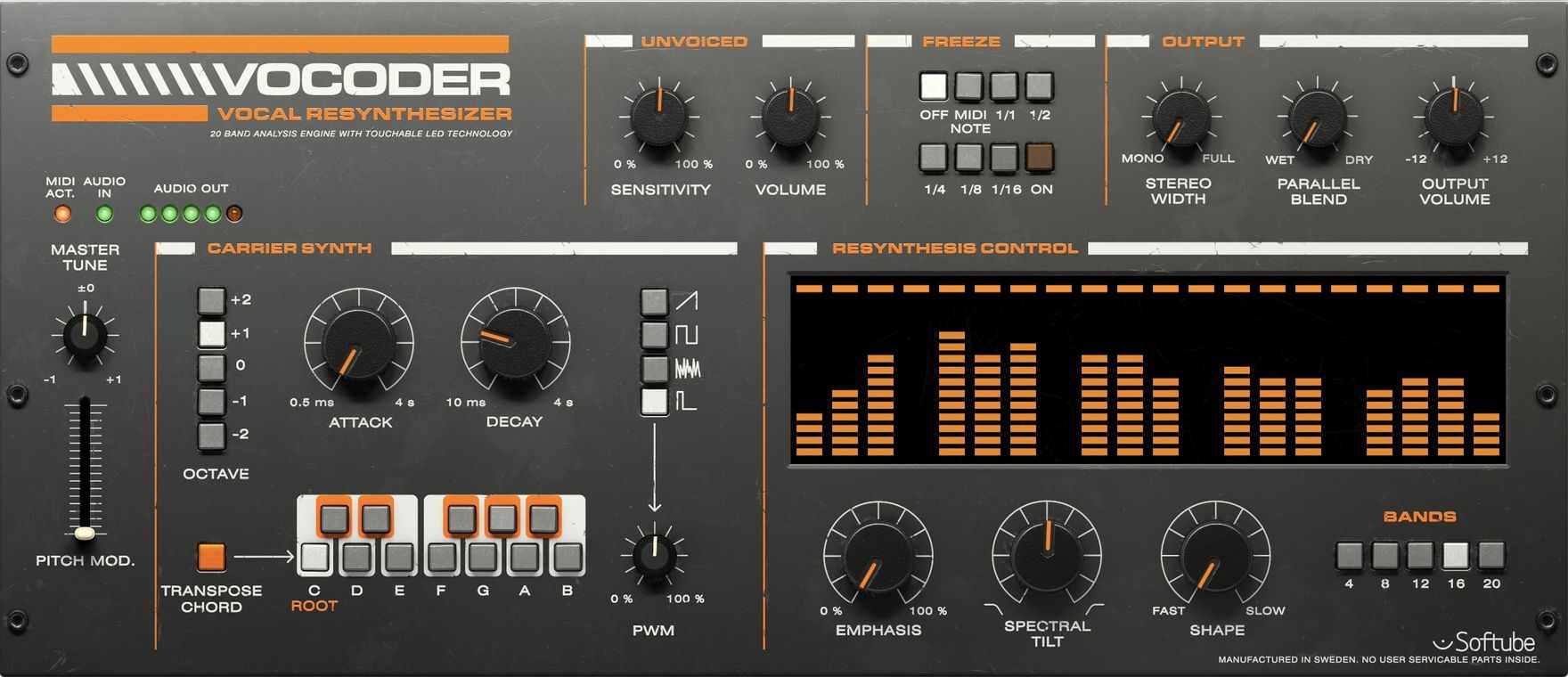
The Softube Vocoder is the smooth, easy-to-use, analog-flavored pick. It has a built-in six-voice carrier synth with MIDI, four selectable waveforms, and an Attack Hold Decay envelope, so you can be up and running with a classic tone in a couple of minutes.
Where it gets interesting is the extras. There's an Unvoiced section for plosives and consonants that keeps things intelligible, Spectral Tilt for tone shaping, a variable band count (4, 8, 12, 16, or 20), and a Freeze section for holding formants in a rhythmic, sustained way. It started life as a UAD exclusive back in 2018 and later came out native.
Being honest here: reviews love the smooth sound and the Unvoiced and Freeze controls, but they flag that the synth flexibility is limited and the low end can feel a little weak. That tracks with my read of it — it's a specialist in a sound, not a do-everything box.
A scenario where this shines: you want dialed-in classic vocoder tones fast, without a lot of menu-diving. Less is more, and this one leans into that.
Pros
- Smooth, classic analog-style sound
- Unvoiced and Freeze sections add real usable character
- Variable band count and Spectral Tilt for quick tone shaping
- Fast to a usable sound
Cons
- Limited synth flexibility
- Weaker low-end response
Arturia Vocoder V Plugin
#4
Top Pick
Arturia Vocoder V Plugin
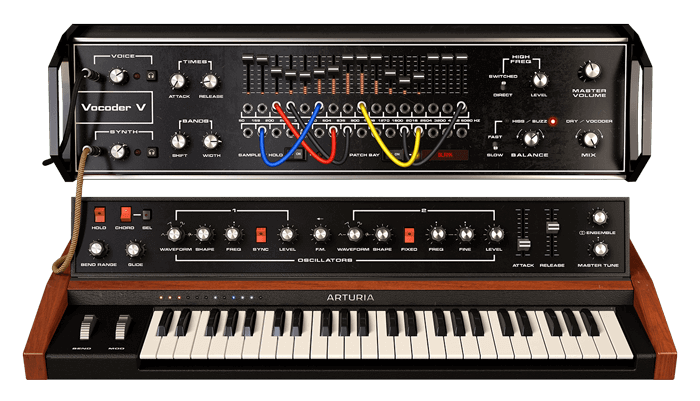
Vocoder V is the genuine newcomer on this list, arriving as part of Arturia's V Collection X cycle. It's modeled on Bob Moog's original 1979 16-band vocoder using the classic Moog ladder filter, and reviewers say it nails that vibe — which is high praise, because that's one of the best-sounding vocoders ever built.
But calling it just a vocoder undersells it. This is a full toolkit: a 16-channel vocoder, a dual-oscillator synth with FM and waveshaping, chord and glide, an ensemble section, external voice input with pitch tracking, an integrated sample player with 700-plus samples and 250 presets, patch-bay band rerouting, and 11 effect types. Standalone, VST, VST3, AU, AAX, and NKS are all covered.
The one caveat to know going in: the carrier is a fixed model of that analog synth. You can't feed your own signal in as the carrier, so if that's a dealbreaker for your workflow, keep it in mind.
A scenario where this shines: you want the vintage Moog vocoder sound plus a big playground built around it. There's a lot to explore here, and it stays musical while you do.
Pros
- Captures the vintage Moog vocoder sound convincingly
- Huge feature set — synth, sampler, effects, and modulation
- 700+ samples and 250 presets to start from
- Broad format support including NKS
Cons
- Carrier is a fixed model — no external-carrier input
- Deep feature set can be a lot if you just want a quick vocoder
Waves Morphoder Vocoder Plugin
#5
Lowest Price
Waves Morphoder Vocoder Plugin
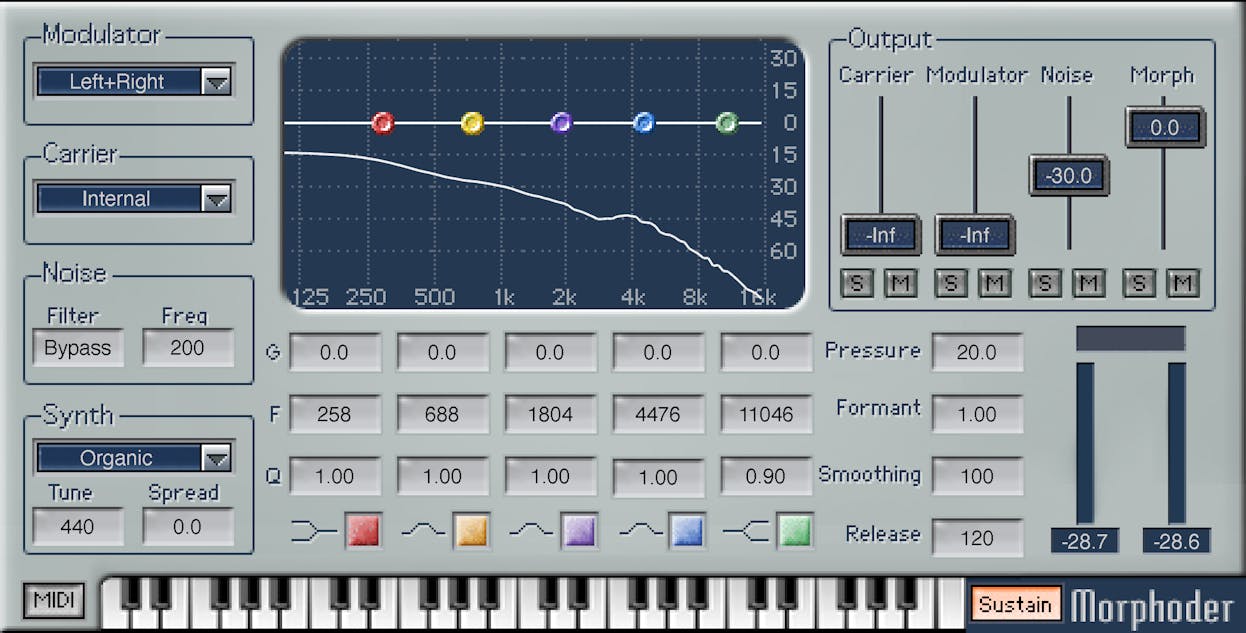
Morphoder is the workmanlike, gets-the-job-done pick, and Waves recently rebuilt and modernized it. It's got a formant filter, a linear-phase EQ, and an 8-voice MIDI-controllable synth built in, so you're covered for the essentials right out of the gate.
The refreshed build adds a four-fader output mixer with per-path solo and mute, plus a five-band EQ — low-shelf, high-shelf, and three mid bands — for shaping the morphed sound. It runs in AAX Native, AudioSuite, AU, VST3, and SoundGrid, as a 64-bit plugin on current macOS and Windows. Worth noting this is a long-standing product with a recent update, not a brand-new release.
A scenario where this shines: you want a solid, reliable vocoder without a mountain of options to wade through. If you're already deep in the Waves world, it slots right in — and if you want more of their vocal tools, our roundup of the best Waves vocal plugins covers plenty more.
Pros
- Simple, reliable vocoding that gets the job done
- Rebuilt with a new output mixer and five-band EQ
- 8-voice built-in synth and formant filter
- Broad Waves format support including SoundGrid
Cons
- Less deep than the sound-design-focused options here
- No external-carrier flexibility to speak of
| Plugin | Bands | Carrier | Standout Feature |
|---|---|---|---|
| Antares Auto-Tune Vocodist | Varies by model | Internal (modeled) | Auto-Tune built in |
| Zynaptiq Orange Vocoder IV | 24 modes | Internal synth | 24 cross-synthesis modes |
| Softube Vocoder | 4–20 selectable | Internal synth | Unvoiced and Freeze controls |
| Arturia Vocoder V | 16 | Internal (fixed Moog model) | Moog vocoder plus full toolkit |
| Waves Morphoder | 8-voice synth based | Internal synth | Rebuilt with new EQ and mixer |
Frequently Asked Questions (FAQs)
What is a vocoder and how does it work?
A vocoder takes two signals — a modulator and a carrier — and uses the modulator to shape the carrier. Usually your voice is the modulator and a synth is the carrier, so the synth ends up "talking" or "singing" in the shape of your voice. That's where the classic robot-vocal sound comes from.
Do vocoder plugins sound as good as hardware vocoders?
Yes — modern vocoder plugins sound every bit as good as hardware. The models on this list hold their own against the classic units they're based on, and you get recall, automation, and no maintenance on top. The "you need real hardware" argument is done.
What's the difference between a vocoder and Auto-Tune?
Auto-Tune corrects the pitch of a vocal so it lands in tune, while a vocoder uses the voice to shape a synth for that robotic, talking-synth sound. They do totally different jobs. The Antares Vocodist happens to bundle both, so you can tune and vocode in one plugin.
Which vocoder plugin is best for beginners?
The Softube Vocoder is the easiest starting point — it gets you a great classic tone fast without a lot of menu-diving. If you want a bigger playground to grow into, Arturia Vocoder V has more to explore. Both keep things musical while you learn.
Can you use your own synth as the carrier in a vocoder plugin?
It depends on the plugin — some let you feed an external signal as the carrier, and some use a fixed internal synth. Arturia Vocoder V takes external voice input but uses a fixed synth carrier, so you can't route your own synth in. Check each plugin's routing before you commit if that's your workflow.
Final Thoughts
Any of these five will get you a great vocoded vocal, so the pick really comes down to how you work. If you're already living in Auto-Tune, Vocodist is a no-brainer. If you want to get weird, Orange Vocoder IV is your rabbit hole. Want a quick classic tone? Softube. Want a whole toolkit around a vintage Moog? Arturia. Want reliable and simple? Morphoder.
My advice is the same as always — trust your ears. Pull up the demos, feed them a vocal you know well, and go with the one that sounds right to you. That's the only ranking that really counts.
Some of the links within this article are affiliate links. These links are from various companies such as Amazon. This means if you click on any of these links and purchase the item or service, I will receive an affiliate commission. This is at no cost to you and the money gets invested back into Audio Sorcerer LLC.