Dither isn't magic, and it isn't just "adding noise" to your track. It's how you handle the rounding errors that show up when you reduce bit depth. That's the whole job.
Most people either apply it wrong, apply it twice, or trust it blindly without knowing what it does. None of that is a crime, but you'll make better calls once you understand the mechanism. Here's what dither actually does, the two things people constantly mix up, and where it fits now that lossless streaming is everywhere.
TABLE OF CONTENTS
What dithering actually does
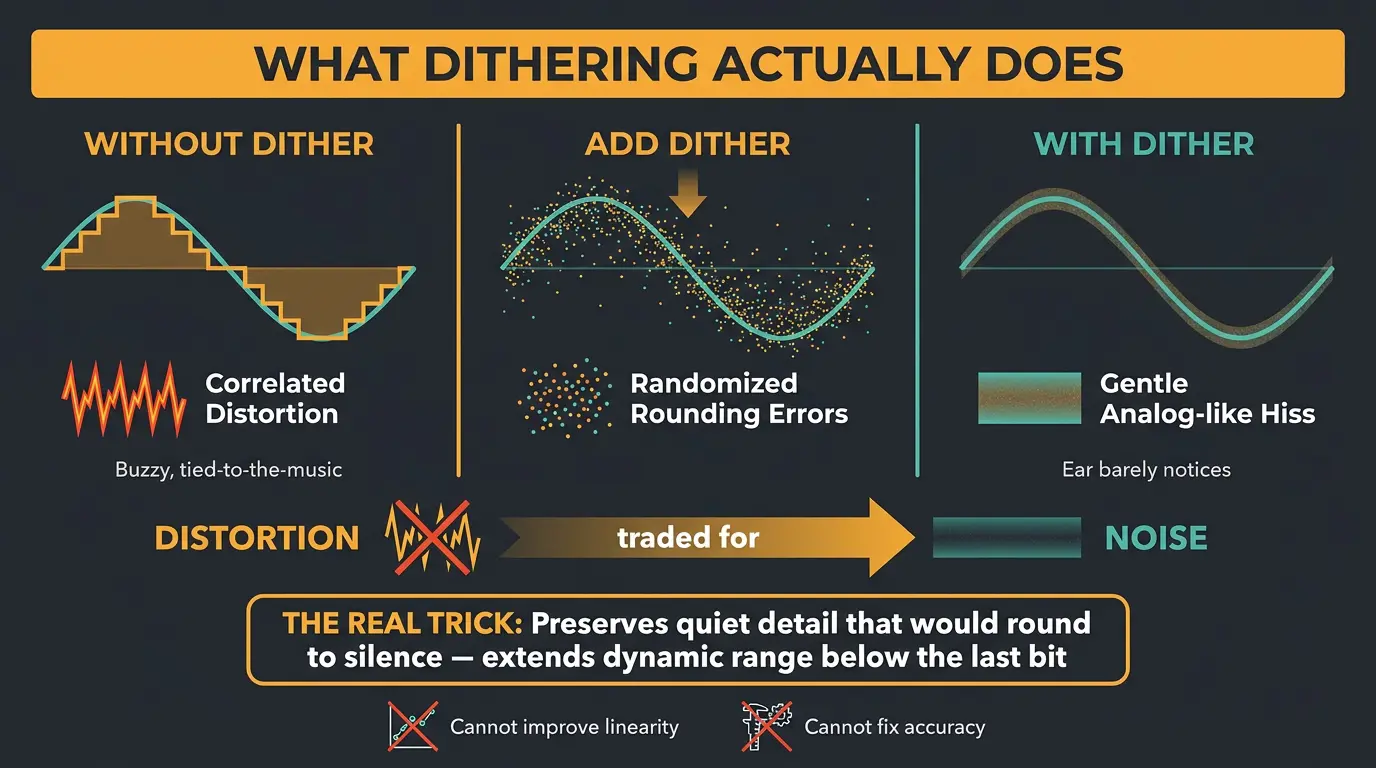
When you reduce bit depth — say from 24-bit down to 16-bit — you're rounding every sample to fewer available values. That rounding isn't random. On quiet signals it creates cyclical patterns, and those patterns sound like harsh, correlated distortion. Not hiss. Ugly, buzzy, tied-to-the-music distortion.
Dither randomizes those rounding errors on purpose. Instead of a repeating pattern, you get a low-level, analog-like hiss. The trade is a great one: you swap nasty distortion for gentle noise the ear barely notices.
Here's the part the old "it's just white noise" framing misses. Dither actually preserves detail that would otherwise round straight to silence, which effectively extends your dynamic range below the last bit. That's the real trick. What it can't do is improve linearity or fix accuracy — it only trades distortion for noise. If you want the bigger picture on how quiet detail survives, our guide to dynamic range in audio pairs well with this.
The two things people mix up: probability distribution vs noise shaping
Almost every dither confusion comes from treating one choice as two, or two choices as one. So let's get the mental model right.
There are two independent axes. One is the probability distribution of the noise you add — the shape of the random values themselves. The other is noise shaping — where that noise sits in the frequency spectrum. They're separate decisions. A dither can be flat or shaped regardless of its distribution. Keep those two ideas in different boxes and the rest gets easy.
Probability distributions: RPDF, TPDF, Gaussian
This is the shape of the random noise you add. Three come up:
- RPDF (rectangular): a uniform distribution — every value in the range is equally likely.
- TPDF (triangular): center values are more probable. You get it by adding two independent RPDF sources together.
- Gaussian: a bell curve, the kind of noise an analog mic preamp naturally makes.
TPDF is the default for good reason. It fully removes audible quantization distortion at a lower noise level than Gaussian, and it minimizes noise modulation — that annoying thing where the residual hiss seems to breathe and swell behind quiet passages, which draws your ear right to it. Lipshitz and Vanderkooy laid a lot of this out in a well-known AES paper decades ago, and the industry basically settled on TPDF as the sensible baseline.
Noise shaping: moving the noise where you can't hear it
Noise shaping is the second axis, and it's totally separate from the distribution. Flat dither spreads the added noise evenly across the whole spectrum. Shaped dither doesn't.
The way it works is an error feedback loop: the quantization error at each sample gets filtered and subtracted from the next sample. That cancels noise in the frequencies where your ears are most sensitive and pushes it up above roughly 10 to 15 kHz, where hearing falls off a cliff. Total noise power doesn't actually drop — you're just relocating it to where you won't notice it. The perceived noise goes way down.
With that being said, there's a trade-off. Aggressively shaped noise piles up in the highs, and on headphones at loud levels it can get faintly audible with certain material. So shaping isn't free. It's a smart bet in the right situation, not a default you slap on everything.
The named algorithms you actually see: POW-r, UV22, and friends
Open a dither plugin or your DAW's export dialog and you'll meet a handful of names. Here's what they are.
POW-r (Psychoacoustically Optimized Wordlength Reduction) came out of a consortium in 1999 and is now licensed into Apple, Avid, Ableton, Magix and others. It comes in three tiers. Worth knowing: the whole POW-r suite isn't noise shaping — the original algorithm uses narrow-band Nyquist dither, while others layer in shaping and white noise. Loosely, folks pair POW-r 1 with low-dynamic material like spoken word, POW-r 2 with rock, and POW-r 3 with wide, orchestral stuff. POW-r 3 shapes hard around 2 to 4 kHz, which is why it can get faintly grainy on headphones at loud volumes. POW-r 2 is a safe default.
Apogee UV22HR takes a different route, concentrating dither energy up near 22 kHz instead of using conventional psychoacoustic shaping. It's a legit pick for acoustic and classical recordings. You'll also run into iZotope MBIT+, Waves IDR, and Sonoris Dither.
Honest takeaway? On a loud, limited pop master, the differences between these are negligibly small. Shaped dithers earn their keep on very quiet, delicate, dynamic material — a classical concerto, a solo piano recording, long fades and tails. That's why plenty of mastering engineers just reach for plain flat TPDF: if you like the sound before dithering, TPDF changes it least. If you want to nerd out further, iZotope has a solid explainer on dithering in audio.
Dithering rules that keep you out of trouble
- Dither is the very last process in the chain — after all EQ, compression, and limiting. Anything after it re-quantizes and defeats the point.
- Apply it once and never stack it. Two layers of dither just add noise for no benefit.
- If your DAW dithers on export, turn dither off in your mastering plugin, or vice versa. One layer, one time.
- Never dither a 32-bit float export. That format is already lossless, so there's nothing to round and nothing to dither.
Where dithering fits in a modern workflow
The old "just make a 16-bit file for CD and streaming" advice is dated now. The delivery landscape moved.
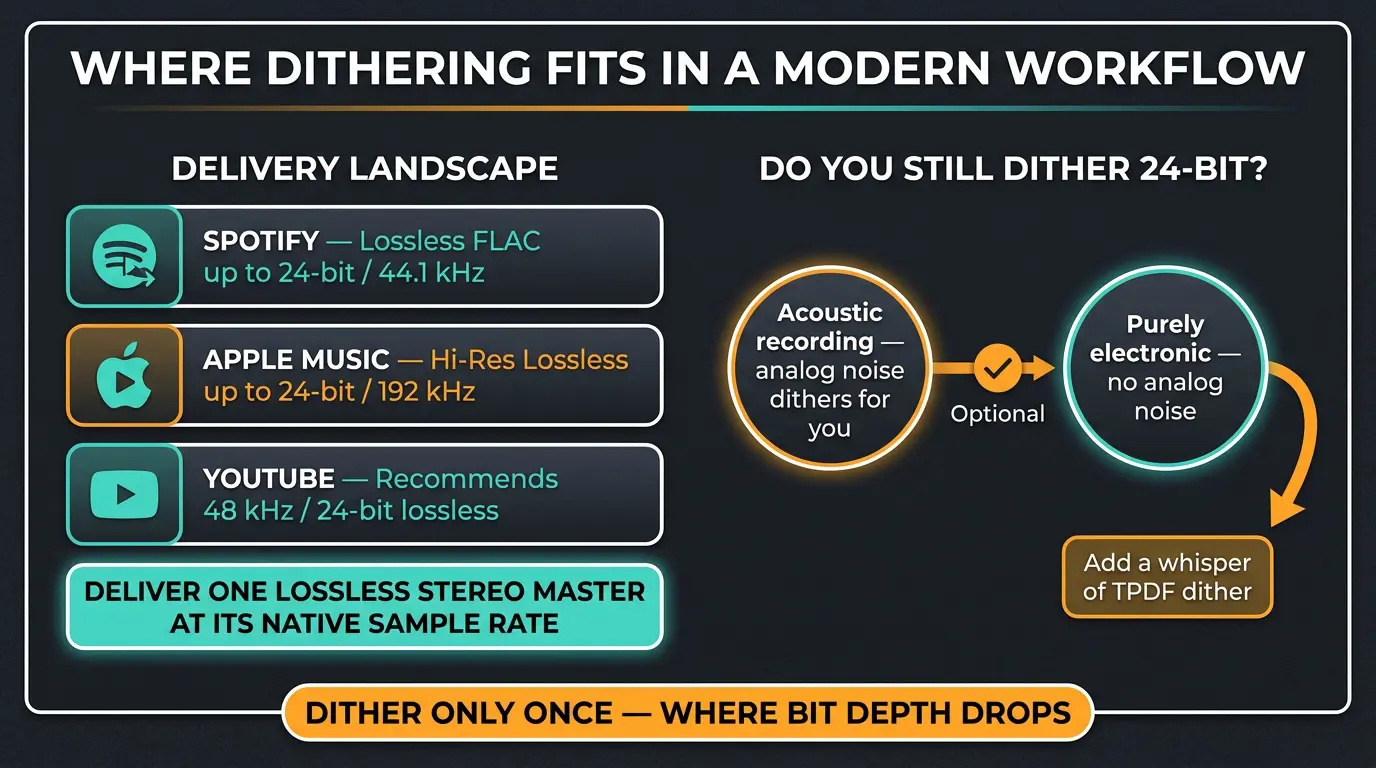
Spotify has offered lossless FLAC up to 24-bit/44.1 kHz since late 2025. Apple Music does Lossless and Hi-Res Lossless up to 24-bit/192 kHz. YouTube now recommends uploading music at 48 kHz / 24-bit lossless. The through-line is simple: deliver one lossless stereo master at its native sample rate and let the platforms handle the rest. Our guide to mastering for streaming services goes deeper on specs.
So do you still dither a 24-bit master? Strictly speaking, 24-bit doesn't require it — the noise floor is so low that quantization peaks are tiny, and on acoustic recordings the analog noise already does the dithering for you. But dithering anyway is the smart move. Purely electronic material has no analog noise to lean on, so a whisper of TPDF covers you without any downside. Make sure you're only doing it once, at the point where bit depth actually drops.
Frequently Asked Questions (FAQs)
Do I need to dither if I export at 32-bit float?
No. A 32-bit float export is lossless, so there's no bit-depth reduction and no rounding to dither. Dithering only matters when you're actually lowering the bit depth of the file, like going to 24-bit or 16-bit. At 32-bit float, leave it off.
Should I dither a 24-bit master?
Yes, dithering a 24-bit master is good practice even though it isn't strictly required. On acoustic material the analog noise often dithers things adequately, but purely electronic music has no natural noise to rely on. A little flat TPDF covers you either way with no real downside.
What's the difference between TPDF and noise shaping?
TPDF is the shape of the random noise you add; noise shaping is where that noise sits in the frequency spectrum. They're independent choices. TPDF sets the distribution, shaping pushes the noise up high where your ears are less sensitive. A dither can use TPDF and be flat or shaped.
Does the specific dither algorithm really matter?
Usually not much. On loud, limited pop masters the differences between algorithms are negligible at normal listening levels. Shaped dithers matter most on very quiet, dynamic material like classical recordings and long fades. For everything else, plain TPDF is a completely fine default.
Can dithering make a bad mix sound better?
No. Dither only handles rounding errors when you reduce bit depth — it can't fix a muddy low end, harsh highs, or a bad balance. It's a tiny finishing step, not a repair tool. Trust your ears on the mix and let dither do its small, specific job.
Final Thoughts
Dither is one of those things that sounds mysterious until you see the two moving parts — the distribution and the shaping — and then it clicks. Pick TPDF, keep it last in the chain, apply it once, and only bother with fancy shaped options when you're working on quiet, delicate material. That's most of the battle.
Less is more here in the truest sense. It's the smallest process in your master, doing a small but real job. Know what the knobs mean, then trust your ears and move on.
Some of the links within this article are affiliate links. These links are from various companies such as Amazon. This means if you click on any of these links and purchase the item or service, I will receive an affiliate commission. This is at no cost to you and the money gets invested back into Audio Sorcerer LLC.